Setting Peak and Continuous Torque Limits
TK and TL Commands:
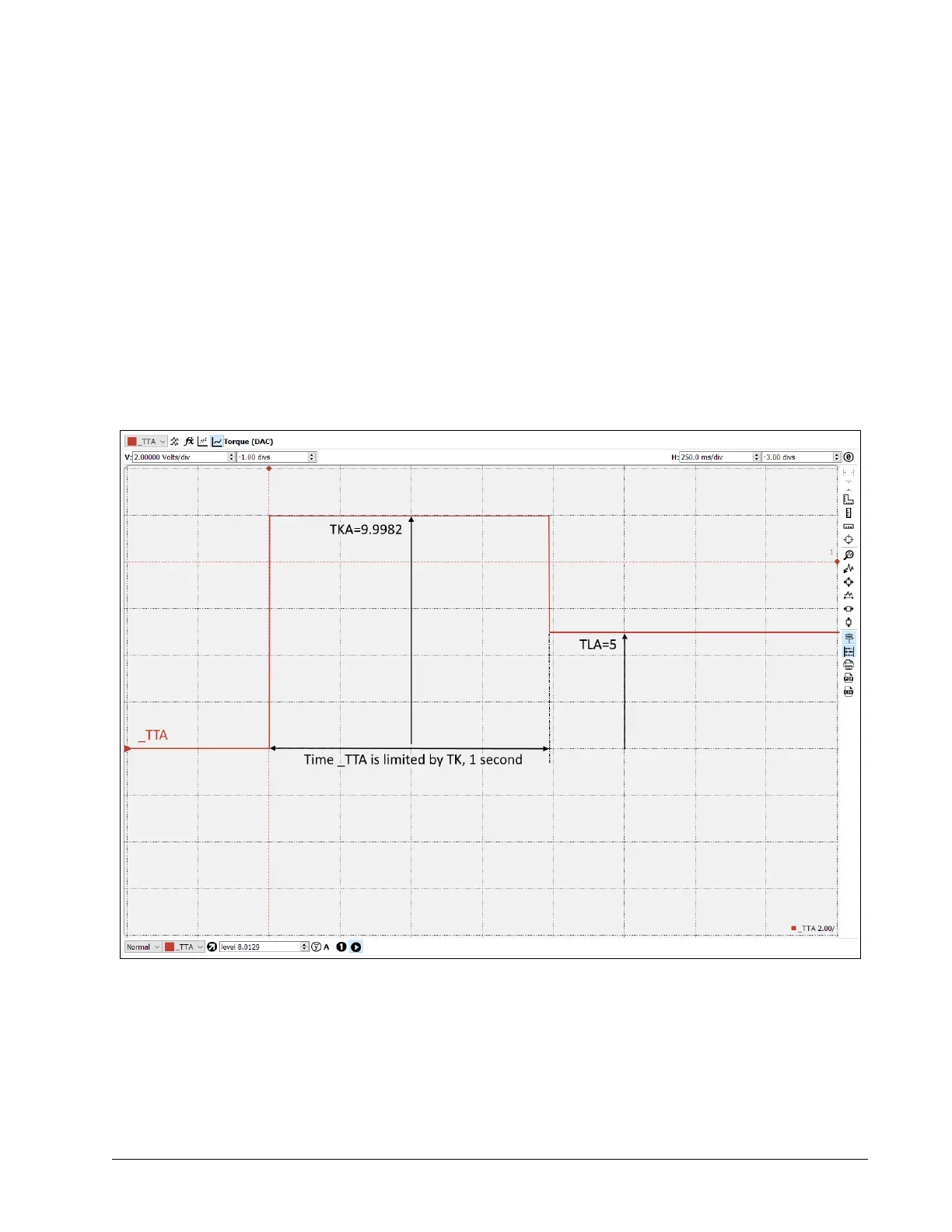
The peak and continuous torque limits can be set through the TK and TL commands respectively. The controller will
command the torque signal (TT) up to the value specified by TK for a maximum of one second, as shown in Figure
A5.2. It will then limit the torque to the value specified by TL. The more time the controller commands the torque
below TL, the longer it will command it to TK when necessary. The DMC code example below exhibits the behavior
of TT being limited by TL and TK, as shown in Figure A5.2.
#TK;
'Begin Program
MO;
'Disable all axes
AGA = 2;
'Set maximum amplifier gain of 2.0 A/V
TLA = 5;
'Set maximum continuous torque limit of 5 V
TKA = 9.9982;
'Set maximum peak torque limit of 9.9982 V
SHA;
'Enable A axis
OFA = 9.9982;
'Command torque signal to 9.9982 V
EN;
'End Program
A5 – AMP-43547 (-D3547, -D3527) ▫ 213 DMC-41x3 User Manual
Figure A5.2: Peak Current Operation


 To Next Page