5.2.2 AAS II on Puma III
There are three types of AAS II mark patterns: 4-Point Positioning, Segmental
Positioning, and Multiple Copies. Note that before print out your designs by inkjet printers,
the registration marks have to be created on your graphic designs by cutting software
like SignPal or GCC CorelDraw plug-in. Hand-made marks or drawings won’t be
reorganized by GCC cutting plotters. For more details about registration mark setting in
cutting software, please refer to ‘Appendix A-3 : CorelDraw Plug-In Instruction”,
‘Appendix A-4 : Illustrator Plug-In Instruction, ’ ‘Appendix A-5 : GreatCut Plug-In
Instruction,’ and ‘Appendix A-6 : SignPal 10.5 Instruction’
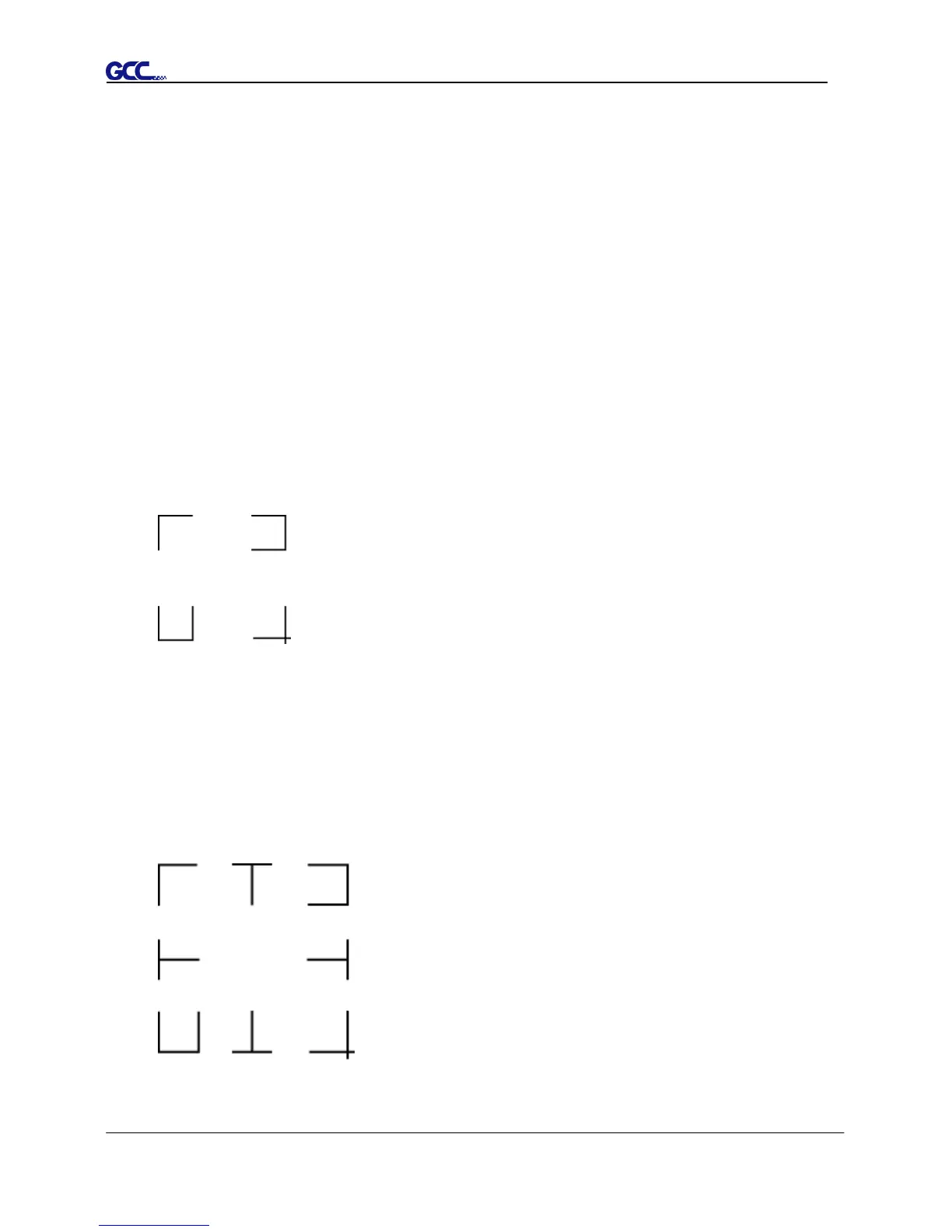
1. 4-Point Positioning
This is the basic mark pattern that AAS II will auto detect four registration marks and
contour cut images inside those marks.
Command: Esc.D1;(XDist);(YDist):
Layout: 4 registration marks at the 4 corners around the design
2. Segmental Positioning
In addition to 4 original points, the intermediate registration marks are added on both X
axis and Y axis to help contour cut accurately, especially for cutting large images.
Command: Esc.D2;(XDist);(YDist);(XStep);(YStep):
Layout:
In-between distance on X: 200~600mm, default 300mm
In-between distance on Y: 200-600mm, default 300mm














 To Next Page