Rocket 4D Evaporation System
04-7848 Issue 2-4 August 2014 21
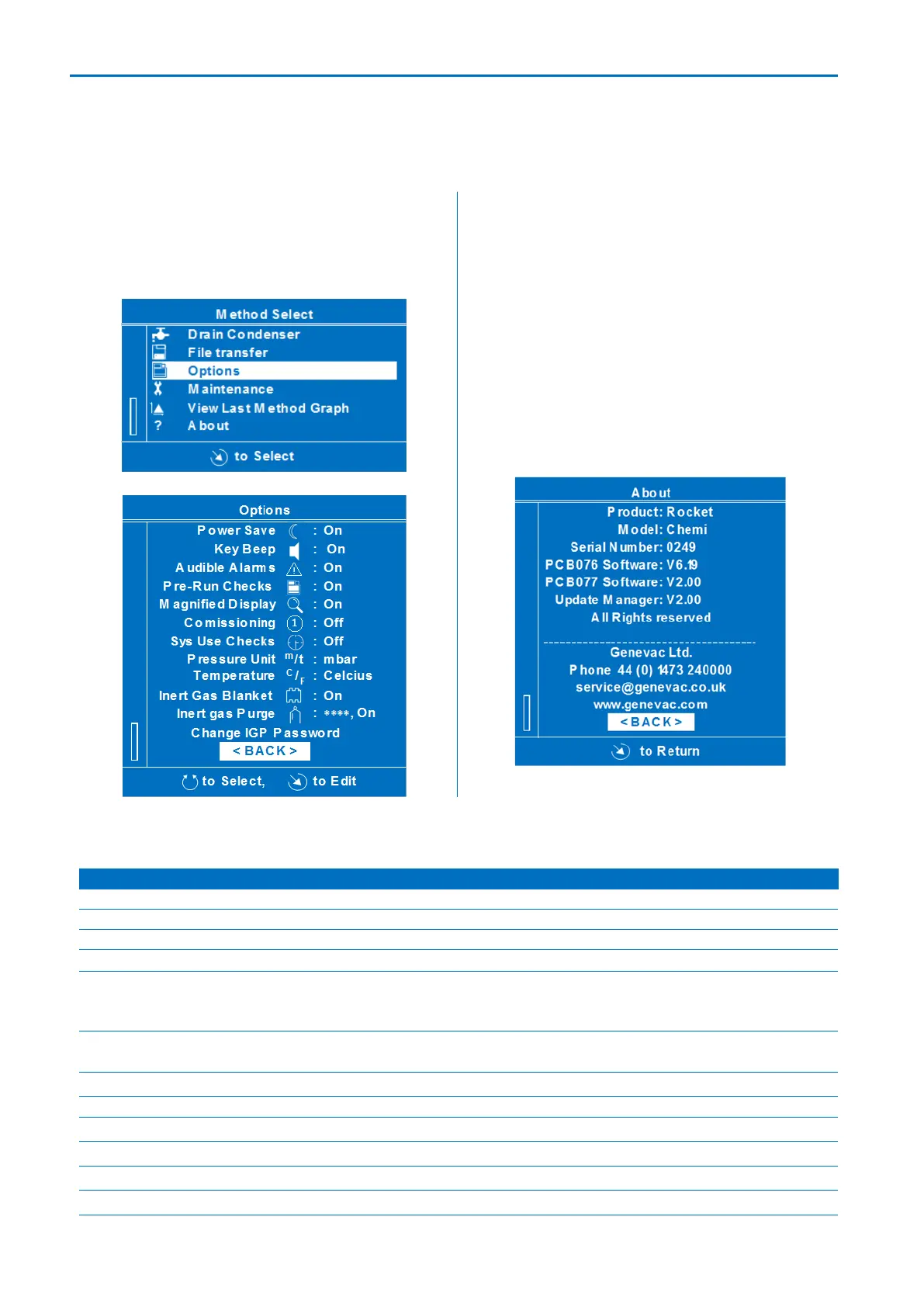
Go to the Method Select menu and select
Options. The menu offers the following
settings that affect the way information is
presented on the Screen.
Go to the Method Select menu and select
View Last Method Graph. The Screen
shows the graph (∆T against time) for the
last completed method, refer to Condenser,
DeltaT.
About menu
Go to the Method Select menu and select
About. The evaporator type, serial number,
software versions and contact information
are shown.
Options
Switches off power after 30 minutes if no user intervention
Displays shows safety check list before allowing run to start
Graphic / numeric display replaced by timer count up (or count
down if end time is defined) after five minutes with no
intervention from user
Displays information useful during installation. The option to
disable this function is offered at subsequent start-ups
Displays extended check list at start of every 10
th
run
Displays pressure in millibar or Torr
Displays temperature in centigrade or Fahrenheit
Enables operation of optional waste full detector
Not applicable for Rocket 4D
Not applicable for Rocket 4D
Not applicable for Rocket 4D



 To Next Page