WP21 Series Operation Manual Chapter 6 Software Operation
58
6.5.5 ADC adjustment
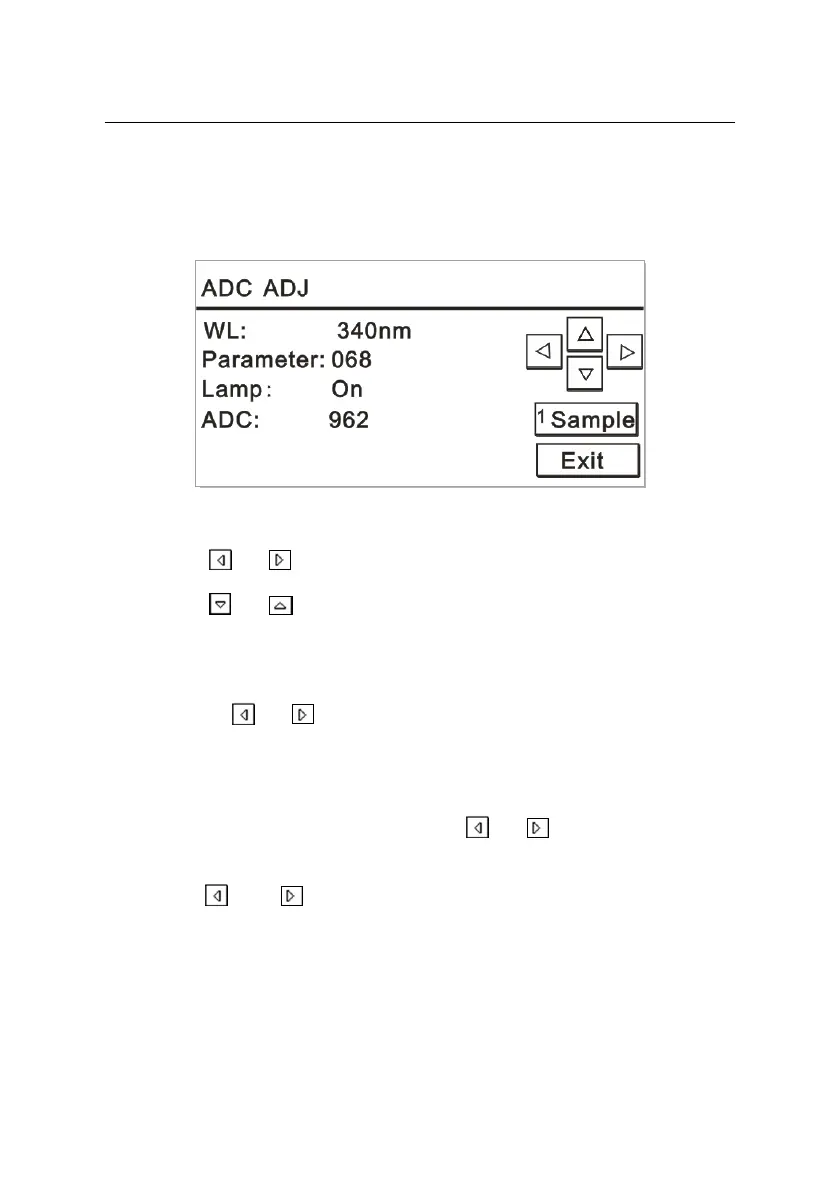
In the “Maintain” interface, press “5” to open the “ADC ADJ” window.
The screen is displayed as Figure 6-25:
Figure 6-25
Press or to set the parameters.
Press or to switch among the set parameters.
Place distilled water onto the instrument and click “Sample” or
press “1” to start aspiration.
a) By using or , the wavelength can be set as 340, 380, 405,
505, 546, 578, or 620nm.
b) Generally, 50000~55000 of the ADC value is the most suitable. If
the ADC value for a wavelength is not within this range, the
parameter can be adjusted. Using or , the parameter can
be set in the range of 0~255.
c) Using and , the working status of light-source lamp can be
switched between “On” and “Off”.
During ADC adjustment, the light-source lamp should be set to
“On”.



 To Next Page