1.1.15
INTRODUCTION CHAPTER 1
GEODIMETER SYSTEM 600
The data stored under labels can be viewed or altered by the
operator. In some cases the data also influence the system.
Changing the data in the time label will, for instance, set the
system real time clock. However, just calling up a label,
viewing the data and restoring without any editing will not
influence the system at all. Data stored under labels can be
retrieved by the F (Function) key or in the U.D.S (User
Defined Sequences) (additional software).
A complete list of functions and labels can be found in
Appendix A.
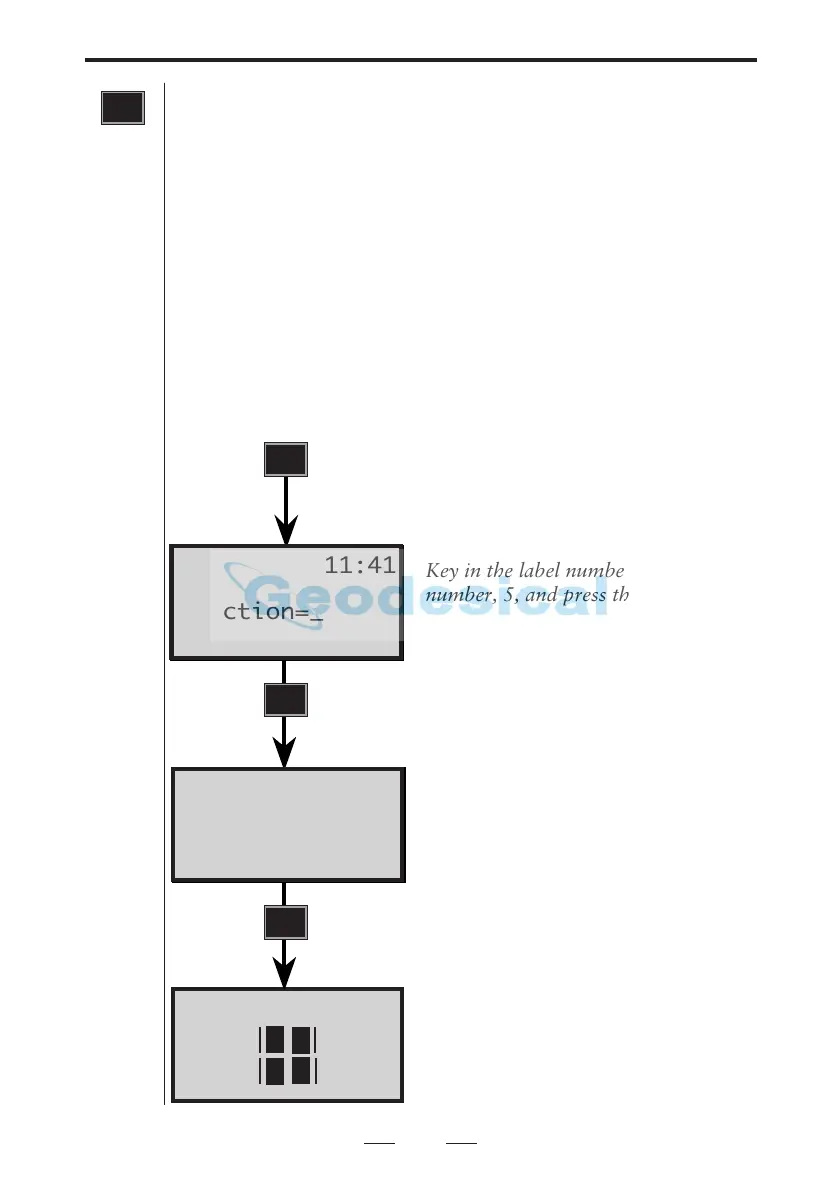
Example:
How to store a point number (Pno)
Turn on the instrument, press the
function key, the following will be
displayed.
Key in the label number for point
number, 5, and press the ENT-key.
The display shows the current value
for the point number.
Accept the value by pressing YES or
ENT or key in a new value.
You now return to the mode that
was current before you pressed the
function key. The new point number
is now stored in the instrument.
Function keys/Labels
F
F
5
I 11:41
..... .....
..... .....
2
I 11:41
Pno=_
I 11:41
Function=_



 To Next Page