1-10
1BGetting Started
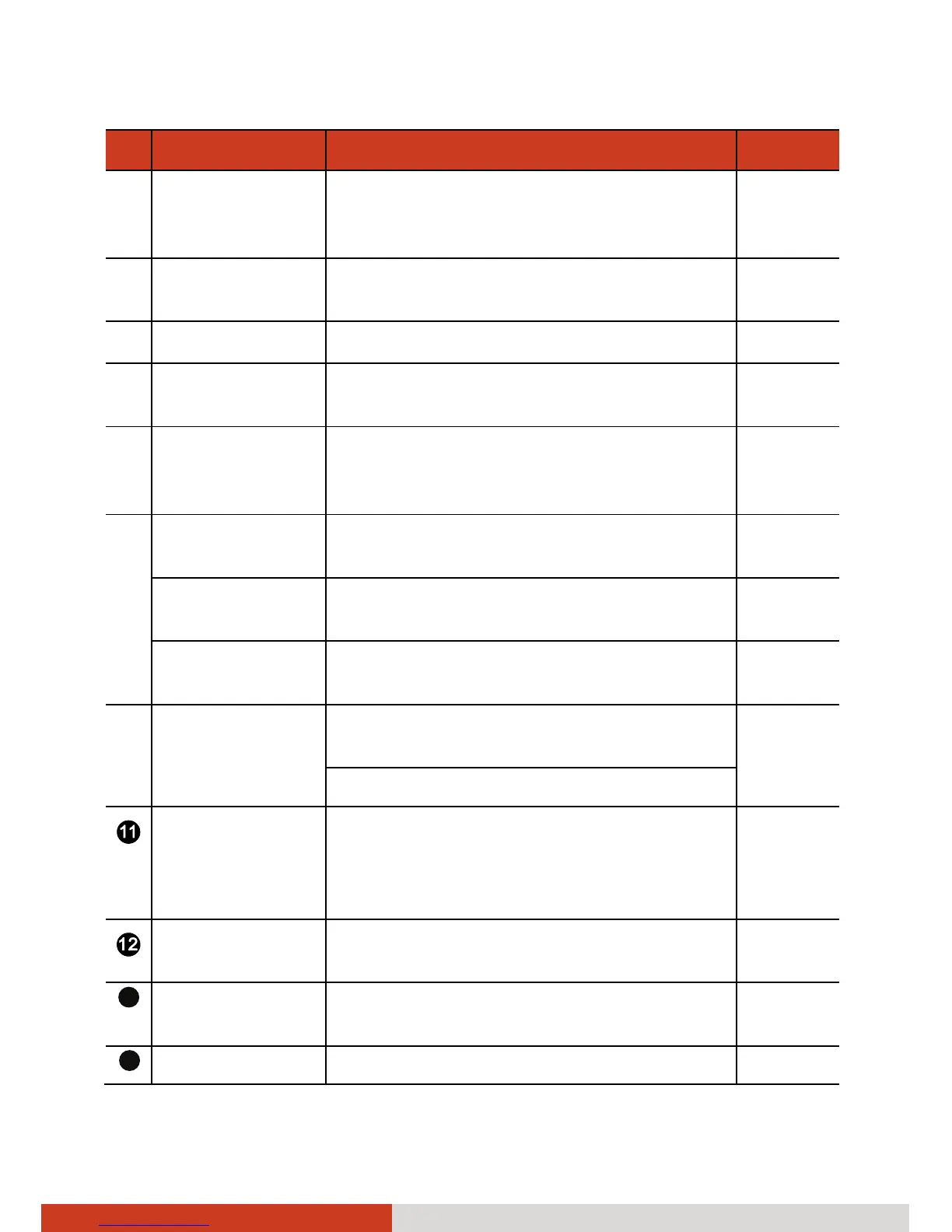
Ref Component Description See Also
q
MMC/SD Card
Reader
Accepts a MultiMediaCard (MMC) or
Secure Digital (SD) card for removable
storage media.
P. 4-14
r
HDMI
Connector
Connects a HDMI (High-Definition
Multimedia Interface) monitor or TV set.
P. 4-2
s
RJ-11 Connector Connects the telephone line. P. 2-21
t
Hard Disk Drive
Compartment
Inside is the hard disk drive. P. 2-16
u
USB Port Connects a USB device, such as a USB
flash disk, printer, digital camera, and
joystick.
P. 4-5
v
Card Slot Depending on your model, the slot can
be any of the following:
Smart Card
Reader
Accepts a smart card for additional
security feature.
P. 4-9
PCMCIA Slot Accepts a PC card for additional
functions.
P. 4-10
w
eSATA/USB
Combo Port
Connects an eSATA device such as an
external hard drive or optical drive.
P. 4-6
Can also function as a USB port.
GPS Antenna
pass-through
Connector
(option)
Connects to the optional antenna for
GPS receiver.
Audio Output
Connector
Connects a set of headphones or
external speakers with amplifier.
P. 4-8
13
Microphone
Connector
Connects an external microphone. P. 4-8
14
RJ-45 Connector Connects the LAN cable. P. 2-22



 To Next Page