223 Sample Changer User’s Guide 2-13
Installation
2
Rear Panel Connections
GSIOC Port
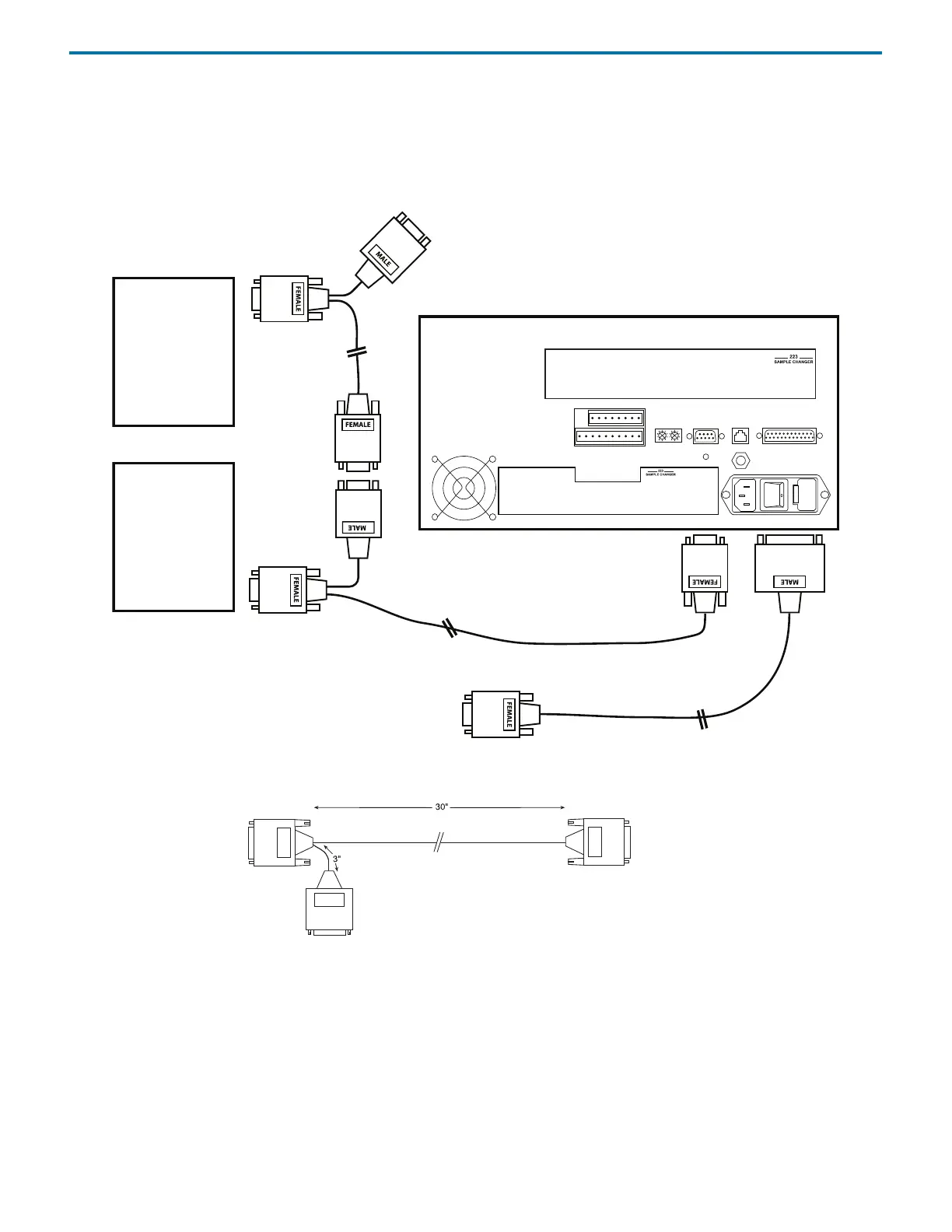
Use a GSIOC cable to connect other instruments to the sample changer and then control all from one computer. A GSIOC cable
has two 9-pin female connectors and one male connector.
The following diagram shows the cabling connections between a computer, sample changer, and GSIOC module.
Connect the female connector, located individually at one end of the cable, into the GSIOC port of the sample changer. Tighten
the retaining screws. (Refer to diagram below.)
Connect the other female connector, located on the same end as the male connector, to the Gilson module. Tighten the retaining
screws.
If connecting more than one Gilson module, use the male connector to attach an additional GSIOC cable. Use the female
connectors to connect each Gilson module.
Cables should be arranged in a linear fashion. Any “Y-branching” from the main GSIOC cable may increase noise.
Gilson
module
Gilson
module
GSIOC
cables
RS-232 cable
to computer
9-pin female connector; connect to
interface module or GSIOC cable for
linking additional GSIOC modules
9-pin male connector; connect to
another GSIOC cable for linking
additional GSIOC instruments
9-pin female connector;
connect to the GSIOC port on the
sample changer















 To Next Page