Installation
2
2-18 Gilson GX-271 Liquid Handler User’s Guide
Rear Panel Connections
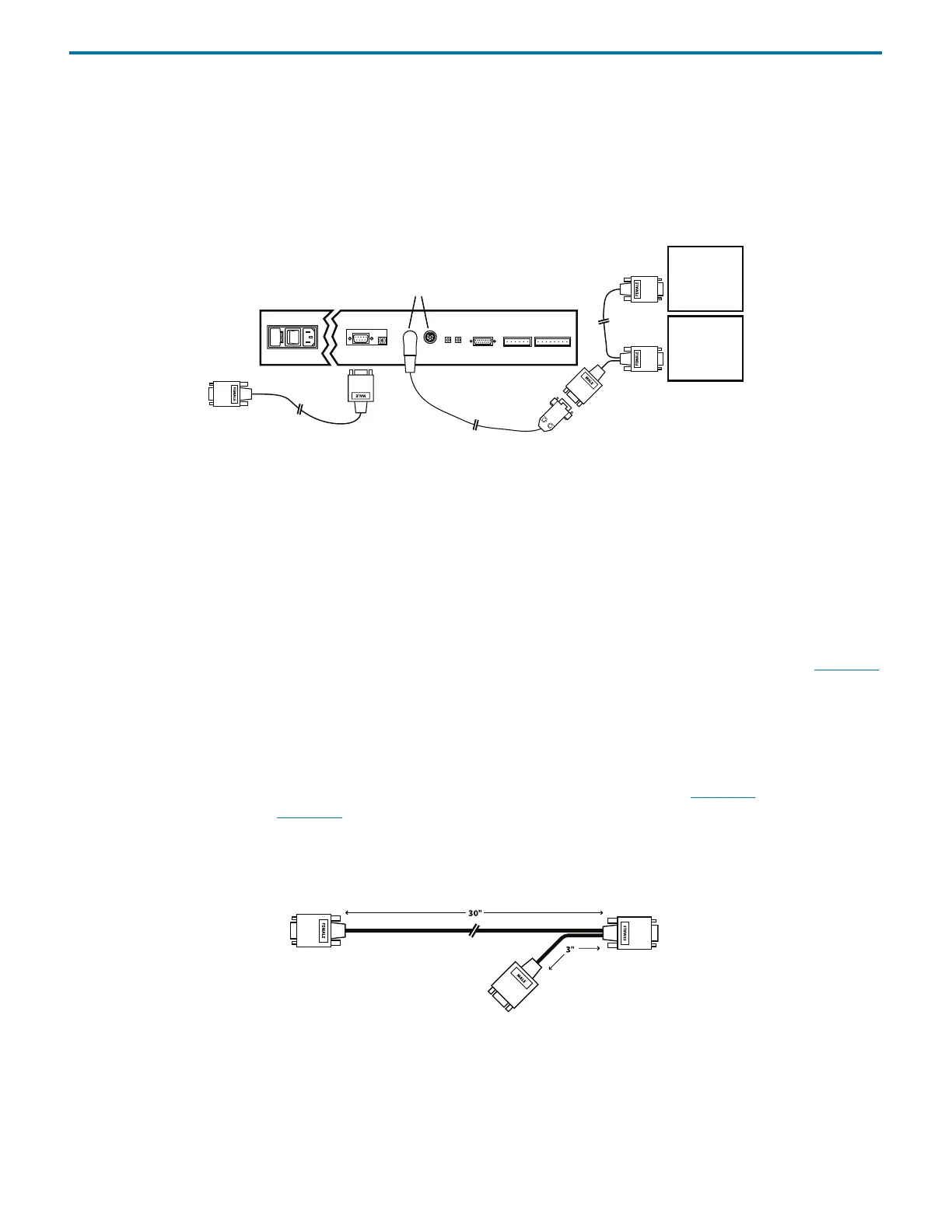
To connect multiple GSIOC modules:
1 Attach the male connector of the 6-pin to 9-pin GSIOC cable to one of the GSIOC ACCESSORIES ports located on the rear
panel of the liquid handler.
2 Attach the male connector of the standard GSIOC cable to the female connector of the 6-pin to 9-pin GSIOC cable. Tighten
the retaining screws using a flat-blade screwdriver.
3 Attach one female connector to each GSIOC module. Tighten the retaining screws.
Figure 2-36: Connecting Multiple GSIOC Modules
Unit ID
The unit ID identifies the liquid handler to software packages that can issue GSIOC commands to the liquid handler.
The unit ID is set to 20. There is no need to change this number unless it has been assigned to another Gilson instrument that is
also connected along the GSIOC.
To change the unit ID:
1 Gently insert a small flat-blade screwdriver into the unit ID selector on the rear panel and turn it. See rear panel on page 2-15
.
2 Align the white dot with one of the indicated numbers. The unit ID is 20 plus the selected number.
GSIOC Communication
The liquid handler is shipped with one of the following types of communication, Ethernet, RS-232, or GSIOC. The following
instructions apply to GSIOC communication. For information on Ethernet communication, refer to page 2-16
. For information on
RS-232 communication, refer to page 2-17
.
A 508 Interface Module or a 506C System Interface Module is required for communication between the liquid handler and the
computer. Use the GSIOC cable (part number 36078143, included in the accessory package) to connect the liquid handler to the
interface module.
Figure 2-37: GSIOC Cable
GSIOC
module
GSIOC
module
standard
GSIOC
cable
RS-232 cable
6-pin to 9-pin GSIOC cable
RS-232
liquid handler
GSIOC
accessories
to
computer
9-pin male connector
9-pin female
connector
9-pin female
connector



 To Next Page