EasyManua.ls Logo

Go-Video DV2130 - Remote Control Guide; Remote Control Button Functions; Battery Installation

Go-Video DV2130
66 pages
Print Icon
To Next Page IconTo Next Page
To Previous Page IconTo Previous Page
Loading...
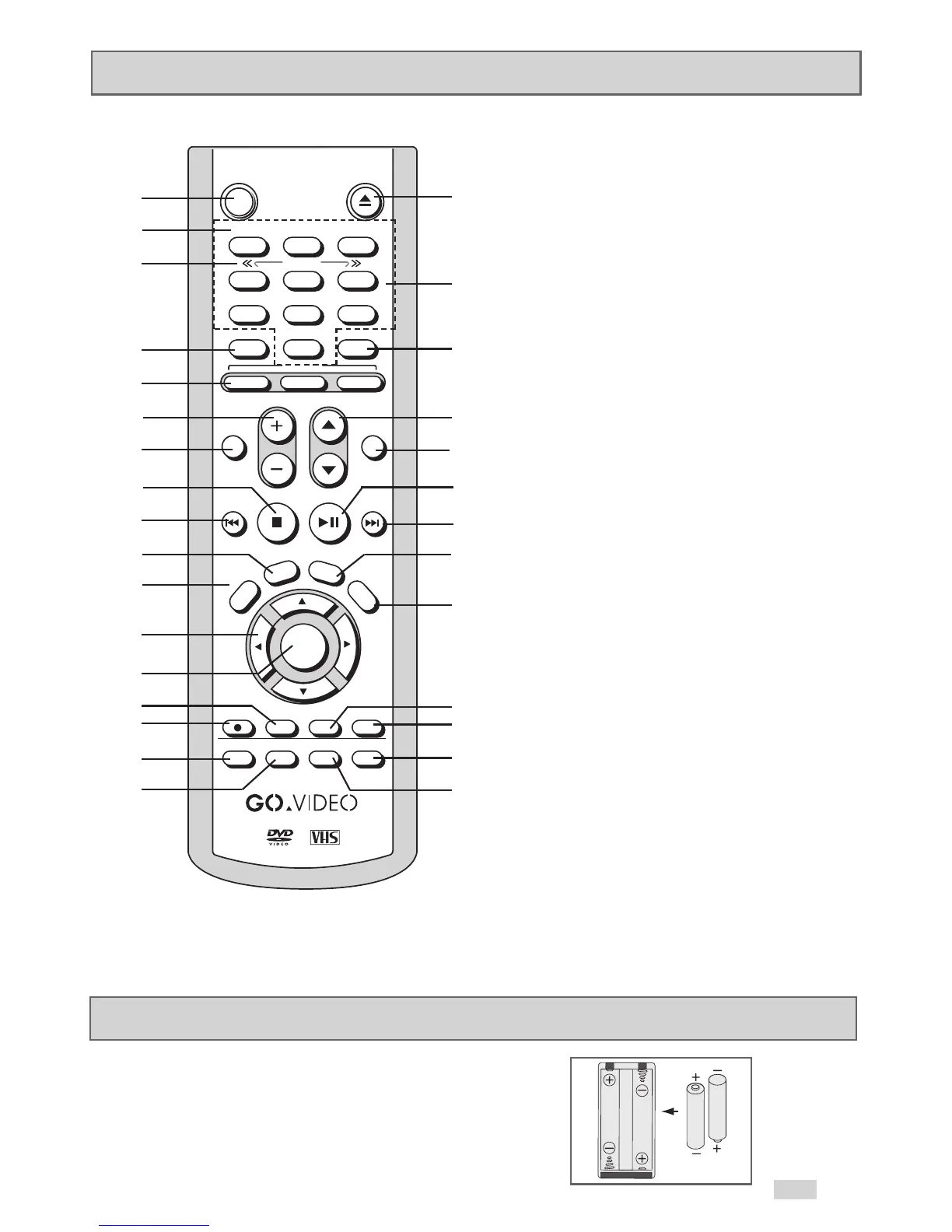
Remote Control
Insert Batteries into Remote
Remove the battery cover on the remote.
• Insert two 1.5V “
AAA” batteries as shown, making sure of the correct
polarities (+/-).
• Slide the cover back onto the remote.
POWER EJECT
AUDIO DISPLAY
TV
REW FF
PLAY/PAUSESTOP
ENTER
CLEAR
LAST CH REPEAT
R
E
T
U
R
N
S
E
T
U
P
S
K
I
P
/
F
.
A
D
V
T
V
V
I
E
W
SELECT
+
V
O
L
U
M
E
C
H
A
N
N
E
L
1
2
3
4
5
6
7
8
9
0
100+
DVD
TV MUTE
3D SOUND TV/VCR
DISC MENU
SUBTITLE MODE ANGLE
MARK
TRACK-
VCR
AUTO
REC
SP/SLP
TIMER SEARCH/IDX
TRACK+
SHUTTLE
1
2
3
4
5
6
7
8
9
10
11
12
13
14
15
16
17
18
19
20
21
22
23
24
25
26
27
28
29
30
1 POWER
2 TRACK-/+, AUTO TRACKING
3 SHUTTLE <</>>
4 100+, 3D SOUND
5 SELECT DVD, TV and VCR
6 VOLUME +/–
7 AUDIO, TV MUTE
8 STOP
9 REWIND, SKIP BACK
10 SETUP
11 RETURN
12
,
,
¦
,
ARROWS
13 ENTER
14 SP/SLP
15 RECORD
16 SUBTITLE, LAST CH
17 MODE, REPEAT
18 EJECT
19 0-9
20 TV/VCR
21 CHANNEL
/
22 DISPLAY
23 PLAY/PAUSE
24 FAST-FORWARD, SKIP NEXT
25 SKIP, FRAME ADVANCE
26 TV VIEW
27 CLEAR
28 DISC MENU
29 MARK, SEARCH, INDEX
30 ANGLE, TIMER RECORD
11

Table of Contents

Related product manuals