34
Rating Control is a password-protected system that allows you to
block playback of DVDs based on their content. The system uses an
eight level rating system.
• If you try to play a DVD that exceeds the selected rating, an error
message will appear.
• Not all discs are rated.
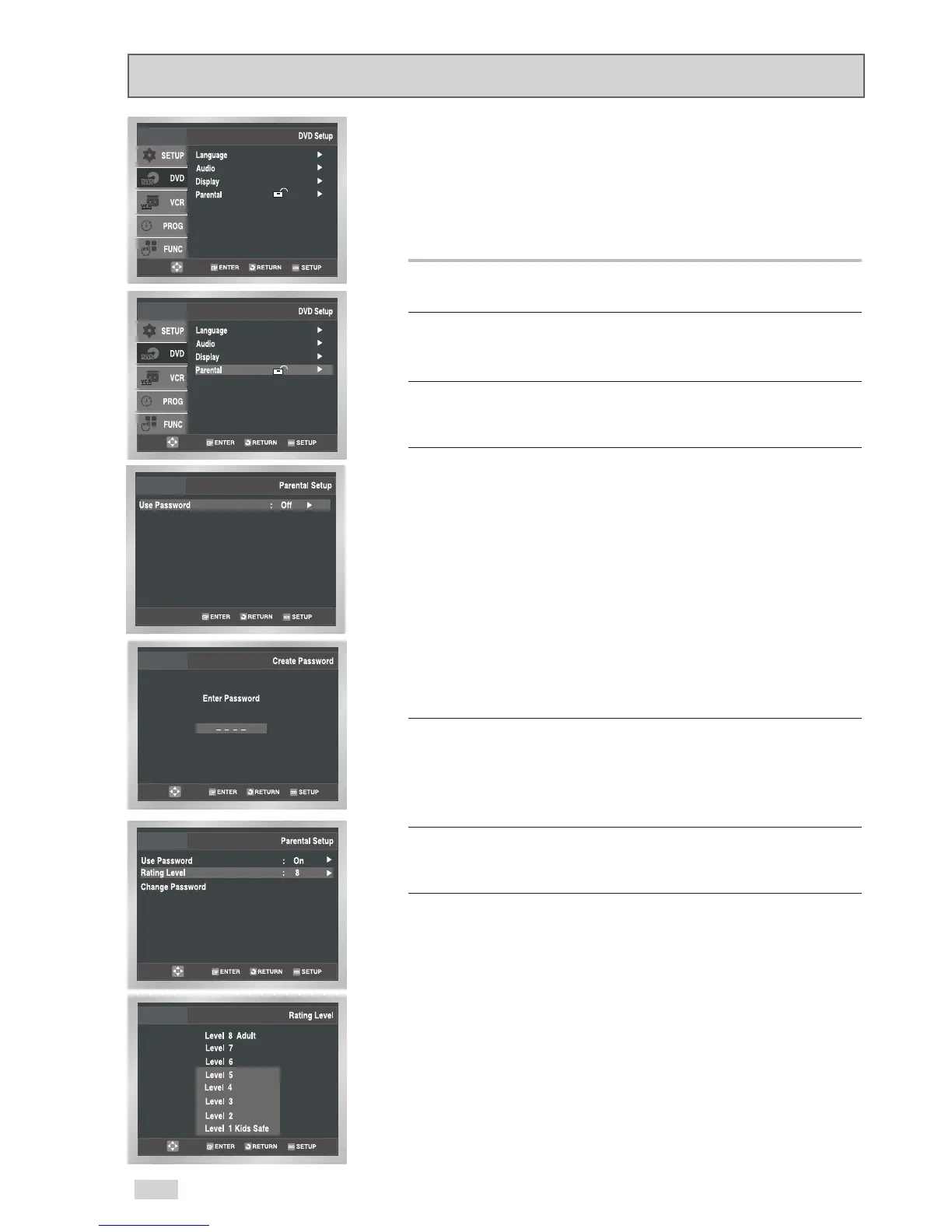
1Open “Initial Setup” menu
Press the SETUP button while the DVD is in Stop mode.
2 Select “DVD”
Use the
/
buttons to highlight “DVD”, then press ENTER to
select.
3 Select “Parental”
Use the
/
buttons to highlight “Parental”, then press ENTER to
select.
4 Select “Use Password”
Use the
/
buttons to highlight “Use Password”, then press
the
button to select one of the following options:
• Off - No password is necessary to view a DVD or to change the
Rating Level. No additional settings are necessary.
• On - A password is necessary to view a DVD and to view the
Rating Level. The menu will change as shown.
NOTES:
• The first time “Require Password” is set to “Yes,” you will be
prompted to enter a new password.
• If the “Enter Password” screen appears, then “Require
Password” has already been set to “Yes.” Please skip to Step 5.
• There is no Default Password.
5 Enter Password
Use the number buttons (0-9) on the remote control to enter the
4-digit password.
• Write your password down, and keep it in a safe place in case
you need it to change your settings later.
6 Select “Rating Level”
Use the
/
buttons to highlight “Rating Level”, then press
ENTER to select.
7Change Rating Level
Use the
/
buttons to select one of the following ratings:
• Level 8 Adult • Level 4
• Level 7 • Level 3
• Level 6 • Level 2
• Level 5 • Level 1 Kids Safe
All ratings above the level you select will also be blocked, e.g., if
you block Level 6, then Levels 7 and 8 will also be blocked.
Press ENTER to confirm your selection.
• If you forgot your password, press power on from a cold start
with no disc in the unit. Press the REW and FF buttons
simultaneously on the front panel for 5 seconds. The “Reset OK”
message will appear. Press the POWER button and the
DVD+VCR will go to “Auto Setup” mode. (See page 13)
Parental


 To Next Page