16
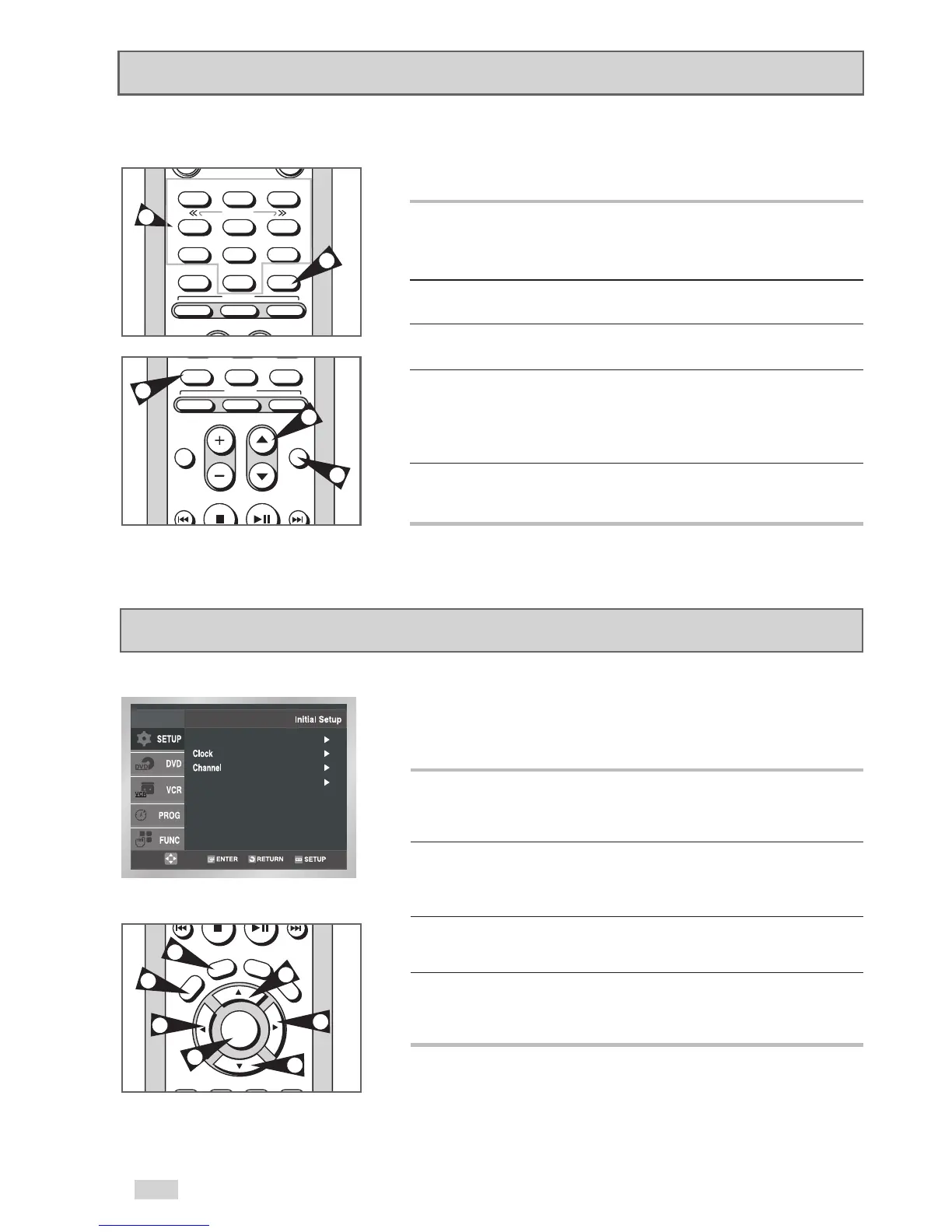
Basic TV Tuner Operation
Use the following buttons when watching TV with the DVD+VCR's
built-in TV tuner.
1 TV/VCR
Switches between your TV's tuner and the DVD+VCR's internal
tuner.
• You don’t need to press the TV/VCR button in VCR mode.
2 Channel
/
Moves to the next or previous channel.
3 0-9 Buttons
Selects the desired channel directly.
4 100+ Button
Tunes to channels 100 and above. First, press the 100+ button,
then use the number buttons (0-9) to enter the remaining digits of
the desired channel number.
• This button is only active in Cable TV Mode.
5 DISPLAY Button
Displays the current channel.
• Also works in DVD and VCR mode.
The on-screen menus allow you to enable or disable various
functions on your DVD+VCR. Use the following buttons to open
and navigate the on-screen menus.
1 SETUP Button
Press while the DVD is in Stop or Play mode to open the on-screen
Initial Setup menu.
2
/
and
¦
/
Moves the cursor up, down, left and right to cycle through menu
options.
3 ENTER Button
Confirms menu settings.
4 RETURN Button
Returns to the last menu screen or exits the on-screen menu
system.
On-Screen Menu Navigation


 To Next Page