EasyManua.ls Logo

Gorgy Timing LEDI NETWORK iTS - Output Card Switches Verification; Address Switches

Gorgy Timing LEDI NETWORK iTS
Print Icon
To Next Page IconTo Next Page
To Previous Page IconTo Previous Page
Loading...
114
MDE-LEDInetworkITS-server-4078V1.3
APPENDIX D – MAINTENANCE



.
3. OUTPUT CARD SWITCHES VERIFICATION
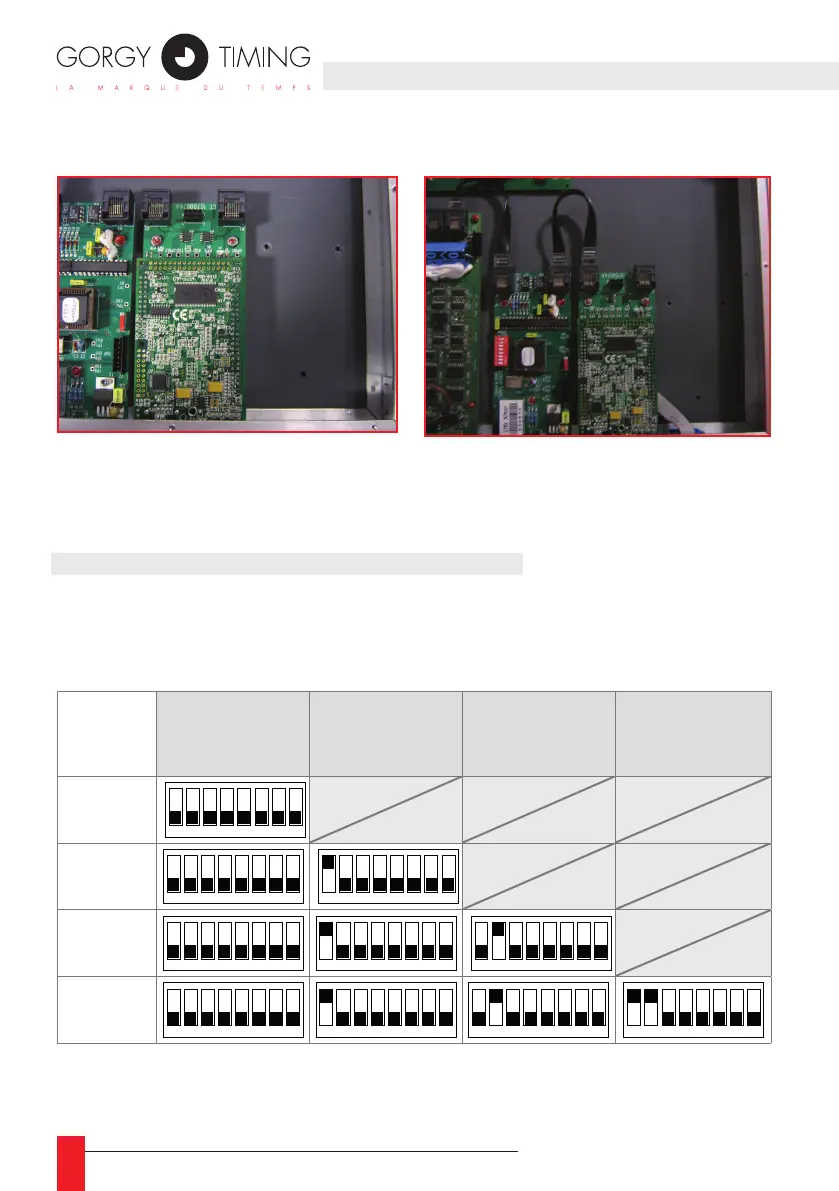
3.1. Address switches
If you need to add an output card or if an output seems to be in failure (do not appear
in the WEB page), open the device and verify the switch conguration on the output
cards:
Output 1
(the nearest of

Output 2 Output 3
Output 4
(the furthest of

1 sortie
1
2 3 4 5 6 7 8
2 sorties
1
2 3 4 5 6 7 8
1
2 3 4 5 6 7 8
3 sorties
1
2 3 4 5 6 7 8
1
2 3 4 5 6 7 8
1
2 3 4 5 6 7 8
4 sorties
1
2 3 4 5 6 7 8
1
2 3 4 5 6 7 8
1
2 3 4 5 6 7 8
1
2 3 4 5 6 7 8
The 8
th
switch of each card allows you to test the card by forcing the signal on output.



Table of Contents