Appendix A - Advanced Display Module (ADM)
114 3A2098S
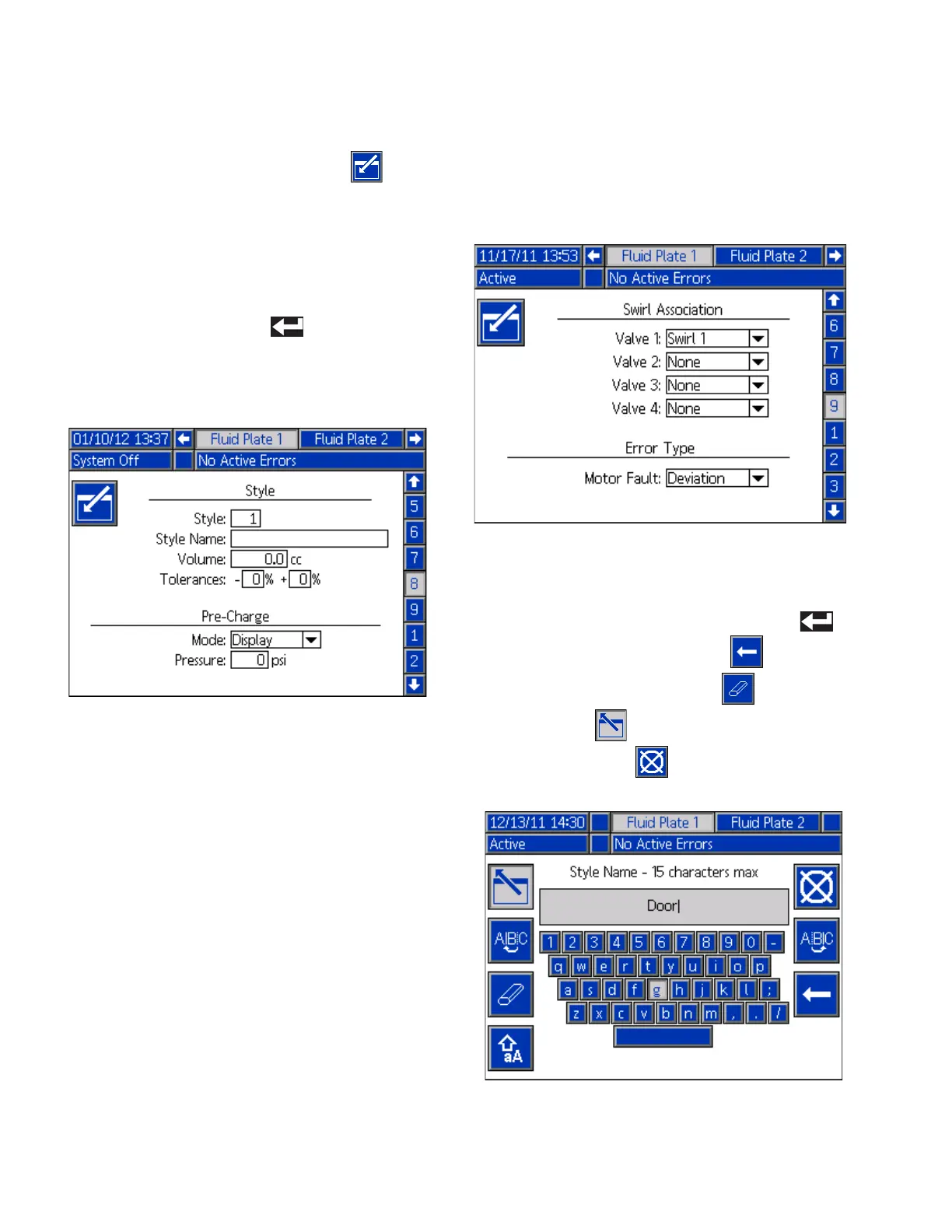
Fluid Plate x, Screen 8 (Style)
This screen enables users to set up to 256 styles,
depending on system configuration. Press to
access the style setup fields. Enter the style number in
the Style field, the target volume in the Volume field, and
the tolerance percentage in the Tolerance field.
NOTE: The number of possible styles is dependent on
the model type.
To enter the style name, press while in the Style
Name field. See Keyboard Screen, page 114, for
instructions on using the keyboard screen to enter the
style name.
Fluid Plate x, Screen 9 (Swirl Association)
This screen enables users to set the swirl to fluid plate
association. This allows the system to apply errors to
the correct fluid plate when a swirl error occurs, and to
stop the correct fluid plate from dispensing when certain
swirl errors occur.
Keyboard Screen
The keyboard screen appears when text is edited. Use
all four arrow buttons to select each letter; press to
enter the letter. To back space, press . To delete
the entire style name entered, press . To enter the
style name, press . To cancel the entry and exit the
keyboard screen, press .



 To Next Page