Appendix A - Advanced Display Module (ADM)
3A2098S 117
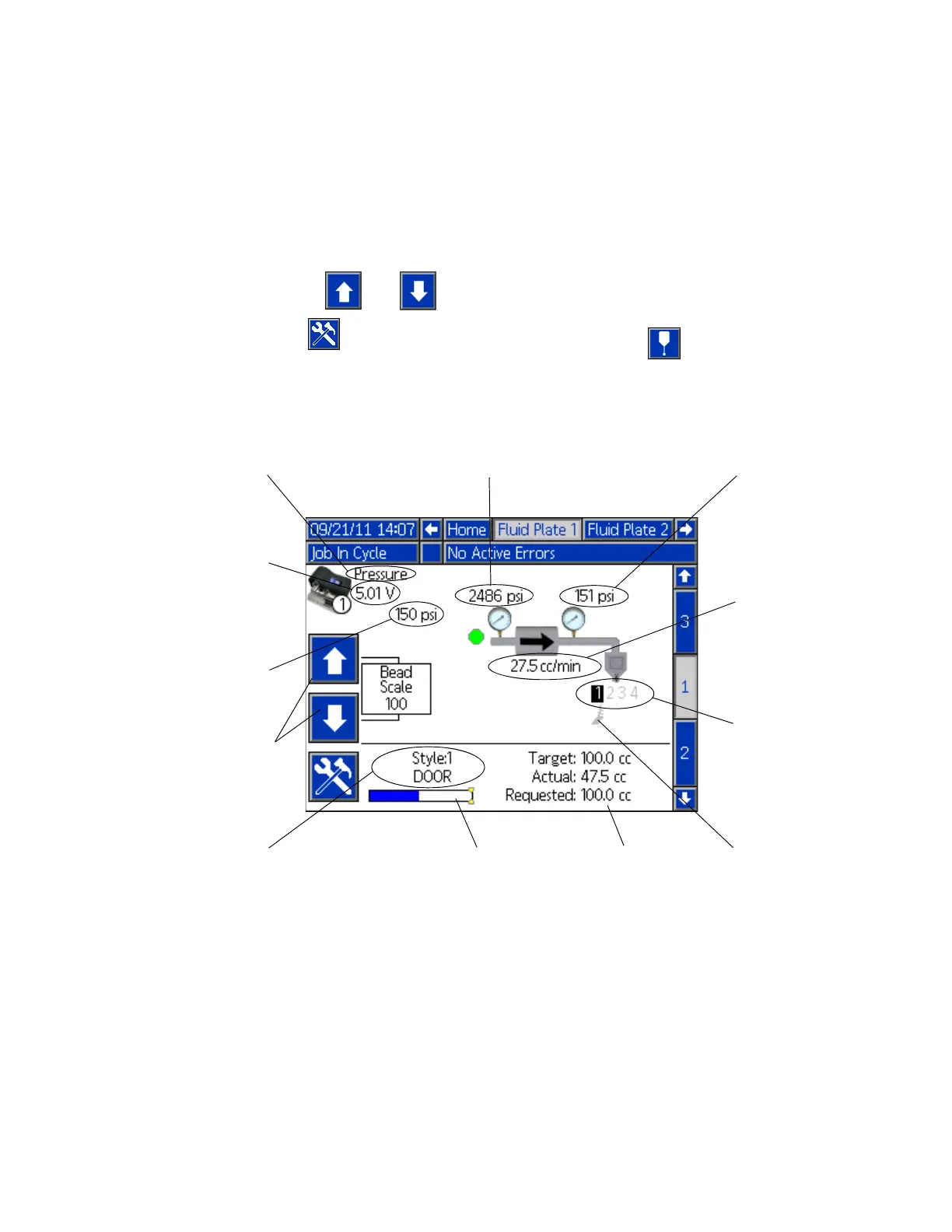
Fluid Plate x, Screen 1
This screen displays the current dispense control mode
used, the current pressure, and the current style being
dispensed. It also displays the target dispense volume,
the actual dispense volume, and the requested
dispense volume.
From this screen users can adjust the bead scale and
enter maintenance mode. Press and to
change the bead scale. Press to enter
maintenance mode.
The PCF system has two operating modes:
• Dispense mode – enables the module to begin
dispensing when it receives a command from the
automation unit.
• Maintenance mode – enables the module to begin
dispensing when the user presses the manual
dispense button. Dispense parameters and duration
depend on the selected control.
Dispensing continues for as long as the manual
dispense button is pressed.
Current Dispense
Control Mode
Outlet Pressure
Current Command
Value
Flow Rate
(systems with flow
meters)
Inlet Pressure
(non-heated systems)
Command Voltage
(Displays only when
Command Cable or Gate-
way is selected as the
Command Value Source;
see Fluid Plate Setup
Screens, page 111.)
Active Style
Progress Bar
Volumes
Active Dispense
Valves
Associated Swirl
Dispensers
Bead Scale
Quickly adjust pres-
sure/flowrate from this
screen



 To Next Page