PEL-3000(H) User Manual
108
Select Rename
Previous
Menu
LOADRS232
01/Oct/2018
Path: usb:\Test
3 folder(s), 15 file(s)
New
Folder
Delete
Folder1
Folder2
Folder3
175H_01.M
175H_02.M
175H_03.M
16-Feb-17 13:46
18-Feb-17 11:16
19-Feb-17 08:32
01-Mar-17 10:12
03-Mar-17 13:13
23-Mar-17 09:02
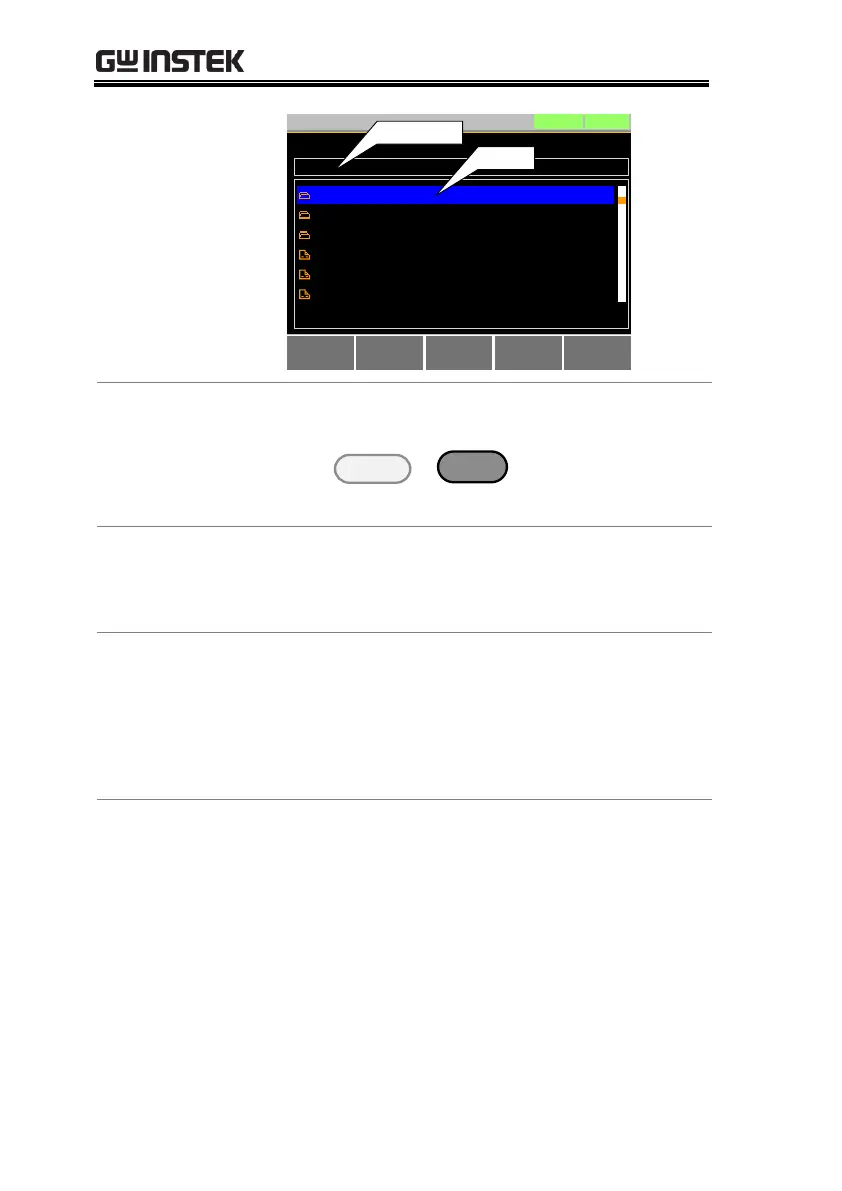
USB path
cursor
Access the File
Utilities Menu
1. Insert a USB drive into the USB port.
2. Press
> File Utility[F5].
The file utilities screen appears.
1. Press New Folder[F2] to create a new folder.
Use the on-screen display to enter the filename.
A maximum of 8 characters.
1. Use the scroll wheel to move the cursor to the
file/folder you wish to rename.
2. Press Rename[F3].
Use the on-screen display to enter the filename.
A maximum of 8 characters.
1. Use the scroll wheel to move the cursor to the
file/folder you wish to delete.
2. Press Delete[F4].
3. Press Delete[F4] again to confirm the deletion.



 To Next Page