PEL-3000(H) User Manual
50
Help Menu
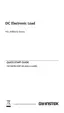
When any function key has been pressed or when a menu has been
opened, the HELP key can be used to display a detailed description.
1. Press any function key or soft-menu key.
2. Press
to see the help contents on that
particular function key or menu.
3. Use the scroll to navigate the help contents.
4. Press the Exit[F5] key to exit the help menu.
Help
on Help
LOADRS232
03/Oct/2018
Exit
HELP
Press F5 to exit the Help mode.
Rotate the VARIABLE knob to scroll all
the contents.
-End-



 To Next Page