EasyManua.ls Logo

GW Instek PEL-3021 - Configure RS232 C

GW Instek PEL-3021
257 pages
Print Icon
To Next Page IconTo Next Page
To Previous Page IconTo Previous Page
Loading...
PEL-3000(H) User Manual
198
Configure RS232C
RS232C
Configuration
Connector
DB-9, Male
Baud Rate
2400, 4800, 9600, 19200, 38400
Stop Bit
1, 2
Parity
None, Odd, Even
Operation
1. Connect an RS232C cable from the PC to the
rear panel RS232 port.
2. Press
Shift
+
Utility
Help
> Interface[F3] and
set the Interface setting to RS232.
3. Set the Baud Rate, Stop Bit and Parity settings.
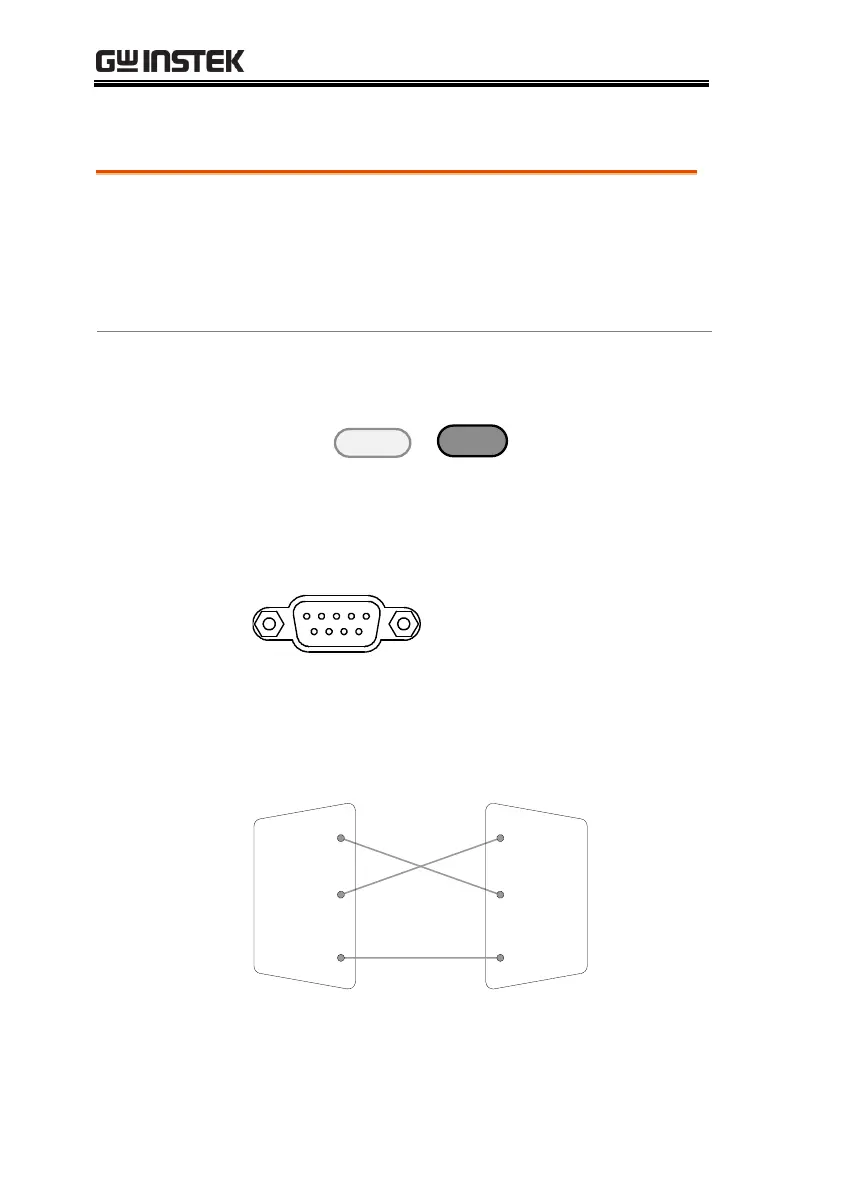
Pin Assignment
1 2 3 4 5
6 7 8 9
2: RxD (Receive data)
3: TxD (Transmit data)
5: GND
4, 6 - 9: No connection
PC Connection
Use a null modem connection as shown in the
diagram below.
PEL-3000(H)
PC
RxD
Pin
2
RxD
Pin
2
GND
Pin
5
GND
Pin
5
TxD
Pin
3
TxD
Pin
3

Table of Contents