EasyManua.ls Logo

GW Instek PEL-3021 - Turning on the Load with the Selected Function

GW Instek PEL-3021
257 pages
Print Icon
To Next Page IconTo Next Page
To Previous Page IconTo Previous Page
Loading...
PEL-3000(H) User Manual
114
Turning on the Load with the Selected Function
Description
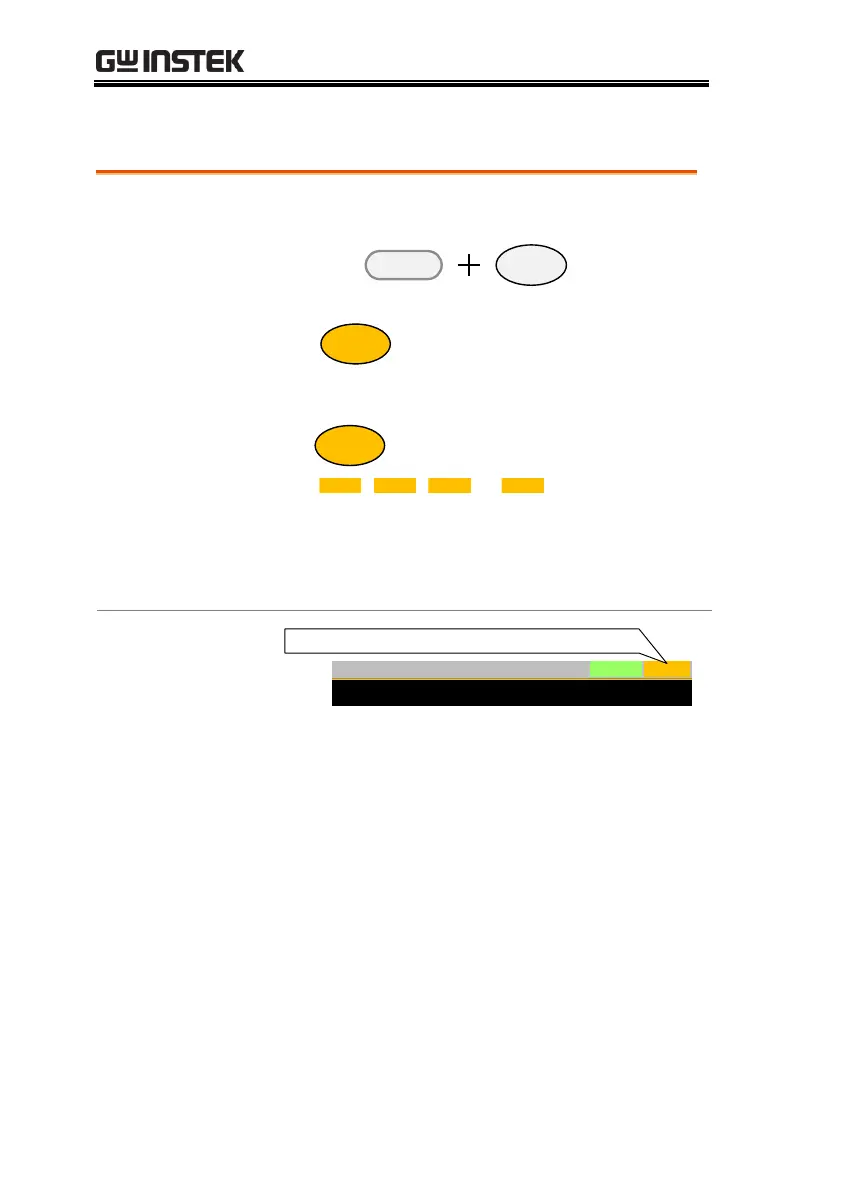
1. When a function is turned on, the load can be
turned on (with the selected function) by
pressing
Shift Load
On/
Off
. This can be
done at anytime.
The
Load
On/
Off
key will turn orange when the
load is “on”.
The load can be turned off again by pressing
the
Load
On/
Off
key.
The
PROG
,
NSEQ
,
FSEQ
or
OCP
icon turns orange
when the load is turned on.
The selected function will need to be turned off
before a “normal” load operation can be
performed.
Display
Mode
CP
IRange
H 35A
VRange
L 15V
Function
Dynamic
Configure
1.500
V
0.000
A
1.50
w
Timer1 0.025
Level2 0.00
Level1 0.00
PROGRS232
Fine
03/Oct/2018
mS
W
W
LOAD on with the selected function active

Table of Contents

Other manuals for GW Instek PEL-3021

Related product manuals