3
1. Mounting Procedure 3-1
Installation
1. Mounting Procedure
Mounting Procedure
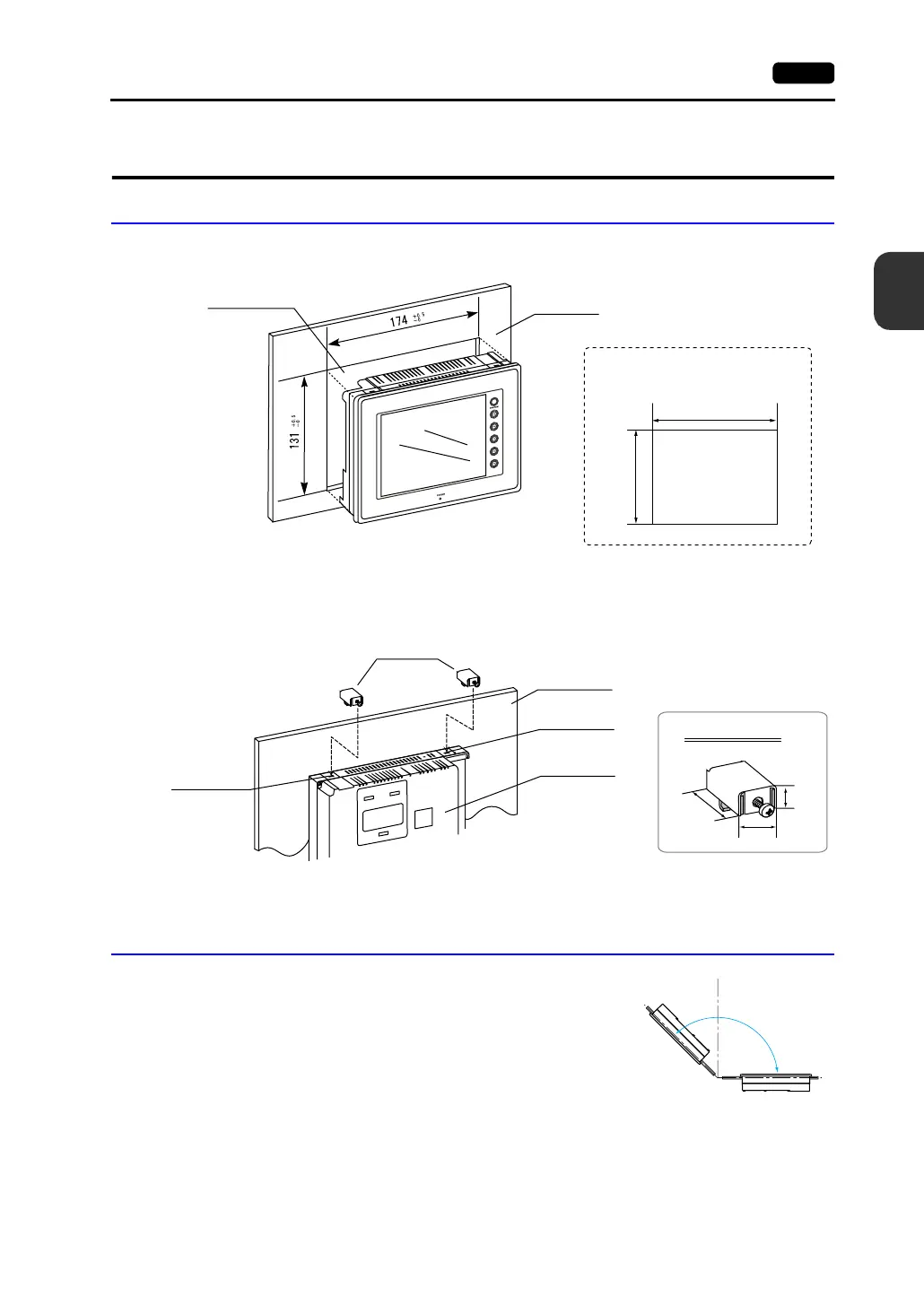
1. Cut out the mounting panel (max. thick: 5 mm) to match the dimensions shown below.
2. Insert four fixtures attached to the V606e into the mounting holes, and tighten them with the
locking screws.
<Tightening torque: 0.3 to 0.5 N•m>
3. Mount the gasket so that it will be sandwiched securely between the unit and the mounting panel.
Mounting Angle
Install the unit within the angle of 0° to 135° as shown on the right.
+0.5
-0
+0.5
-0
174
131
Mounting panel
Panel cut-out hole
• Panel cut-out dimensions
(Unit: mm)
17.8
10.5
30.0
Fixture dimensions
(Unit: mm)
Fixtures
Mounting hole
Mounting hole
V606e unit
Mounting panel
0°
135°
90°
D
i
s
p
l
a
y
Display



 To Next Page