6-14 2. Main Menu Screen
4. SRAM/Clock
• The SRAM/Clock setting is effective with V606eX20 only.
• To use the built-in clock of the V606e or to use the SRAM memory or cassette, it is necessary to
select [SRAM/Clock Setting] from the [System Setting] menu and make the SRAM/clock setting.
For the setting procedure, refer to the Reference Manual.
• Be sure to set the battery when using the built-in clock of the V606e or the SRAM memory or
cassette. Without battery, the contents in the SRAM or clock data will not be retained.
If the battery is not connected, the message “Data has some error. Error: 161 (24: )” is displayed
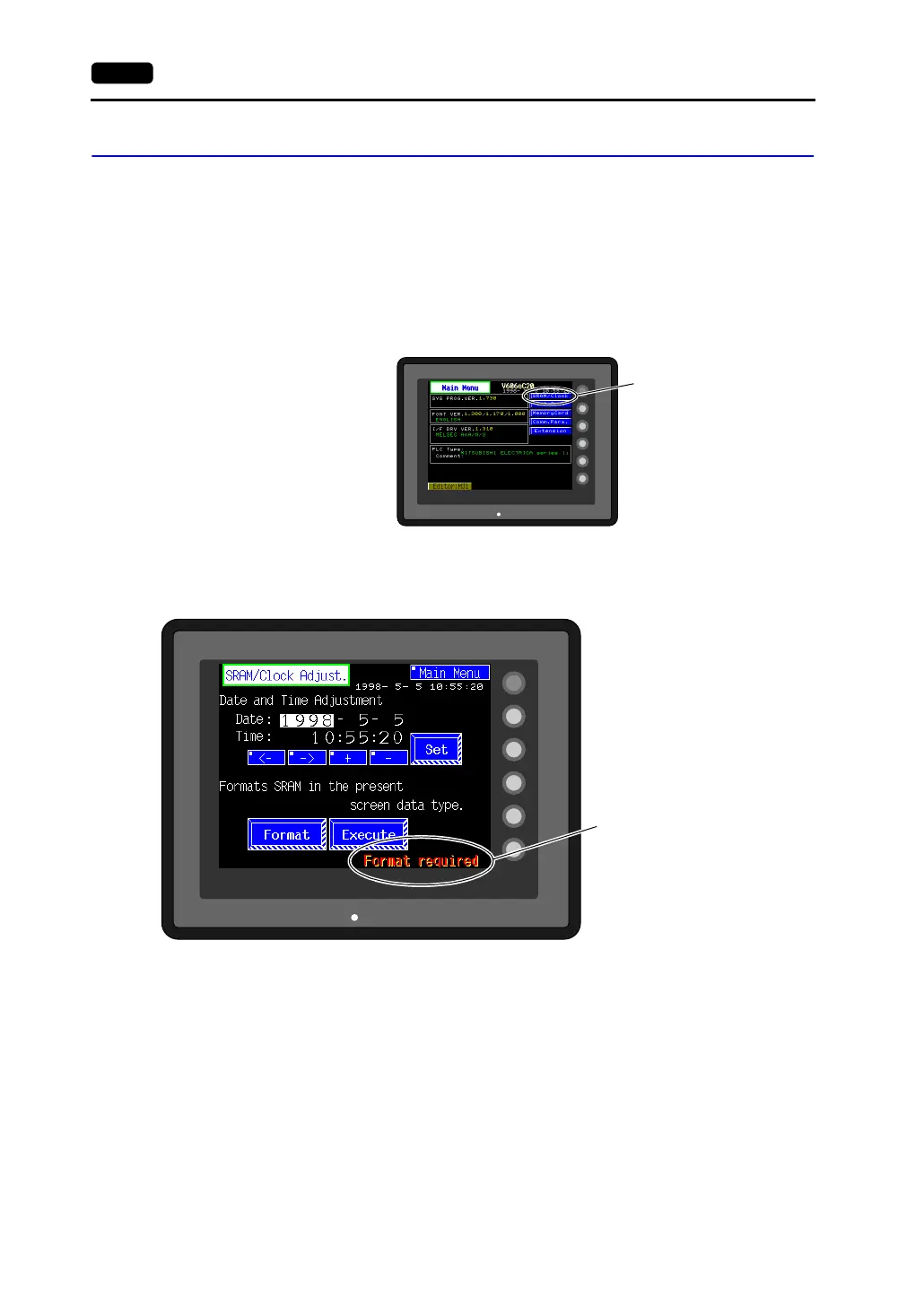
on the Main Menu screen or “Format required.” is displayed on the “SRAM/Clock Adjust.” screen.
• When the [SRAM/Clock] switch on the Main Menu screen is pressed, the following “SRAM/Clock
Adjust.” screen appears.
This screen is used for adjusting the built-in calendar and for initializing the SRAM area.
SYSTEM
F2
F3
F4
F5
F1
POWER
[SRAM/Clock] switch
SYSTEM
F2
F3
F4
F5
F1
POWER
This message is also displayed if the
battery is disconnected or the battery
voltage has decreased.



 To Next Page