35
Before starting Installation
Operation
Screen block
diagram
Function setting Program System setting Specifications
4. Time/schedule setting
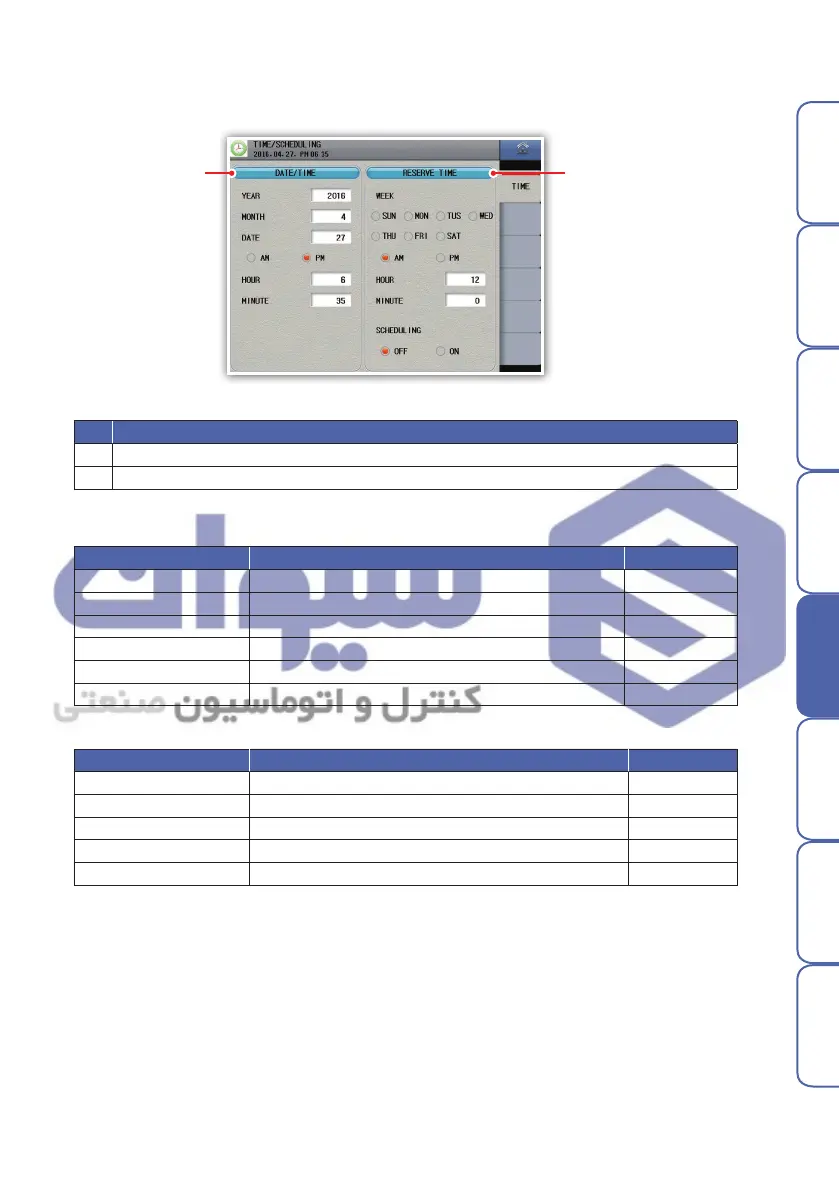
Screen to set current time and schedule. Schedule can be repeated by day.
Parameter Setting Default
Year
2000 ~ 2099
-
Month 1 ~ 12 -
Date 1 ~ 31 -
AM/PM AM/PM -
Hour 1 ~ 12 -
Min. 0 ~ 60 -
Parameter Setting Default
Operation day
Monday, Tuesday, Wednesday, Thursday, Friday, Saturday, Sunday
-
AM/PM AM/PM AM
Hour 1 ~ 12 12
Minutes 0 ~ 60 0
Reservation confirm cancel, set cancel
Present time setting parameters
Schedule time setting parameters
No. Description
1 Set the present time. It is not possible to change while saving
2 Set the operation start schedule time
Picture 40) time/schedule setting
① ②
※ Selection of repeated days of the week available
هﺮﮐ ﮓﻧﺎﯿﻧﺎﻫ تﻻﻮﺼﺤﻣ یرﺎﺼﺤﻧا هﺪﻨﯾﺎ ناﻮﯿﺳ ﺖﮐﴍ


 To Next Page
 Loading...