55
Before starting Installation
Operation
Screen block
diagram
Function setting Program System setting Specifications
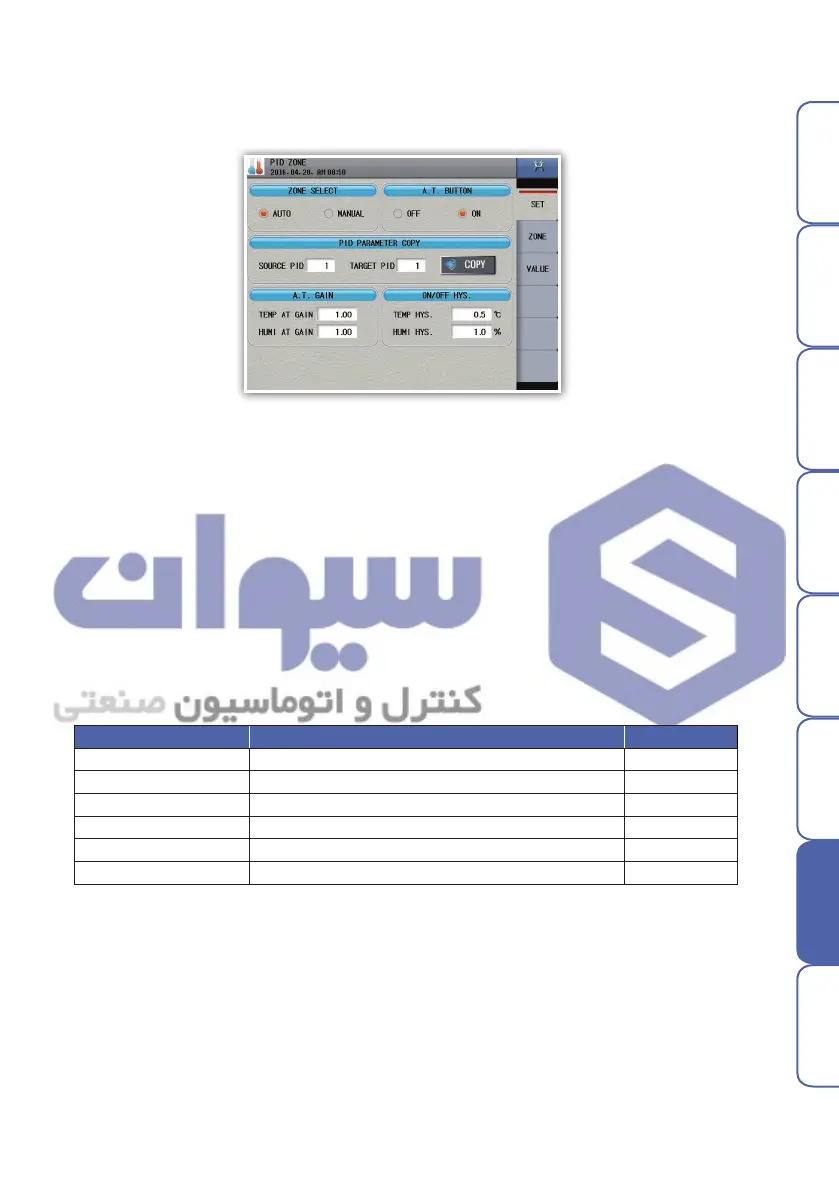
1. Zone selection type
- Set PID zone selection type.
2. PID control type
3. Copy PID time constant
- Original channel : No. of original channel
- Target channel : No. of target channel
- Original PID : No. of original PID
- Target PID : No. of target PID
- Enter 0 to original PID and copy it in order to copy all PID values of it to a target channel.
4. A.T. GAIN
- Used to manually and finely optimize PID numerical values automatically calculated with constant
values applied to individual PID items for calculating PID.
5. ON/OFF HYS.
- Set hysteresis(width) for auto tuning or ON/OFF control.
▶ PID setting
3. PID setting
Parameter Setting range Default
PID ZONE Mode AUTO, MANUAL
AUTO
A.T. Button Dissplay OFF, ON ON
Temperature A.T. Gain 0.01 ~ 10.00 1.00
Humidity A.T. Gain 0.01 ~ 10.00 1.00
Temperature HYS. 0.0 ~ 250.0 ℃ 0.5 ℃
Humidity HYS. 0 ~ 100.0 % 1.0 %
Fig. 72) PID setting
هﺮﮐ ﮓﻧﺎﯿﻧﺎﻫ تﻻﻮﺼﺤﻣ یرﺎﺼﺤﻧا هﺪﻨﯾﺎ ناﻮﯿﺳ ﺖﮐﴍ


 To Next Page
 Loading...