AXIS4000 WHEEL ALIGNMENT SYSTEM
HAWEKA Wheel Alignment –AXIS4000
Front axle measurement
9.5 Steering gear middle position
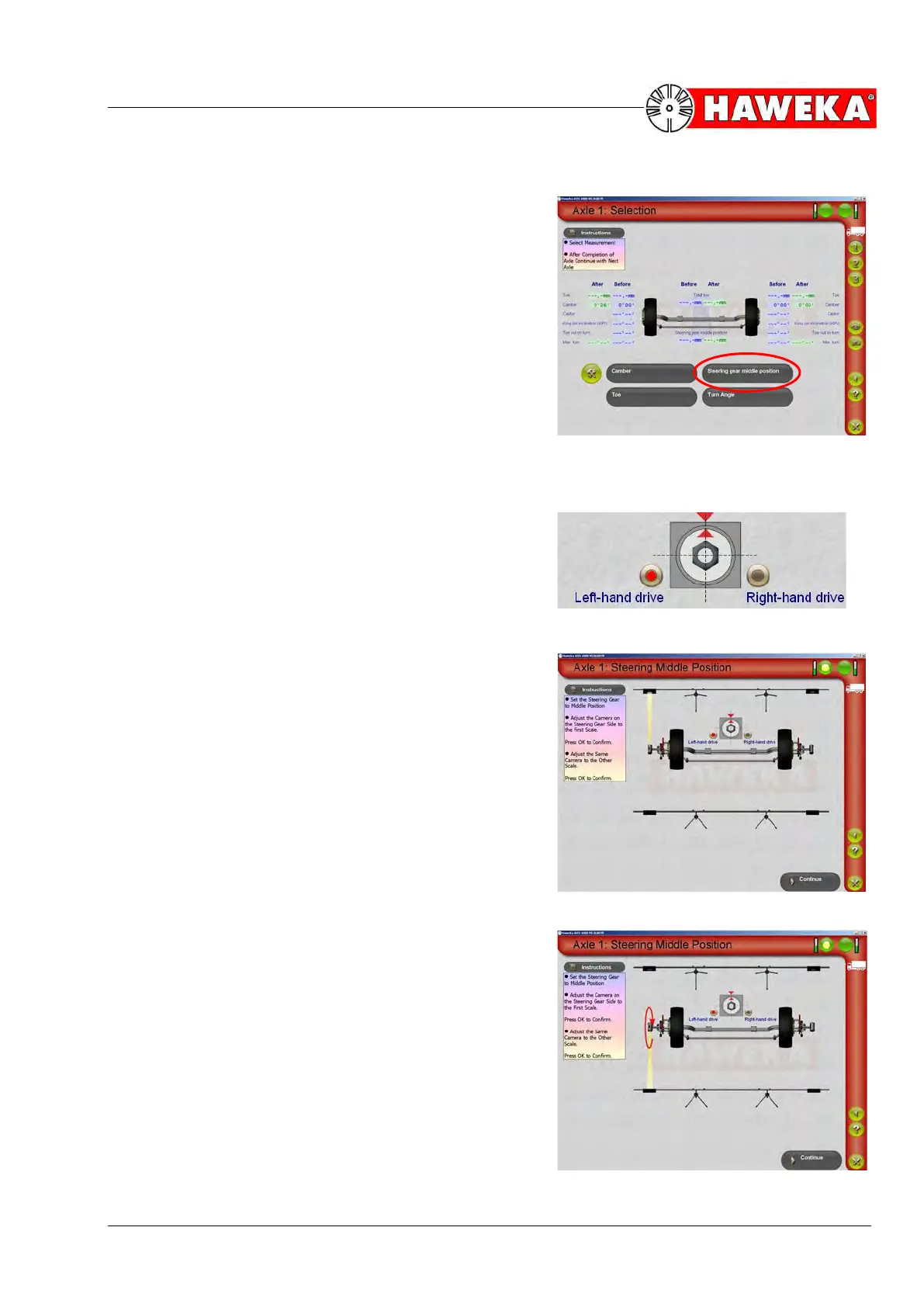
• Select the "Steering gear middle position" menu
point on the overview screen for selection measure-
ment types.
(Fig. 42)
The middle position of the steering gear is measured on
the one steering gear side of the vehicle.
• If required, the specific steering side can be altered
by clicking the Left-hand drive / Right-hand drive
button.
(Fig. 43)
• The steering gear must be brought into a central posi-
tion before starting the measurement.
• The corresponding camera must now be aligned to
the front reflector.
(Fig. 44)
• Once the reflector has been detected, confirm the
process with the OK button on the camera.
• The camera is now rotated by 180 degrees and
aligned to the rear reflector.
(Fig. 45)
• Once the second reflector has been detected, confirm
the process again with the OK button on the camera.
• The measured value is displayed as soon as the work
steps have all been completed.
• The Continue button changes the program back to
the overview screen for the selected axle and dis-
plays the ACTUAL measured value.


 To Next Page