AXIS4000 WHEEL ALIGNMENT SYSTEM
HAWEKA Wheel Alignment –AXIS4000
Articulated trailers
13.2.1 Setting up the reflector stands
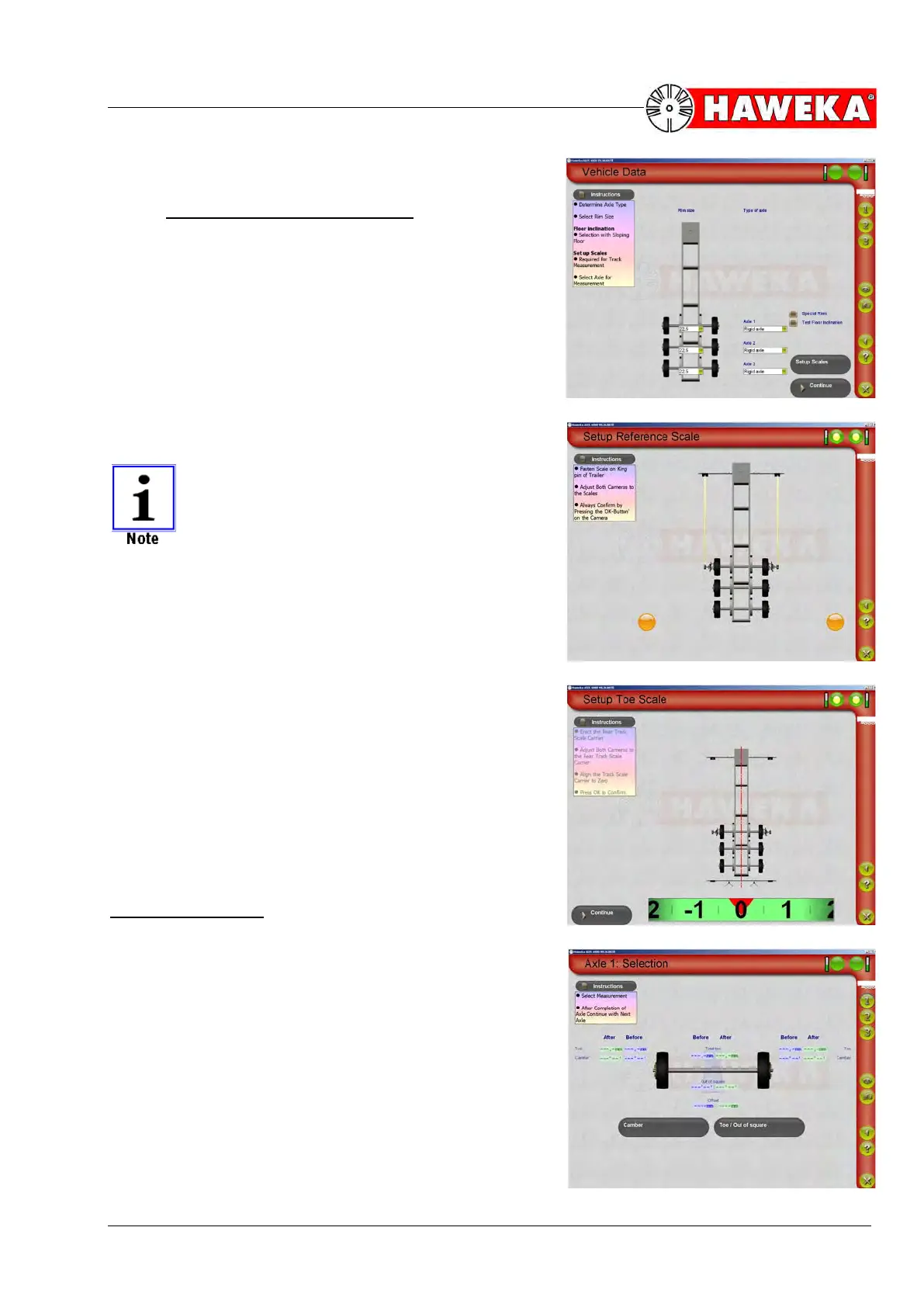
• Use the quick selection option in the AXIS4000
program to select a trailer with the right number of
axles.
The program changes to entry of vehicle data.
(Fig. 95)
• This is where you select the corresponding axle
type and appropriate rim size.
• Choose the "Setup scales" button.
No magnetic feet are required for setup as
the measurement rectangle is now defined
by the reflectors on the king pin.
• Align the camera on the left and right to the reflec-
tors on the king pin.
• Confirm positioning with the OK button on both
camera casings.
(Fig. 96)
Once both reflectors have been detected, the program
screen changes automatically and you will be asked to
align both cameras to the rear reflectors.
• The reflector stand must now be moved to the side
until the display nearly reaches "0".
(Fig. 97)
Start measurements
All subsequent measurements are carried out accord-
ing to the working sequence for rear axle measure-
ments.
(Fig. 98)
To measure the camber, toe, axle mismatch and incli-
nation, please refer to Point 10 Page 40 Rear axle
measurement.


 To Next Page