AXIS4000 WHEEL ALIGNMENT SYSTEM
HAWEKA Wheel Alignment –AXIS4000
Front axle measurement
9.6 Measuring the total toe and single toe
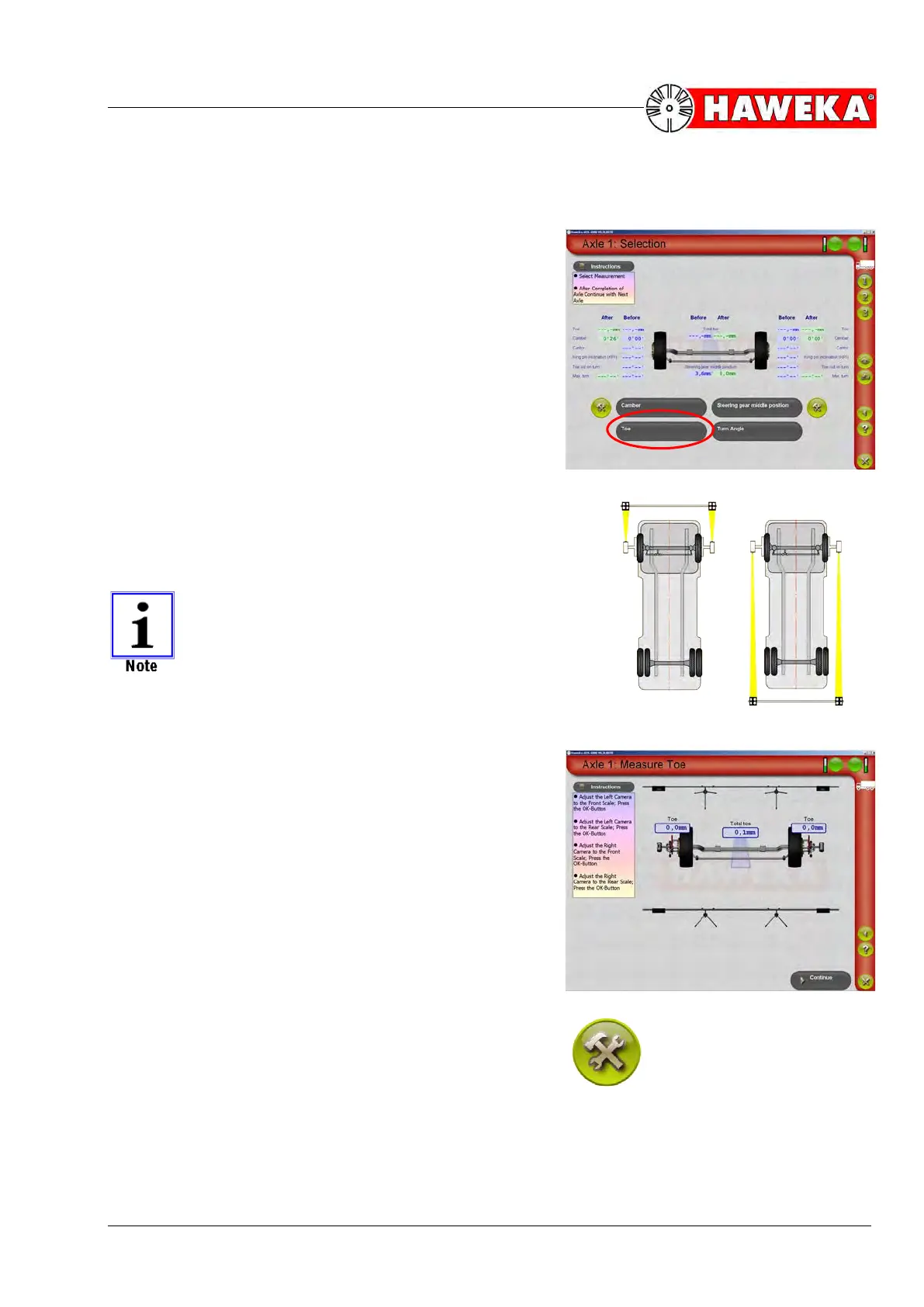
• Select the Toe menu point on the measurement re-
port overview screen.
(Fig. 49)
• For measuring the ACTUAL value, the cameras are
turned to the front reflectors and then to the back re-
flectors and each is confirmed with the OK button.
• The individual work steps are described by the in-
struction windows in the program.
The procedure for recording measured values
is displayed in the program by a yellow light
beam.
(Fig. 50) Values can be measured start-
ing on the left or right side of the vehicle; this
does not alter the measurement result.
• After recording the measured values, the single toe
values measured for each vehicle side and the total
toe will be immediately displayed.
(Fig. 51)
• The Continue button changes the program back to
the overview screen for the selected axle and dis-
plays the ACTUAL toe value measured.
• The measured ACTUAL values must be compared to
the required NOMINAL values.
• If the toe values measured lie outside the permitted
tolerance for NOMINAL values, the vehicle geometry
must be adjusted. This is done by selecting the adjust
button for the toe.


 To Next Page