AXIS4000 WHEEL ALIGNMENT SYSTEM
HAWEKA Wheel Alignment –AXIS4000
Trailers
Preparations for measuring trailers
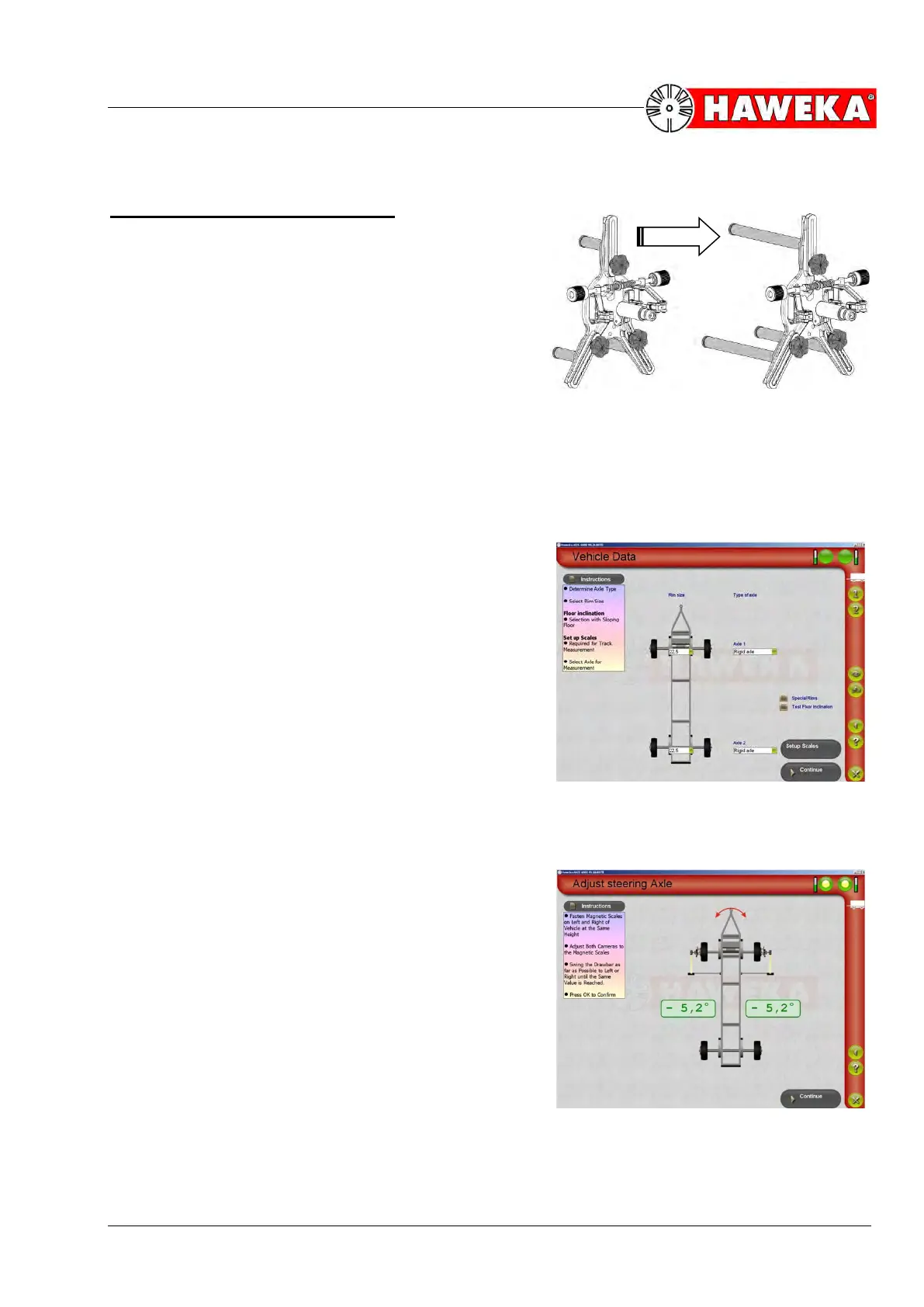
The camera measurement heads may have to be con-
verted using the 265 mm long magnetic feet (similar to
trailer measurements), depending on the rim type.
(Fig. 99)
13.3 Aligning the vehicle axle on the drawbar
• Check the drawbar for visible defects.
• The camera measurement heads are fitted to the
vehicle wheels of the rotating axle.
• Place the magnetic feet on both vehicle sides at the
same position on the chassis.
• Hang the reflectors on the right and left.
• Place the cameras onto the wheel alignment clamp
on each side of the vehicle and align against the re-
flectors on the magnetic feet.
• Prepare the computer and select Trailer as vehicle
type in the program.
• Enter the rim size. (Fig. 100)
• Select the Setup scales button.
• Now the vehicle axle is aligned against the drawbar
until the values shown for both sides are the same.
(Fig. 101)
• Use the parking brake to lock the vehicle wheels on
the axle.
• End the procedure with the Continue" button.


 To Next Page