AXIS4000 WHEEL ALIGNMENT SYSTEM
HAWEKA Wheel Alignment –AXIS4000
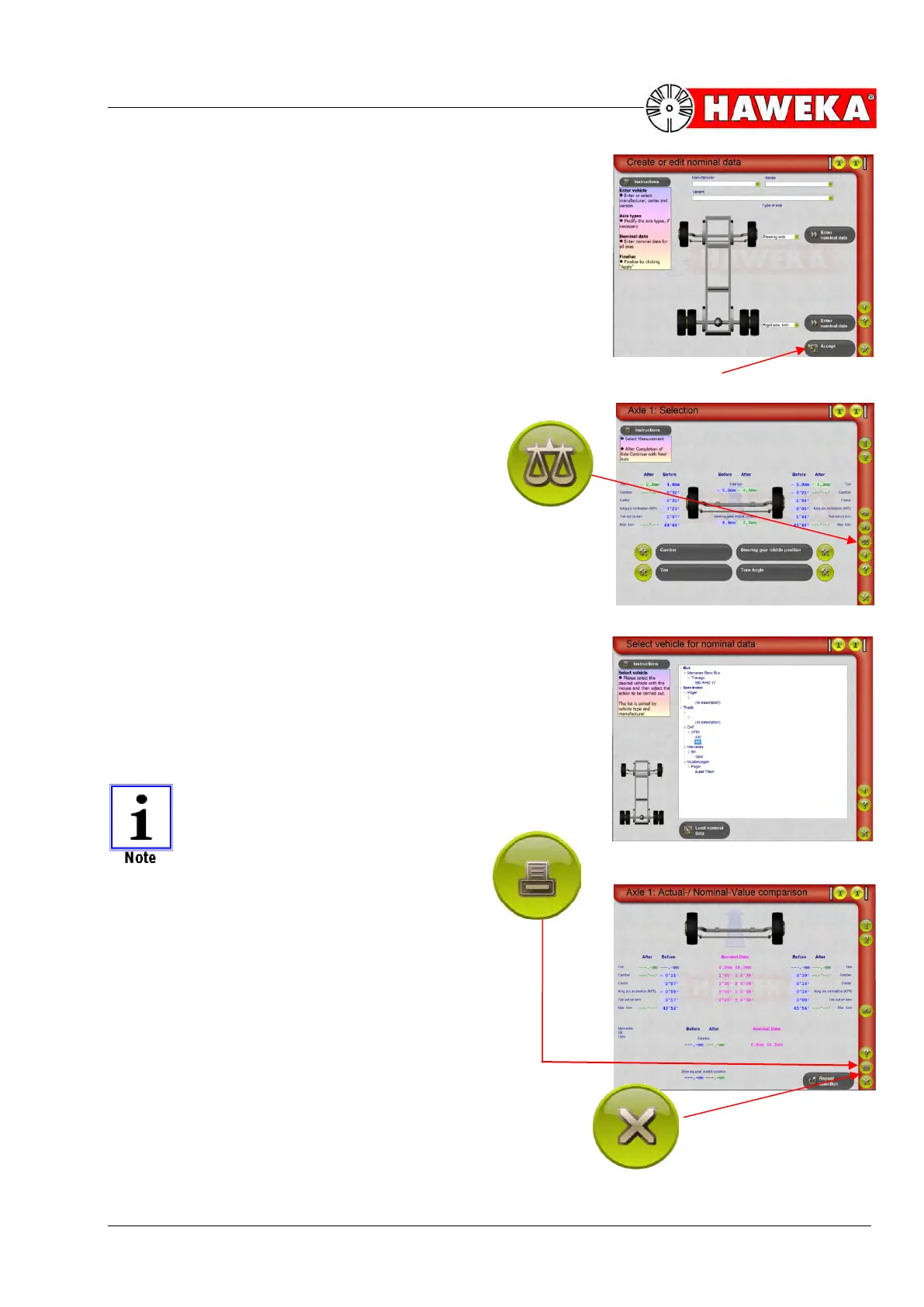
• Finally, go back by clicking “Okay”.
• Save your entered data by clicking the “Accept” button”
(Fig. 86)
The new dataset has been created and can be used.
12.2 Using the user reference database
A new symbol with a set of scales has been added
to the right side of the “Selection” section of the
program.
• Start a vehicle alignment as usual.
• To use the database, click on the scales symbol
after you have added the measured data.
(Fig. 87)
An overview opens with the vehicle data you have created.
• Select the respective vehicle from the list and click on the
“Load nominal data” button.
(Fig. 88)
The NOMINAL data will be shown along with the ACTUAL
data that has been recorded.
Via the print button, the selected vehicle-data
can be printed out separately
• To leave the nominal data screen and con-
tinue with measuring, click on the Cancel
symbol on the bottom right side.
(Fig. 89)


 To Next Page