79HeartWare™ HVAD™ System Peripherals and Accessories
10
9
8
7
6
5
4
3
2
1
Appendix
Reference
Guides
Alarms and
Emergencies
Patient
Management
Surgical
Implant and
Explant
Monitor
Peripherals
and
Accessories
HVAD
®
PumpOverviewIntroduction
4.4 Using the HeartWare
®
Battery Charger
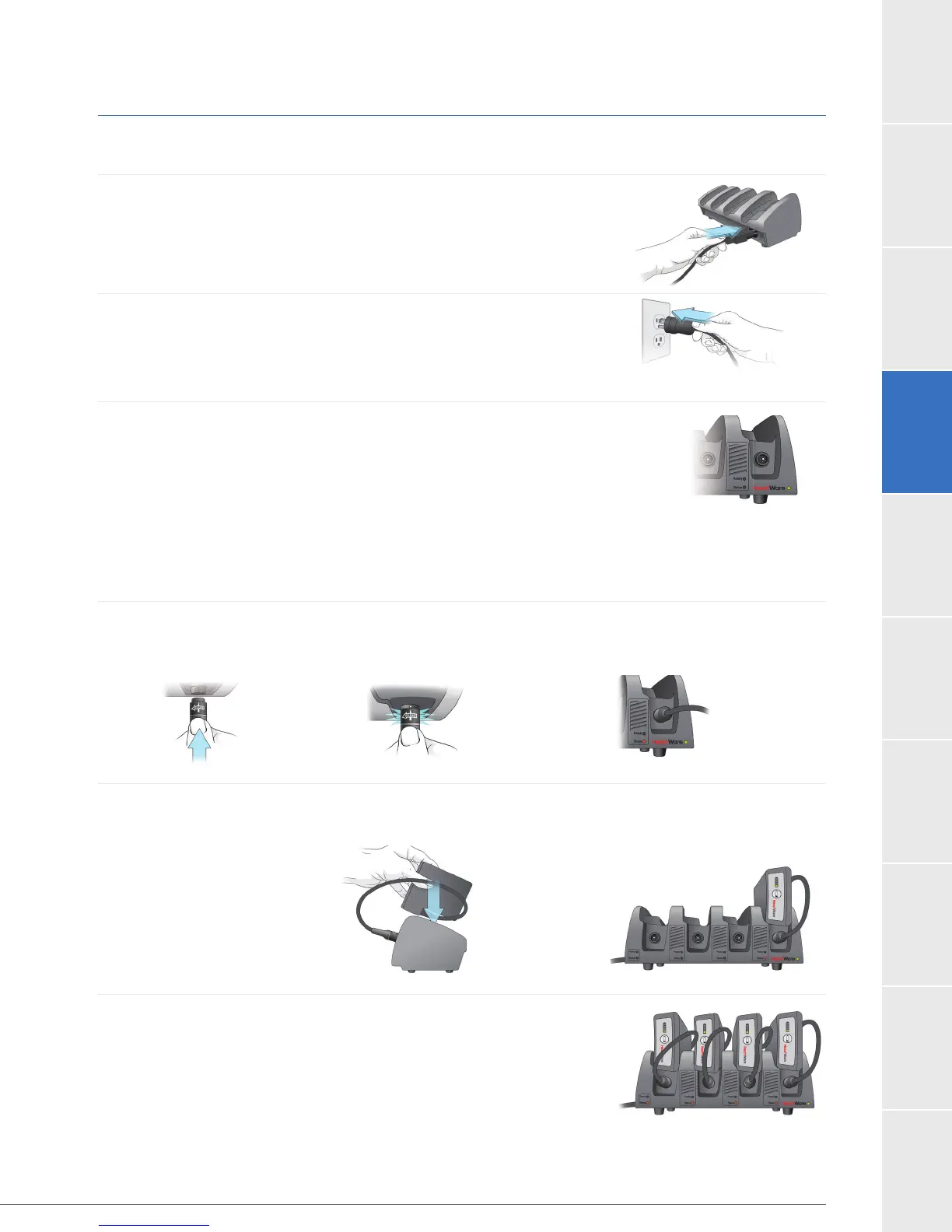
To Set up Your Battery Charger:
1. Insert the power cable into the back of the charger.
2. Plug the other end of the cable into a wall outlet.
3. Once the charger is connected to power, the green power
light, located on the front bottom right side of the charger will
be on.
When a battery is connected, the battery charger checks the battery and begins charging.
To connect a battery to the charger, follow the steps below:
1. Connect the battery to the power port located under each slot, the same way you
connect a battery to the controller.
2.
the battery with the cable-side down.
3. Repeat steps 1 and 2 for all batteries. The charger can hold up
to 4 batteries at one time.
Figure 50
Figure 52
Figure 55
Figure 54
Figure 53
Figure 51



 To Next Page