10
9
8
7
6
5
4
3
2
1
Appendix
Reference
Guides
Alarms and
Emergencies
Patient
Management
Surgical
Implant and
Explant
Monitor
Peripherals
and
Accessories
HVAD
®
Pump Overview
Introduction
100 HVAD® Instructions for Use
5.3 System Screens (continued)
Alarm Settings Tab (continued)
The user should always log off the password-protected System Screens after completing system
Clinical Screen. If the System Screen is not used for 11 minutes, the user is automatically logged
out and needs to enter the password to access these screens.
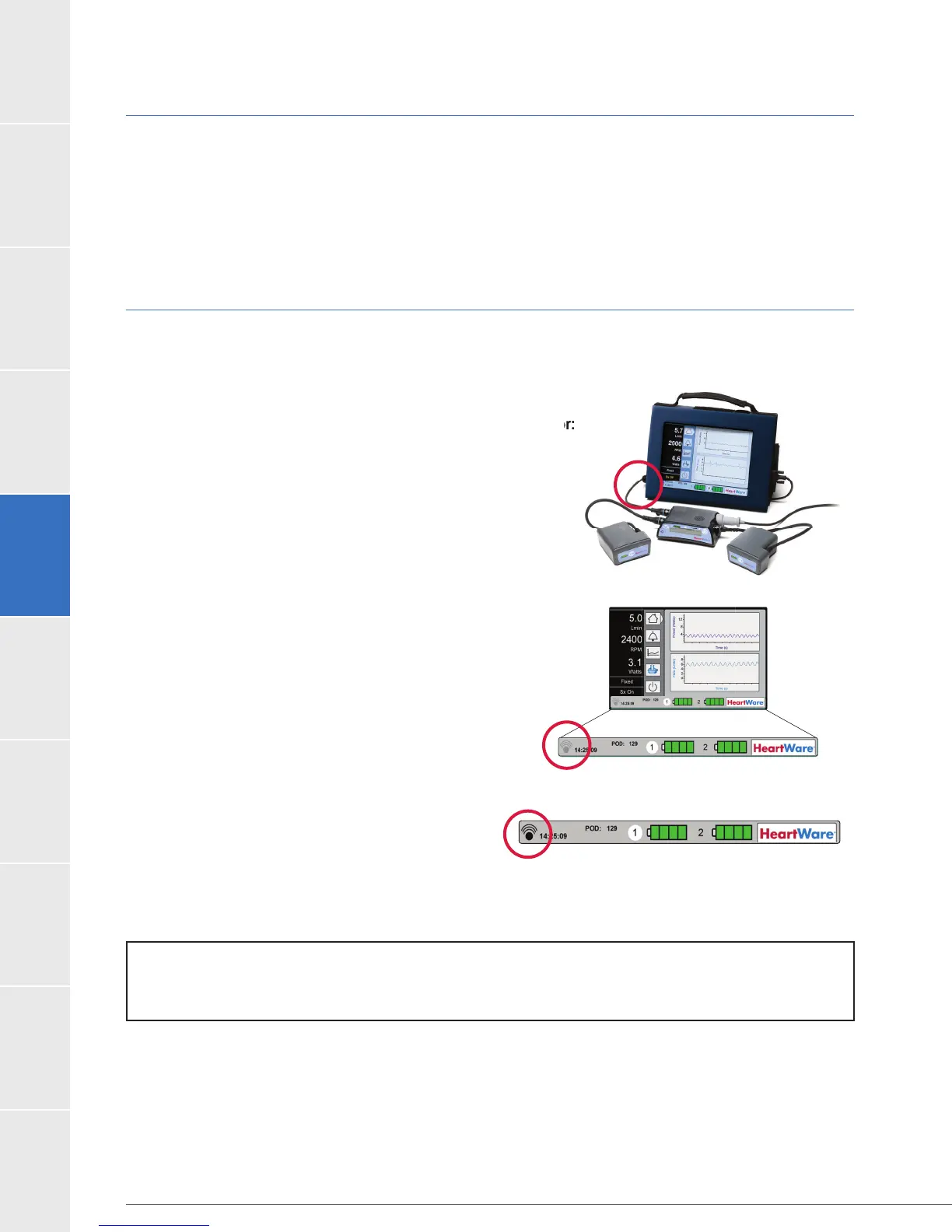
5.4 Downloading Controller Log Files
allows the clinician to obtain alarm and trend data from the controller and to transfer it from the
How to download log les from the controller to the monitor:
1. Connect the blue data cable from the monitor to the
data port on the controller (Figure 86).
2. The gray data download icon in the lower left hand
(Figure 87),
indicating the download has begun (it may take
up to 10 minutes for the download to complete).
3. When the data download icon turns solid black
(Figure 88), the data download is complete.
Disconnect the data cable from the controller.
Please note: the controller will automatically
connected to the monitor.
How to download log les from the controller to the monitor:
NOTE:
controller to the monitor to complete the data transfer.
Figure 86
Figure 87
Figure 88



 To Next Page