10
9
8
7
6
5
4
3
2
1
Appendix
Reference
Guides
Alarms and
Emergencies
Patient
Management
Surgical
Implant and
Explant
Monitor
Peripherals
and
Accessories
HVAD
®
Pump Overview
Introduction
86 HVAD® Instructions for Use
5.1 General Overview (continued)
The monitor is designed to provide a user-friendly way to monitor and control the HeartWare
™
HVAD
™
System. The monitor:
Displays pump information
Allows users to adjust pump parameters
Monitors and reports system errors and alarm conditions
Updates controller software, when applicable
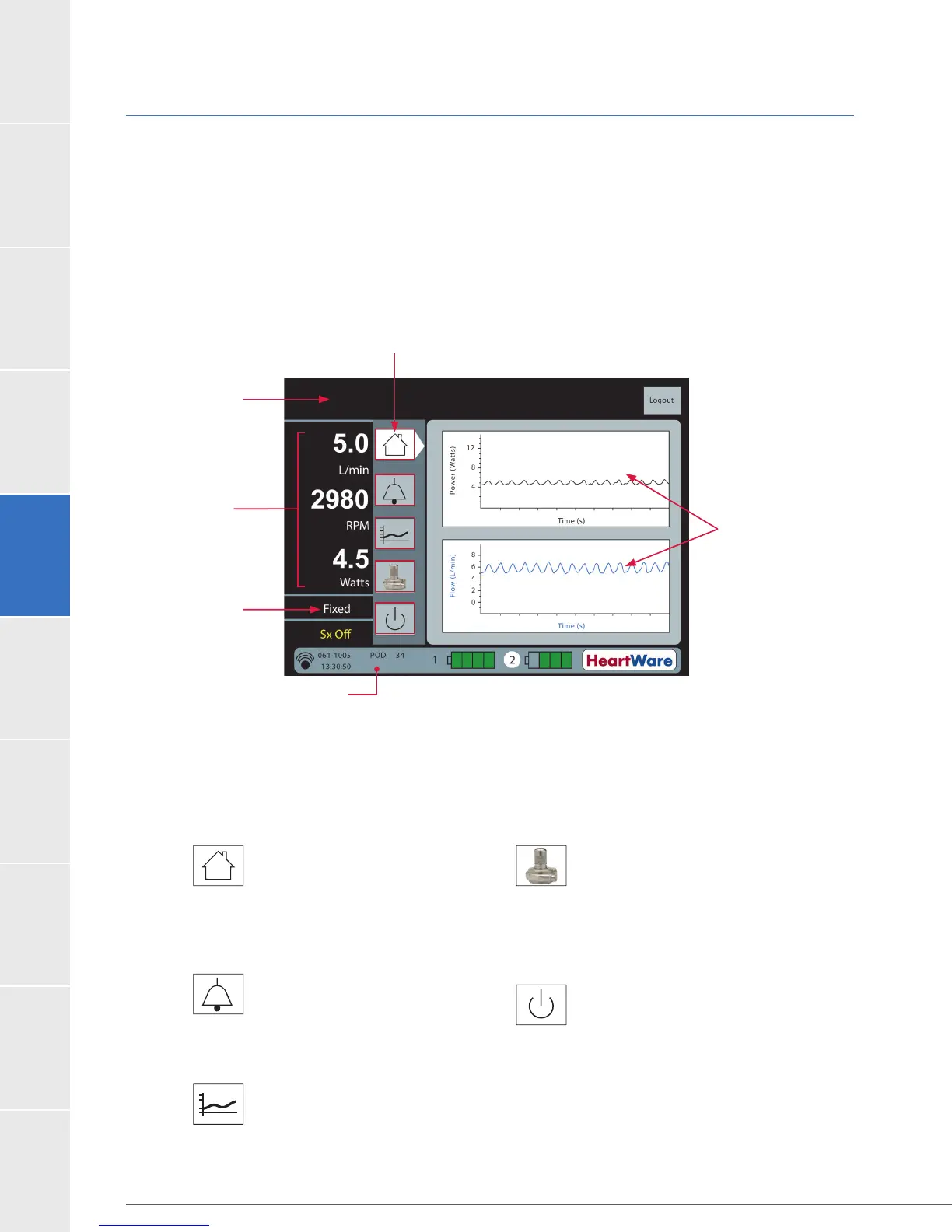
Figure 61: Monitor Screen Layout
(Figure 62) on the monitor to access system information and to manage pump
operation. The icons are displayed on all screens. When an icon is selected, it points to the screen.
Figure 62: HeartWare
®
Monitor Screen Icons
Home:
power, algorithm status
Alarm:
during active alarm
during active alarm
Trend:
displays (60 min, 4 hours,
14 days, 30 days)
System:
Enables clinician to:
Monitor:
affect pump operation)
Power and Flow
Waveforms
Controller
Message
Display Area
Pump
Parameters
Touchscreen Icons
Algorithm
Status Area
Controller Status
Area



 To Next Page