059327–00 REV. C
HEAT-TIMER CORP.
|
25
13 SETTING THE CONTROL TO FACTORY DEFAULTS
--- BOOST MODE ---
30 Minutes
Disable
BACK ▲▼ SAVE
TOTAL CLEAR STARTED
Release buttons
and
Please Wait
05 STARTUP
ETS-LT PROGRAMMING MENUS
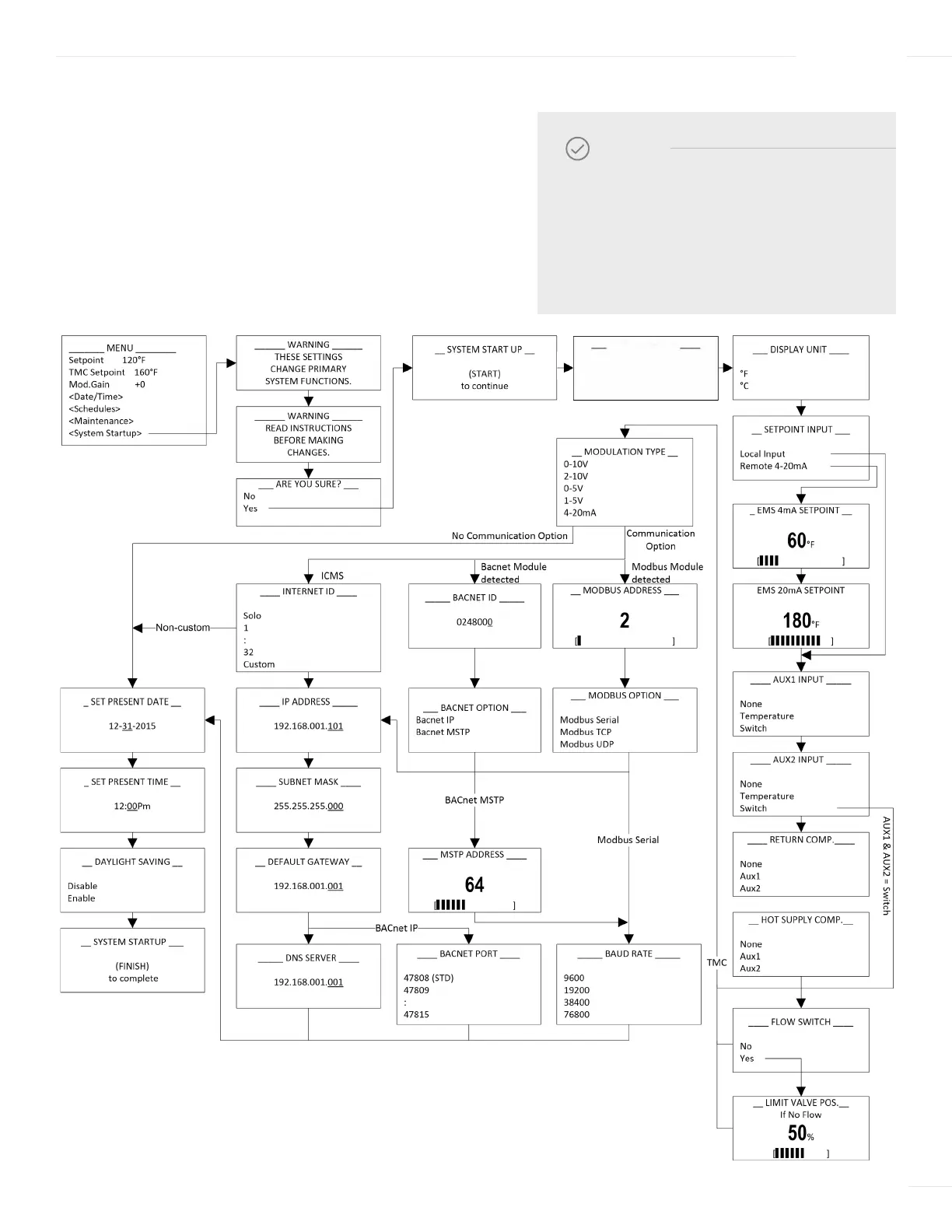
SYSTEM STARTUP MENU
When the ETS-LT Control Module is first powered-on
and initialization is complete, the System Startup menu
screens appear. Follow the System Startup menu screens
to program the unit.
NOTE
If the System Startup menu screens to
not appear, the ETV Platinum Plus has
already been configured. To check the
configuration or to make changes, select
System Startup from the Main menu.
CONTROL MODE
ETV
ETV+TMC
TMC Only
13 SETTING THE CONTROL TO FACTORY DEFAULTS
--- BOOST MODE ---
30 Minutes
Disable
BACK ▲▼ SAVE
TOTAL CLEAR STARTED
Release buttons
and
Please Wait



 To Next Page