•
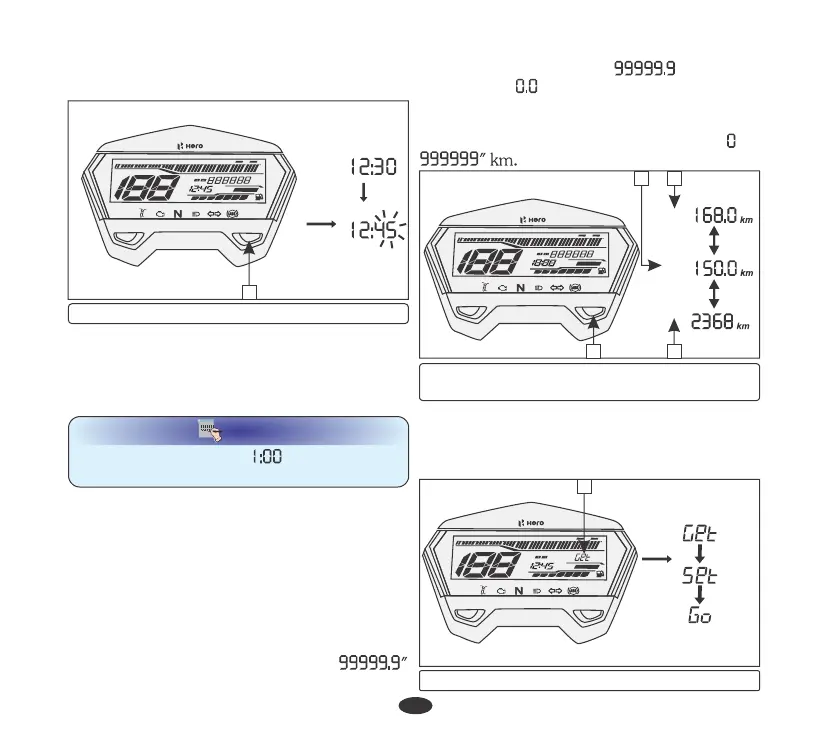
To end the adjustment press set utton (2). b
The display will stop flashing automatically
and it will return to its pervious value if the
button is not pressed for 30 seconds or
more.
The tripmeter shows distance travelled since
trip meter was reset last time. There are two
tripmeters, tripmeter-A (2) and tripmeter-B
(3).
(b) Odometer/Tripmeter
Push the mode button (4) to select odometer,
tripmeter-A or tripmeter-B. Tripmeter-A or
tripmeter-B can be displayed upto "
km.
The odometer (1) shows accumulated
distance travelled.
TOTAL
TRIP B
TRIP A
0
1 2 3 4 5 6 7 8 9 10 11
AM
PM
km/h
E
F
SERVICE
km
TRIP
ODO
x 1000 RPM
S
M
•
The time advances fast when the button is
pressed and held.
If the tripmeter exceeds " " km it will
return to " " km automatically. When
tripmeter is selected long press the set button
to reset tripmeter to zero.
The odometer can be displayed from " to
NOTE
The clock will reset “AM: “ if the battery is
disconnected.
18
1
3
2
4
(1) Odometer (2) Tripmeter-A
(3) Tripmeter-B (4) Mode button
(3) Set button
0
1 2 3 4 5 6 7 8 9 10 11
AM
PM
km/h
E
F
SERVICE
km
TRIP
ODO
x 1000 RPM
S
M
3
The scroll (1) displays a message “GET SET
GO” for few seconds whenever the ignition
switch is turned "ON".
(c) Scroll message
0
1 2 3 4 5 6 7 8 9 10 11
AM
PM
km/h
E
F
SERVICE
TRIP
ODO
x 1000 RPM
S
M
1
(1) Scroll





 To Next Page