Hex ezCAN for CAN-bus-equipped Motorcycles
_________________________________________________________________________________________________
_________________________________________________________________________________________________
© Hex Innovate (UK) Ltd. Page 26 of 60 ezCAN 2408.x
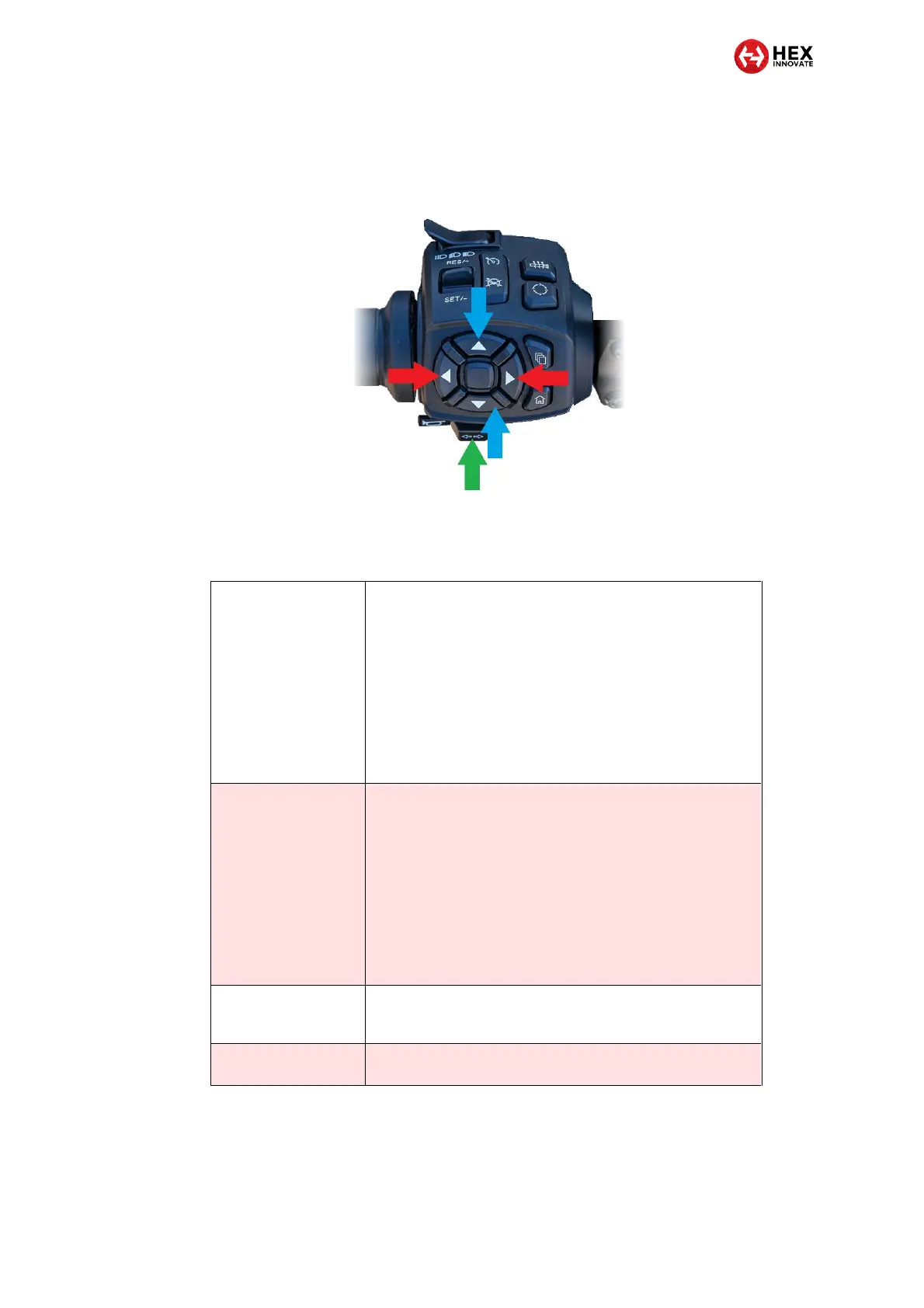
The ezCAN is controlled using the Navigate Left/Right buttons (red
arrows, below), Navigate Up/Down buttons (blue arrows, below) and turn-
signal cancel button (green arrow, below) on the left-side handlebar
controls.
The Navigate Left/Right buttons, Navigate Up/Down buttons and Turn-
signal cancel button referred to in this section are located on the Pan
America’s left-side handlebar controls. See the image above for details.
Adjusting Aux 1 lights
only
1. Press and hold the Navigate Left button until the Aux 1
lights flash twice.
The Aux 1 lights are now in brightness-adjustment
mode.
2. Briefly press and release the Navigate Up button to
increase light brightness by 10% per click (to a
maximum of 100%), or press and release the Navigate
Down button to decrease brightness by 10% per click (to
a minimum of 0%).
3. Exit brightness-adjustment mode by not operating the
Navigate buttons for more than 5 seconds.
Adjusting Aux 2 lights
only
1. Press and hold the Navigate Right button until the Aux 2
lights flash twice.
The Aux 2 lights are now in brightness-adjustment
mode.
2. Briefly press and release the Navigate Up button to
increase light brightness by 10% per click (to a
maximum of 100%), or press and release the Navigate
Down button to decrease brightness by 10% per click (to
a minimum of 0%).
3. Exit brightness-adjustment mode by not operating the
Navigate buttons for more than 5 seconds.
Toggling Aux 1 lights
On and Off
Press and hold the turn-signal cancel button for more than 3
seconds. The state of the lights persists even if the ignition is
cycled.
Toggling Aux 2 lights
On and Off
Click the turn-signal cancel button three times. The state of
the lights persists even if the ignition is cycled.



 To Next Page