Network Video Recorder User Manual
56
Step 5 Click OK.
3.5 Configure the Customized Protocols
Purpose:
To connect the network cameras which are not configured with the standard protocols, you can
configure the customized protocols for them. The system provides 16 customized protocols.
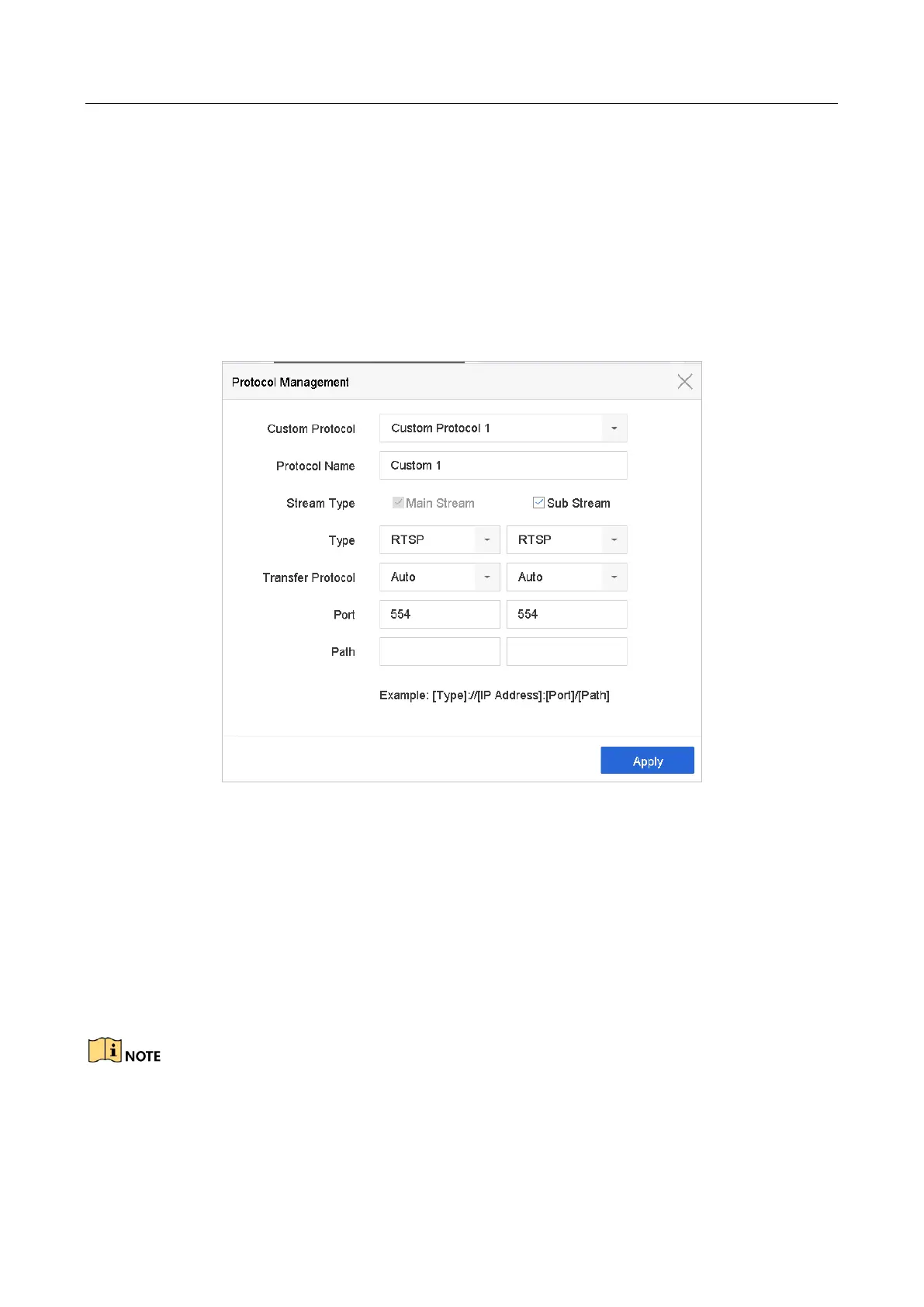
Step 1 Click Protocol at the top taskbar to enter the protocol management interface.
Figure 3-2 Protocol Management
Step 2 Select the protocol type of transmission and choose the transfer protocols.
● Type: The network camera adopting custom protocol must support getting stream through
standard RTSP.
● Path: You have to contact the manufacturer of the network camera to consult the URL
(uniform resource locator) for getting main stream and sub-stream.
● The format of the URL is: [Type]://[IP Address of the network camera]:[Port]/[Path].
● Example: rtsp://192.168.1.55:554/ch1/main/av_stream.
The protocol type and the transfer protocols must be supported by the connected IP camera.
Result:



 To Next Page
 Loading...