77
Excel Direct Input Function (HID Function)
2
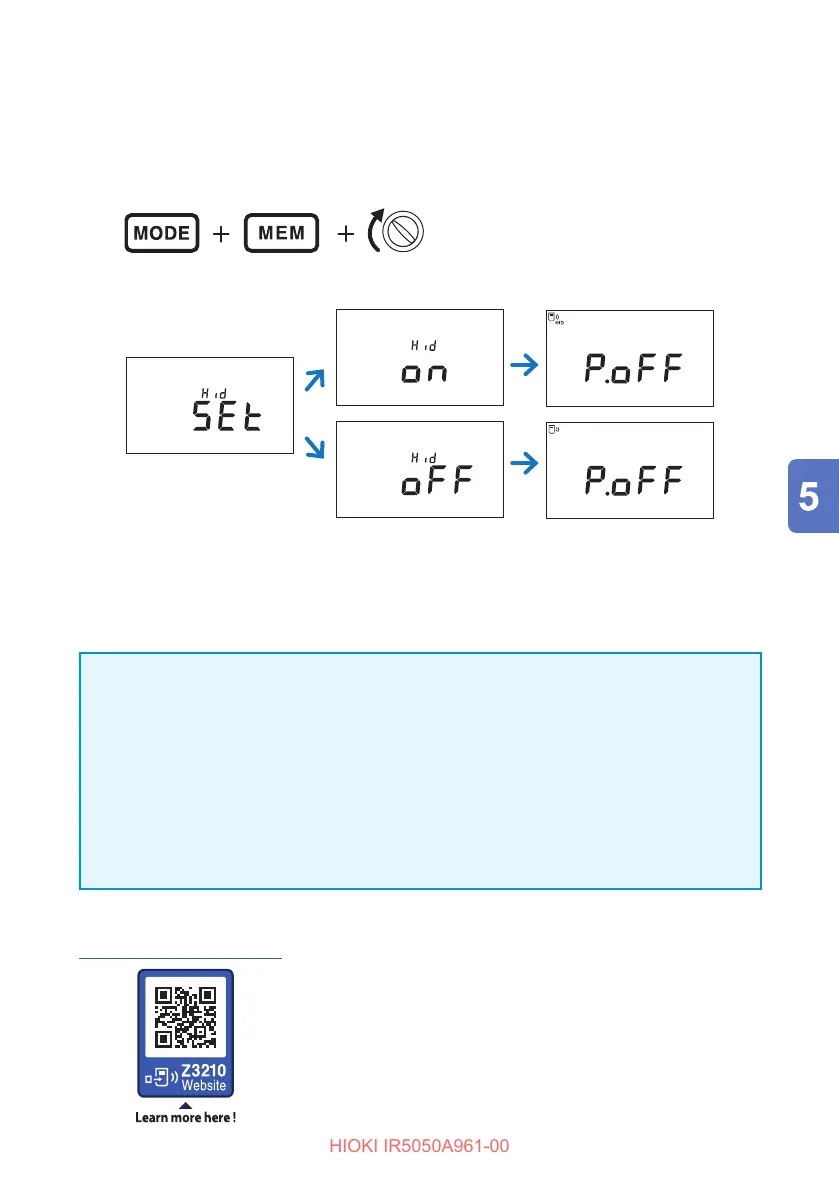
Install the Z3210 wireless adapter (option) in the instrument.
See: “2.2 Installing the Z3210 Wireless Adapter” (p. 31)
3
While holding down the MODE key and the MEM key, turn the rotary
switch to turn on the power.
(Any position)
After the setting appears, the power is turned o automatically.
FILTER
NOISE
Year
TCPIDARSVDD
TIMER
PI DAR SV
Ramp
DD
USED
COMP
READ
MEMORY
LOGGING
No.
Month Day
hr:min:sec
HID
When [oLd] appears
Use GENNECT Cross (version 1.8 or later) and update the Z3210 to the latest
version.
IMPORTANT
To switch from the HID function to GENNECT Cross
If GENNECT Cross is started without unpairing the mobile device and instrument,
the instrument may not be recognized as a connected device.
Use the following procedure and connect the instrument to GENNECT Cross again.
1. From the Bluetooth
®
settings for your mobile device, delete the instrument.
2. Turn o the Z3210’s HID function.
3.
In the GENNECT Cross connected instrument settings, reconnect the instrument.
For details, see the Z3210 website.
https://z3210.gennect.net



 To Next Page