EasyManua.ls Logo

Hitachi PH - Page 123

Hitachi PH
288 pages
Print Icon
To Next Page IconTo Next Page
To Previous Page IconTo Previous Page
Loading...
3-55 Renewing print contents at a fixed period
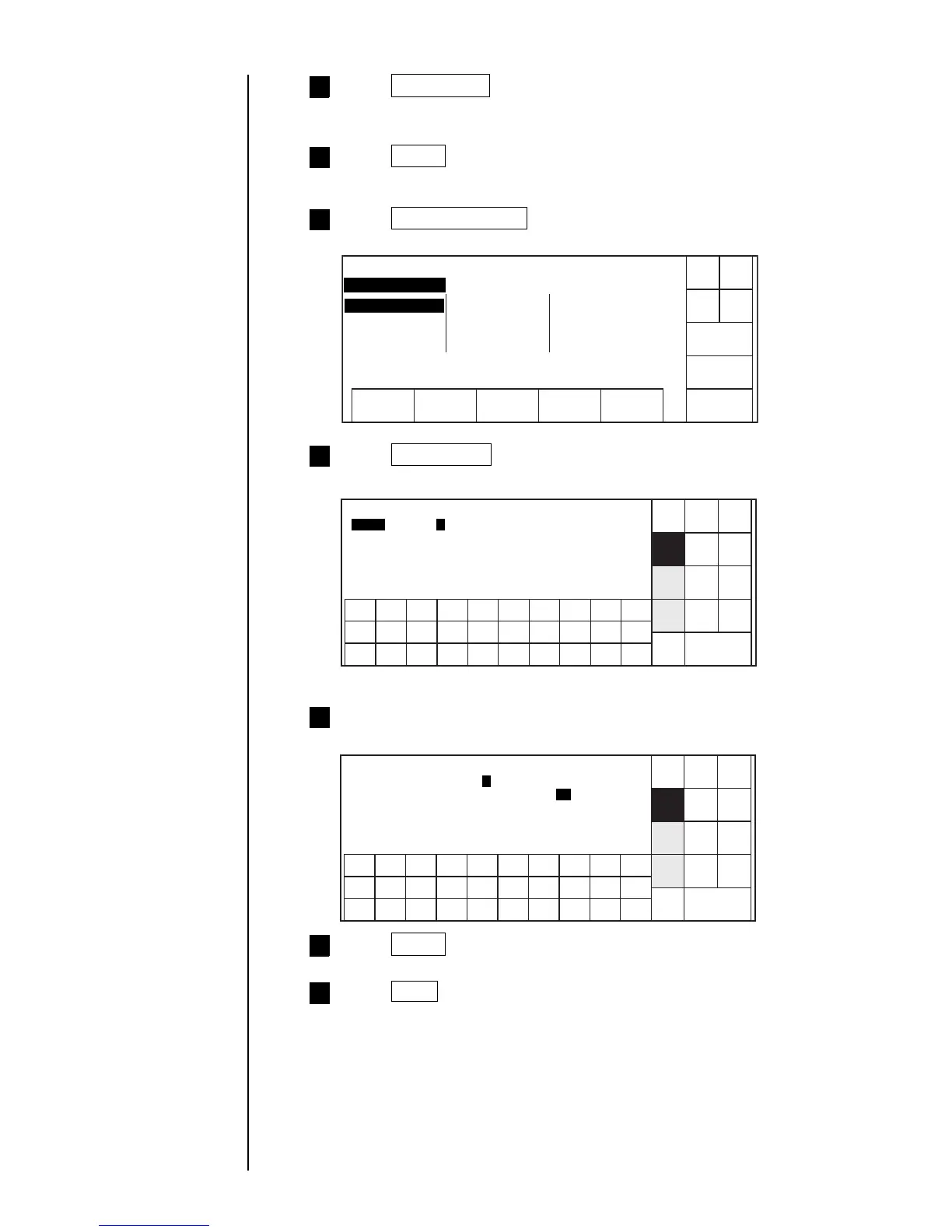
Press Time count twice.
Time count character "F" will be input.
3
Press Apply .
4
Press Time count .
"Time count" screen will appear.
6
Shut
down
Manual
Back
Show
cursor
Decre-
ment
Incre-
ment
123 4567890
[ A ]
[ GG]
Reset [ AA ]
Reset time [ 05 ] hour 00 minute
A
. .
Time count condition Status: Ready
Range
Prev.
dis-
paly
Next
dis-
paly
User
pat-
tern
ABC
.
123
Sign
.
Input range, Reset (character), Reset time and Renewal period
(minute).
7
Shut
down
Manual
Back
Apply
Decre-
ment
Incre-
ment
123 4567890
Renewal period(minute) [ ] (1: 5 2: 6 3:10
4:15 5:20 6: )
6
. .
Time count condition Status: Ready
30
Blank
Prev.
dis-
paly
Next
dis-
paly
User
pat-
tern
ABC
.
123
Sign
.
Press Apply .
8
Press Back three times.
"Print description" screen will return.
9
Press Calendar/Count .
"Calendar/Count" screen will appear.
5
Calendar/count
Column1 Column2 Column3
Shut
down
Manual
Back
Calendar
conditions
Time count
Count
conditions
Status:Ready
Com=0
. . . . . . . . . .
. . . . . . . . . .
F
. . . . . . . . . .
. . . . . . . . . .
. . . . . . . . . .
. . . . . . . .
F

Table of Contents

Related product manuals