FAXITRON PATH USER MANUAL | HOLOGIC | REVISION 024
ECTION
ISION
oftware
5
5-4
Occasionally it may be desirable to incorporate the X-Ray attenuation characteristics of a
uniform attenuator in the flat-field reference calibration images. For example, if all objects to be
imaged are placed on a thin plastic plate, X-Ray attenuation characteristics of the plate will be
observed in every image acquired. In this case, placing the plate in the X-Ray beam during flat-
field reference calibration image acquisition could improve image quality. The following is a
summary of the advanced calibration protocol for "Both" (Flat Field and Image):
Place the uniform attenuator on the detector. The entire detector surface should be covered by
the attenuator. For ideal results, the attenuator should be larger than the detector's imaging
area.
From the start-up screen of the imaging software, press the top-right
^
icon to bring the menu
into focus. Select the drop down menu item "Tools" in the horizontal menu located at the top o
the screen, and then proceed to “Advanced Tools” then to “X-Ray Calibration/Exposure Setup”.
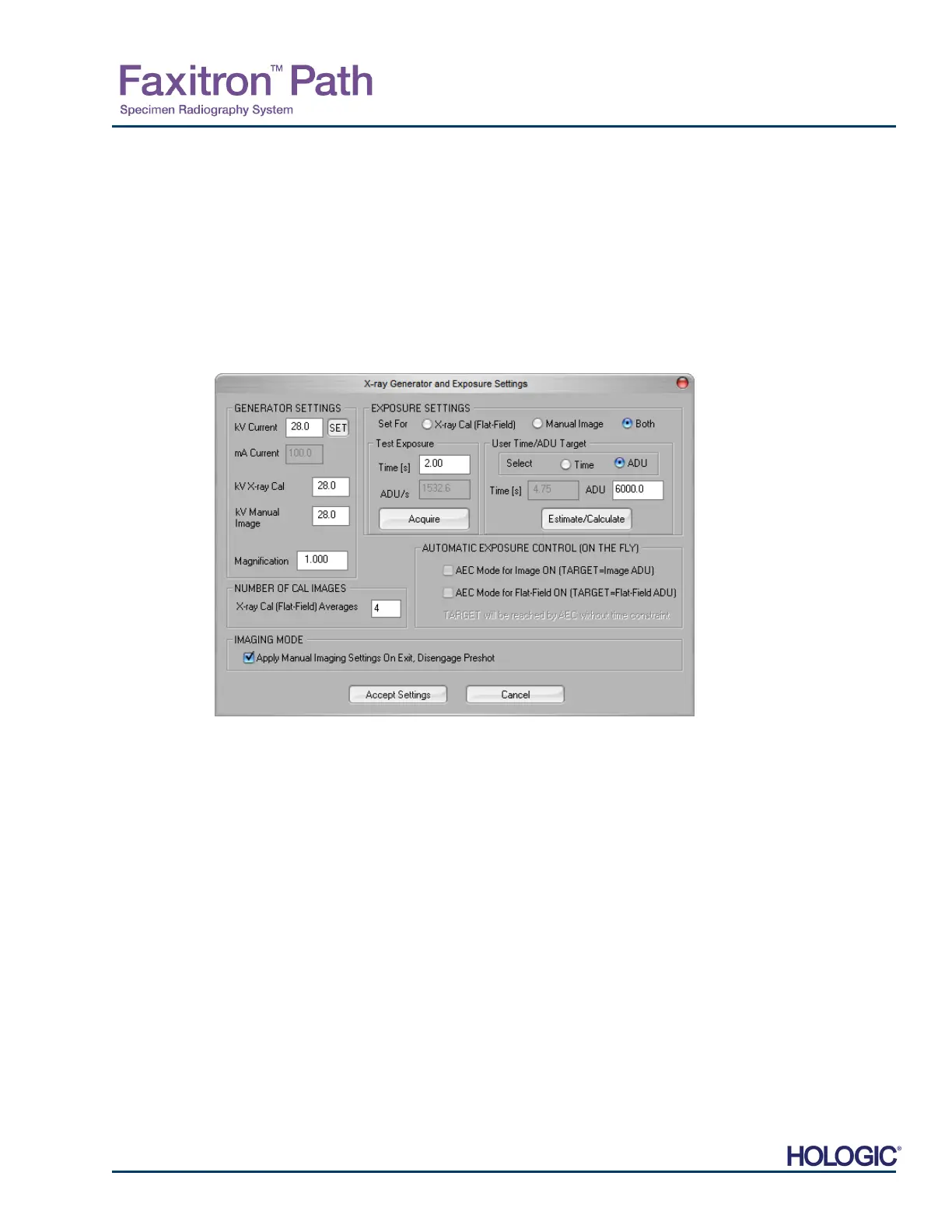
NOTE: The kV, Exposure Time, and ADU/s values may vary from those shown.
• Under "X-Ray Generator and Exposure Settings", enter the generator kV setting in the
appropriate field.
• Set a "Magnification" or leave as the default setting of one (1.0).
• Select the "Set for" "Both" button in the dialog box.
• Leave the default "user ADU target" setting. X-Ray exposure will be terminated when the
detector has accumulated a mean signal level of ADUs that are acceptable for the X-Ray
generator you have.
• Leave the default test exposure time and click on the Acquire button. The system will
automatically begin X-Rays and obtain an image.
• When the X-Ray exposure is complete, click on the Estimate/Calculate button.
• Record the calculated exposure time "Time [s]" reading. The system calculates this time and
the number is greyed out.
• Enter the calculated exposure time reading “Time [s]” in the “Test Exposure” time box. Press
the Acquire button to automatically begin X-Rays and obtain an image.
5.2.1
Advanced
Calibration
Figure 5.2.4
-Ray Generator and Exposure
Dialog Box













 To Next Page