FAXITRON PATH USER MANUAL | HOLOGIC | REVISION 024
ECTION
ISION
oftware
5
5-6
SELECT FROM WORK LIST (Remote Modality Work List
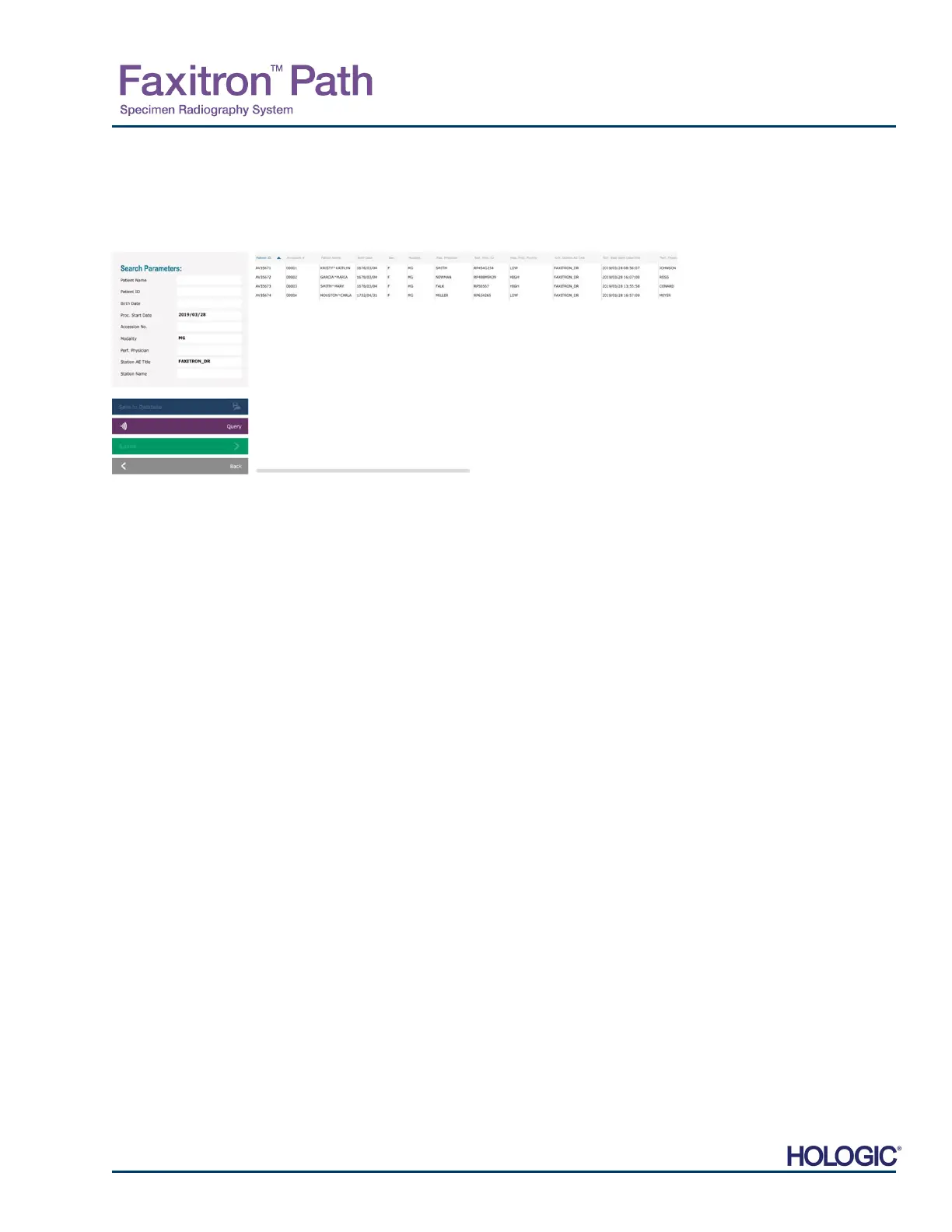
If a Work List has been configured the user can click the Select from Work List button which
will display the following page. See Figure 5.3.2 below.
On the left are various filters that may be used to search for scheduled procedures for the
Station Application (AE). Verify that the station AE Title is defined, then any single field or any
combination of fields may be used as a filter to search for scheduled procedures for this AE. By
selecting the Query button located in the bottom left corner, the table is re-populated with the
entries that match the queried information.
The user can then single-click any entry and hit Submit to automatically populate the Imaging
Information Editor with the patient information.
NOTICE: The user may also double click any entry within the table to quickly go into the Imaging
Information Editor without having to press Submit.
The Imaging Information Editor (Patient Information Dialog) will open. See Figure 5.3.3.
Complete remaining required fields and click on Accept to proceed to image acquisition.
5.3.1
Select from Work
List
Figure 5.3.2
Modality Worklist Search Dialog
NOTE: All patient data is fictitious.
Any resemblance to actual persons is
strictl
coincidence.













 To Next Page