- 40 -
3.6 DIO status screen
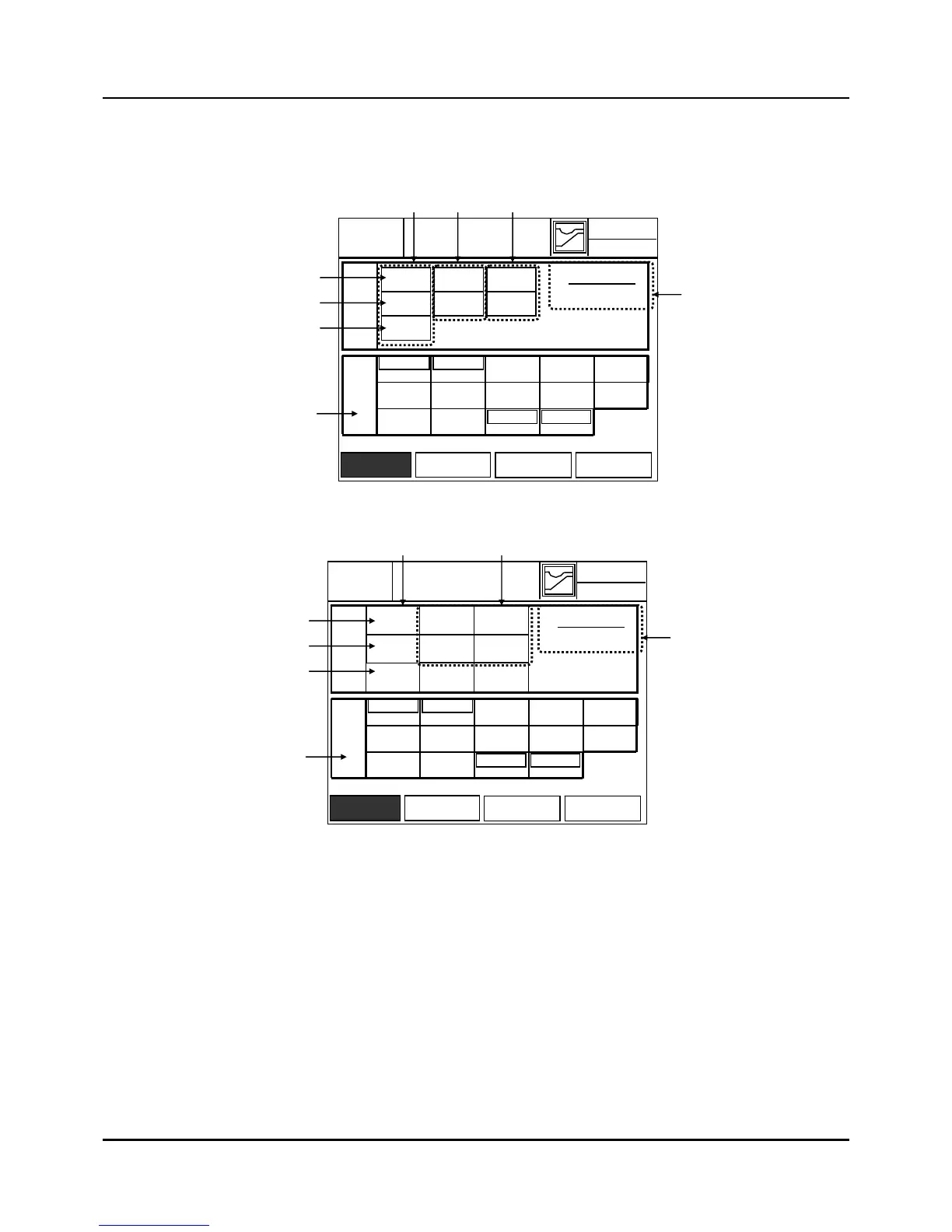
This display screen shows the status of external Digital input/output (Monitoring)
(a) IPC5000D
(b) IPC5000S
Fig. 3.6.1 DI/DO Screen
(1) Status: When highlighted it indicates that there is a remote input.
For (1-1), (1-2) and (1-3) items,
IPC5000D : These are available for depending on channel select(by DI6 and DI7).
IPC5000S : When inputting, the operation is instantly executed.
(1-1) RUN / STOP Input Status Indication.
Terminial number is 2(DI1) and 1(DI_COM) of Digital input group.
RUN: When the input of Digital input 1 is closed (at the rising edge), “RUN” status will
04-02.FRI
(1-1)
(4)
(5)
(1) (2) (3)
(1-2)
(1-3)
DI/DO
EXIT
14.38.33
RUN
HOLD
DI
ADV
PGM No =
10
DO
DO-02
DO-03 DO-04
DO-07 DO-08 DO-09
DO-12
DO-13 DO-14
DO-05
DO-10
DO-01
DO-06
DO-11
AI SET
DI/DO AO SET PWM SET
Program No
CH1
CH2
TRBL1
TRBL2
PWM
PWM
04-02.FRI
(1-1)
(4)
(5)
(1) (3)
(1-2)
(1-3)
DI / DO
EXIT
14.38.33
RUN
HOLD
DI
ADV
PGM No =
10
DO
DO-02
DO-03 DO-04
DO-07 DO-08 DO-09
DO-12
DO-13 DO-14
DO-05
DO-10
DO-01
DO-06
DO-11
AI SET
DI/DO AO SET PWM SET
Program No
TRBL1
TRBL2
TRBL3
TRBL4
PWM
PWM



 To Next Page