LTE CPE B2368 User's
Guide 13 L2TP VPN
Issue 01 Copyright © Huawei Technologies Co., Ltd. 97
Item Description
Restore Click this button to update the screen.
4.13 Configuration Example L2TP VPN tunnel Layer 3
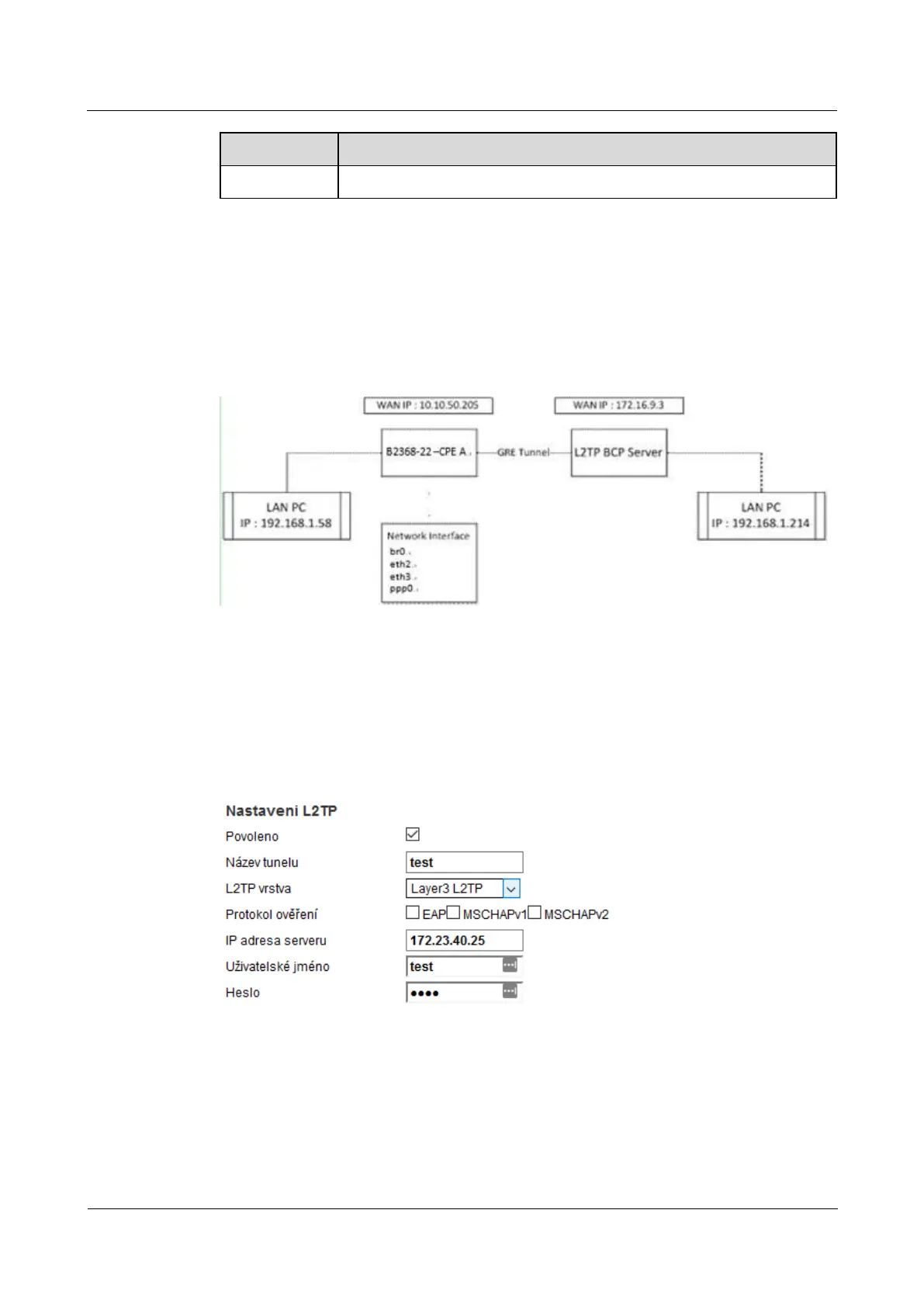
This is a diagram of a network structure in the example below:
Figure 13-4 Example of a network structure of the L2TP tunnel to the VPN Layer 3 Figure 13-4 Example of a network structure of the L2TP tunnel to the VPN Layer 3
A CPE WAN IP is 172.23.40.48, which is to the LAN connected to a computer with an IP address
192.168.1.51. L2TP server uses WAN IP 172.23.40.25 and is effected within a LAN connected computer with an IP
address of 192.168.2.2. IP address of the computer on the LAN must come from a different domain subnet. L2TP VPN
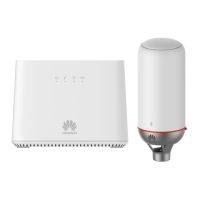
tunnel layer 3 can be set using the web configuration interface.
Figure 13-5 Example configuration L2TP VPN tunnel Layer 3 Add a new tunnel Figure 13-5 Example configuration L2TP VPN tunnel Layer 3 Add a new tunnel
Both CPE activated ppp0 interface and L2TP server assigns L2TP CPE and IP address (192.168.3.2). After
creating the L2TP VPN tunnel layer 3 is also a need to create a static routing rule (click Add new static creating the L2TP VPN tunnel layer 3 is also a need to create a static routing rule (click Add new static
routing on the screen Network Settings> Static Routing, or on the icon adjust on the right side of the table). routing on the screen Network Settings> Static Routing, or on the icon adjust on the right side of the table). routing on the screen Network Settings> Static Routing, or on the icon adjust on the right side of the table). routing on the screen Network Settings> Static Routing, or on the icon adjust on the right side of the table). routing on the screen Network Settings> Static Routing, or on the icon adjust on the right side of the table). routing on the screen Network Settings> Static Routing, or on the icon adjust on the right side of the table).
By default, the CPE does not send any data flow through the L2TP tunnel. IN



 To Next Page