LTE CPE B2368 User's
Guide 5 Wireless WiFi 2.4 / 5 GHz
Issue 01 Copyright © Huawei Technologies Co., Ltd. 44
Item Description
data encryption or authentication.
For more information, see chapter 5.2.1 Higher Security (WPA (2)
PSK).
Use Clicking Use save your changes. Clicking Use save your changes. Clicking Use save your changes.
back Clicking back to exit without saving. Clicking back to exit without saving. Clicking back to exit without saving.
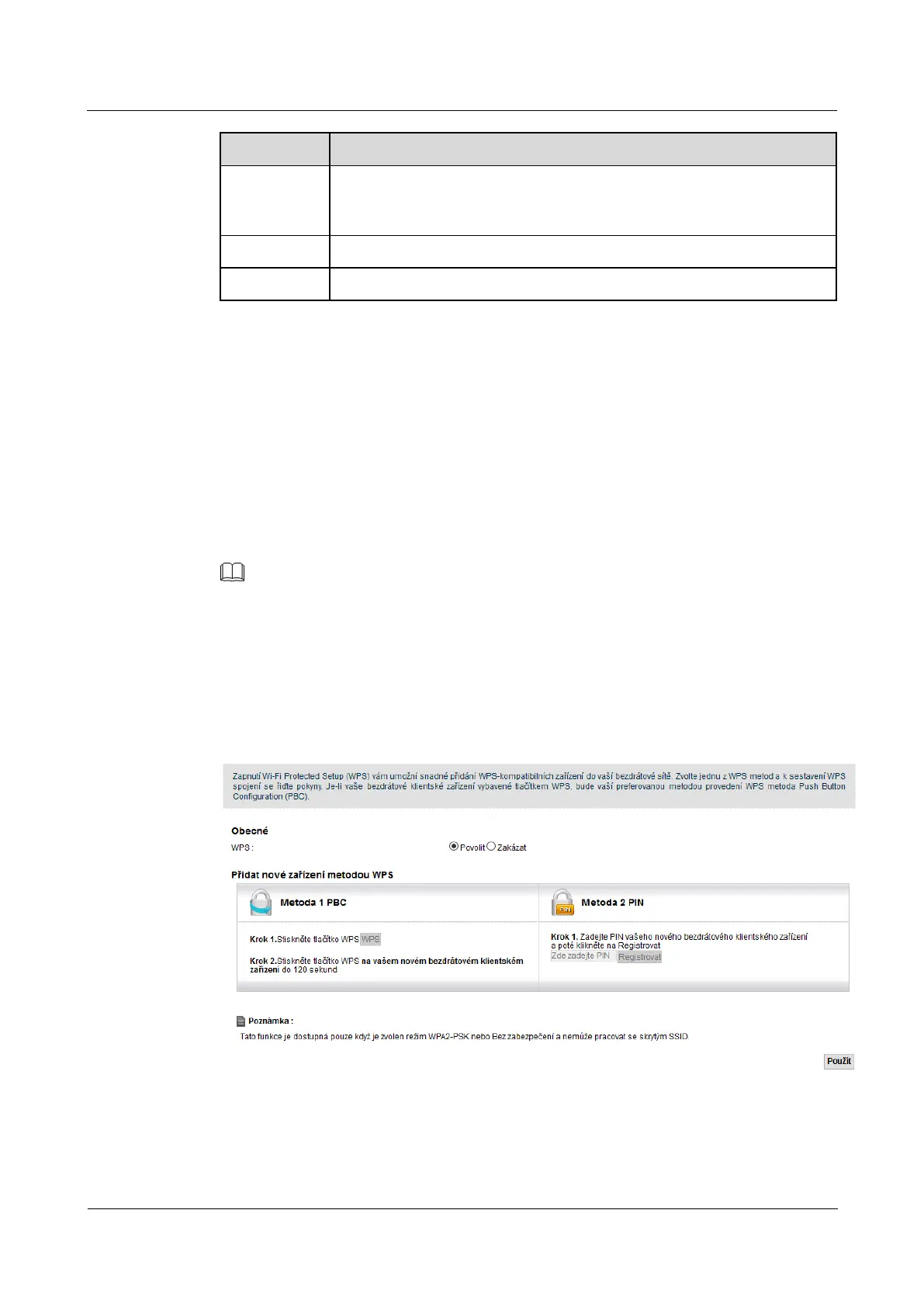
5.4 WPS screen
Use this screen to configure the connection to LTE modem using WiFi Protected Setup (WPS).
WPS enables quick setup wireless networks with strong security without the need for manual configuration of
security parameters. WPS connection is always established between the two devices. Both devices must
support WPS. For more information about WPS connection, see chapter 5.5.5 Connection using WiFi
Protected Setup (WPS).
NOTE
LTE modem observe the security settings of the access profile SSID1 ( more information, see Section 5.1.2 Before). If you want to LTE modem observe the security settings of the access profile SSID1 ( more information, see Section 5.1.2 Before). If you want to LTE modem observe the security settings of the access profile SSID1 ( more information, see Section 5.1.2 Before). If you want to
use WPS connection, it is necessary security mode profile SSID1 set to use WPS connection, it is necessary security mode profile SSID1 set to use WPS connection, it is necessary security mode profile SSID1 set to
WPA2-PSK or Without security. Profile SSID1 It must also not be hidden. WPA2-PSK or Without security. Profile SSID1 It must also not be hidden. WPA2-PSK or Without security. Profile SSID1 It must also not be hidden. WPA2-PSK or Without security. Profile SSID1 It must also not be hidden. WPA2-PSK or Without security. Profile SSID1 It must also not be hidden. WPA2-PSK or Without security. Profile SSID1 It must also not be hidden.
Click on Network Settings> WiFi 2.4 GHz / 5 GHz WiFi> WPS. The following screen will appear. WPS activate Click on Network Settings> WiFi 2.4 GHz / 5 GHz WiFi> WPS. The following screen will appear. WPS activate Click on Network Settings> WiFi 2.4 GHz / 5 GHz WiFi> WPS. The following screen will appear. WPS activate
by selecting Allow and then click Use. Then you have the next setting WPS. by selecting Allow and then click Use. Then you have the next setting WPS. by selecting Allow and then click Use. Then you have the next setting WPS. by selecting Allow and then click Use. Then you have the next setting WPS. by selecting Allow and then click Use. Then you have the next setting WPS.
Figure 5-9 Network Settings> WiFi 2.4 GHz / 5 GHz WiFi> WPS Figure 5-9 Network Settings> WiFi 2.4 GHz / 5 GHz WiFi> WPS
The following table summarizes the available fields on this screen.



 To Next Page