LTE CPE B2368 User's
Guide 10 Firewall
Issue 01 Copyright © Huawei Technologies Co., Ltd. 78
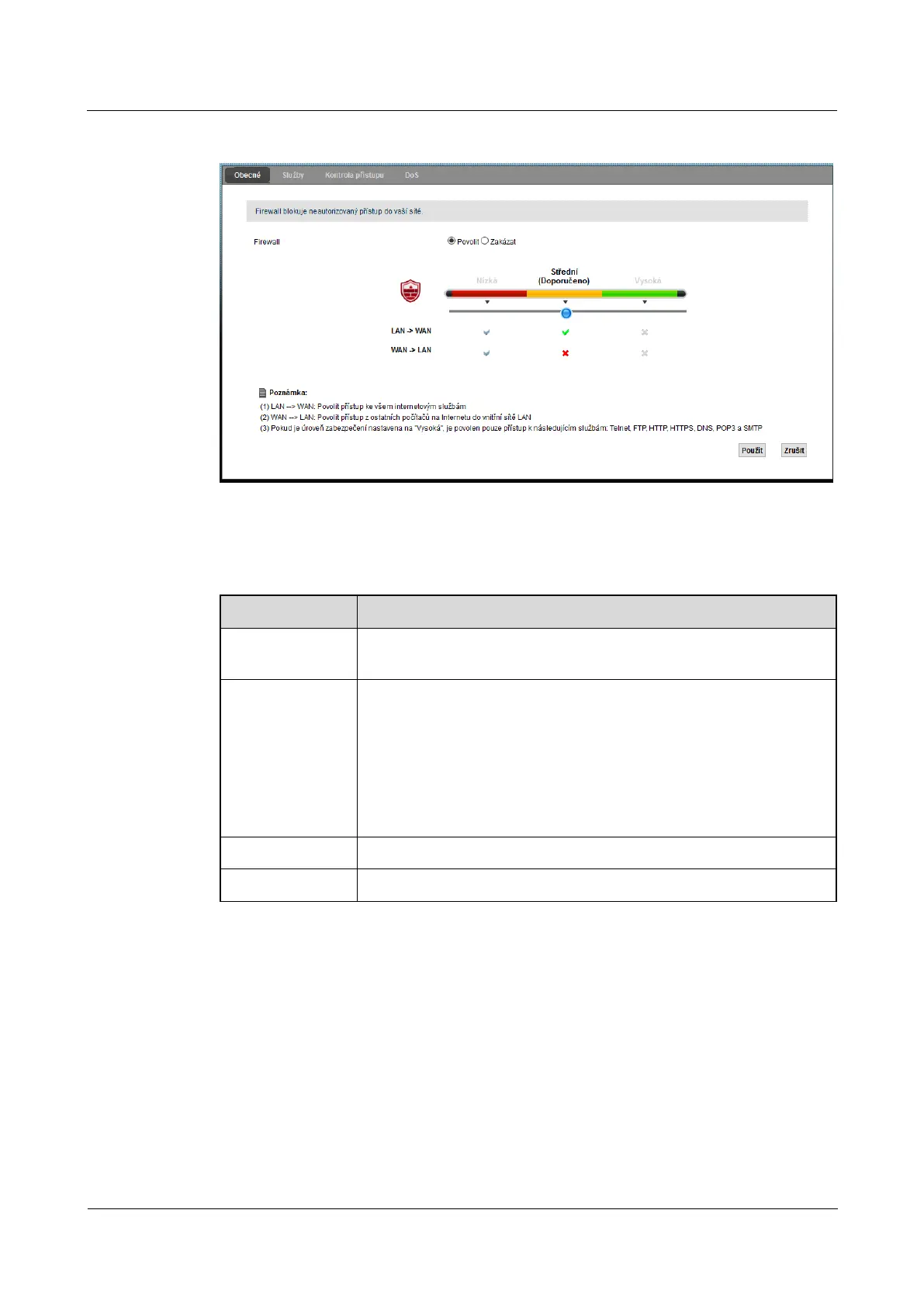
Figure 10-2 Security> Firewall> General Figure 10-2 Security> Firewall> General
The following table summarizes the available fields on this screen.
Table 10-1 Security> Firewall> General Table 10-1 Security> Firewall> General
Item Description
firewall
selecting Allow activate the firewall. LTE modem will perform access control and protect selecting Allow activate the firewall. LTE modem will perform access control and protect selecting Allow activate the firewall. LTE modem will perform access control and protect
the network from attacks, denial of service (DoS).
Low / Medium / High bundles Choice low allow all data transmissions over the LTE modem, a LAN Choice low allow all data transmissions over the LTE modem, a LAN Choice low allow all data transmissions over the LTE modem, a LAN
-> WAN and WAN -> LAN. Choice Medium will only allow data flow in the WAN and WAN -> LAN. Choice Medium will only allow data flow in the WAN and WAN -> LAN. Choice Medium will only allow data flow in the
direction of LAN -> WAN. All inbound traffic from the WAN will be blocked.
Choice high will only allow data flow from Telnet, FTP, HTTP, HTTPS, DNS, Choice high will only allow data flow from Telnet, FTP, HTTP, HTTPS, DNS, Choice high will only allow data flow from Telnet, FTP, HTTP, HTTPS, DNS,
POP3 and SMTP from the LAN to the WAN. All other data flow will be
blocked.
Use Clicking Use save your changes. Clicking Use save your changes. Clicking Use save your changes.
Cancel Click on Cancel restore previous settings in this section. Click on Cancel restore previous settings in this section. Click on Cancel restore previous settings in this section.
10.3 Screen Services
On this screen is a list of configured services / service items. To open this screen, click on Security> Firewall> On this screen is a list of configured services / service items. To open this screen, click on Security> Firewall>
Services. Before creating rules using the menu Security> Firewall> Access Control> Add new ACL ruleServices. Before creating rules using the menu Security> Firewall> Access Control> Add new ACL ruleServices. Before creating rules using the menu Security> Firewall> Access Control> Add new ACL rule
it is first necessary to add at least one maintenance item on this screen.



 To Next Page