9502 User Guide
3004146-0001 Rev H
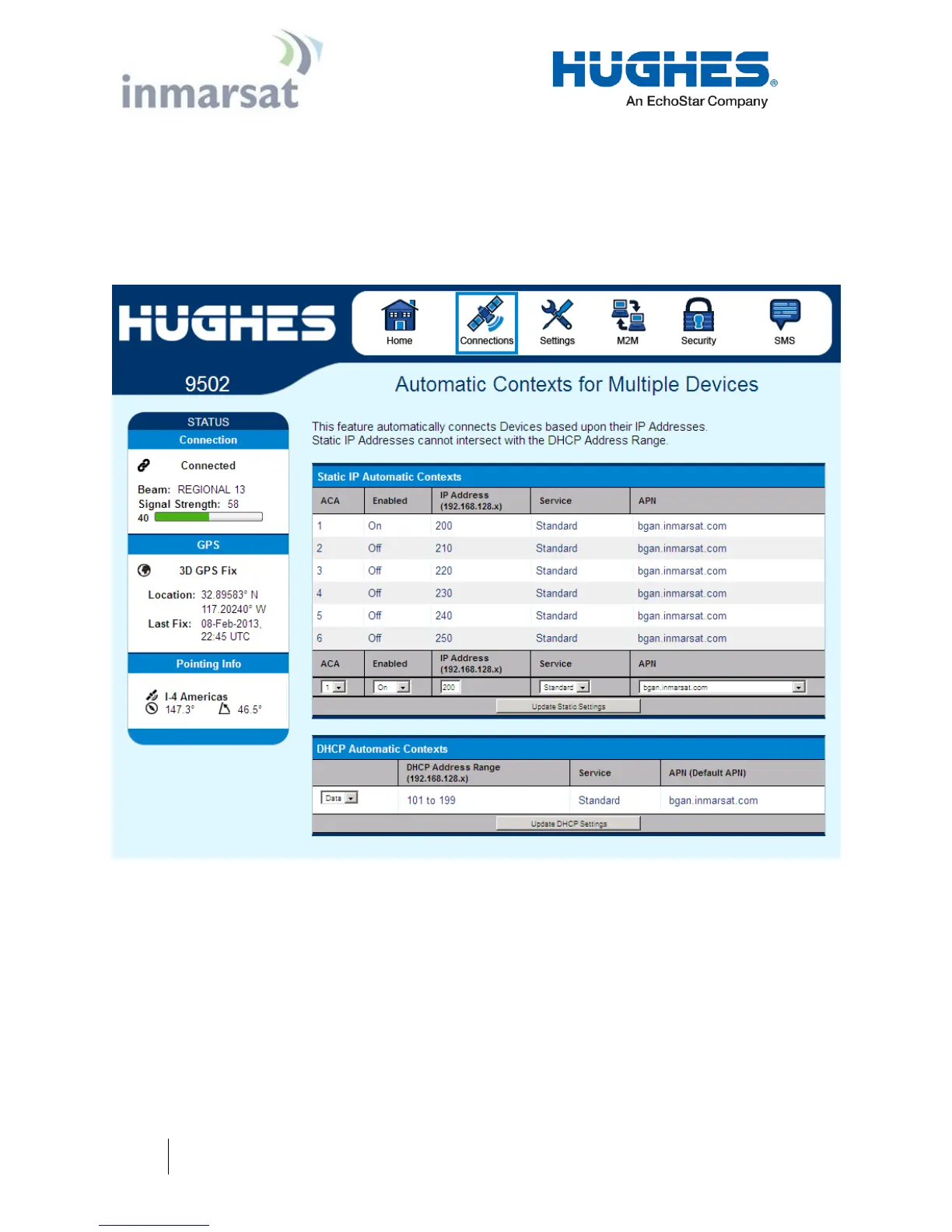
DHCP Automatic Contexts: This option allows you to set up the
UT for dynamic ACA. This means that any device connected to
the UT via DHCP will automatically receive a standard context.
To activate this feature, select “On” or “Data” from the drop down
list under DHCP Automatic Contexts section. The APN will be
the default APN configured on the Manage APNs page.
Figure 2-5 – DHCP Automatic Contexts
Once you hit “Apply” you will get a pop-up message saying that
the ACA settings were updated successfully and to take effect you
will have to reboot the terminal.
Once you reboot the terminal, check that the settings took effect.
To see if the context has been setup properly, click on the
Connections tab>Manage Connections Page and this will show
you all contexts that have been setup (active or inactive).


 To Next Page