TROUBLESHOOTING
42
Problem
Rechargeable battery needs recharging.
Solution
There are two methods for charging the rechargeable battery wand — the
dual charging station or the single charger.
CAUTION: The rechargeable battery wand can only be charged with these
Hunter Douglas provided charging options. Attempting to charge battery
wands with an alternative charger may result in permanent damage.
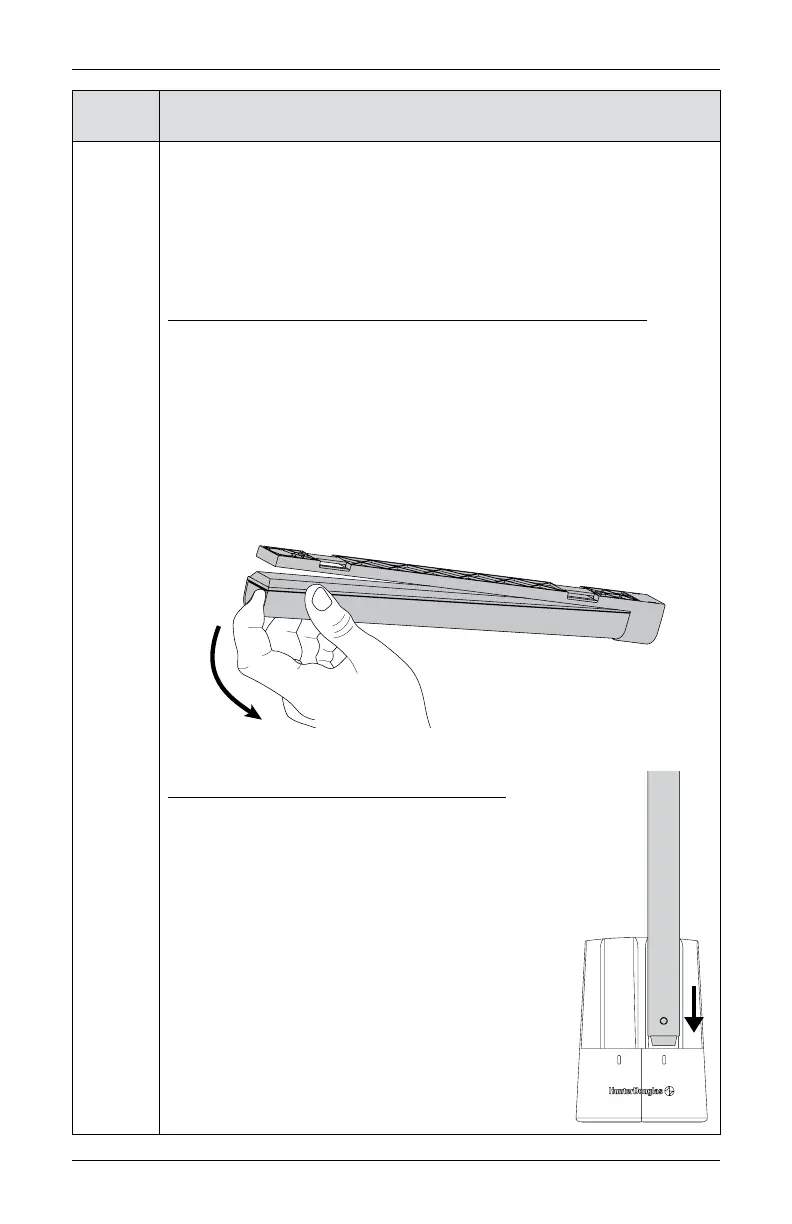
Removing the Rechargeable Battery Wand from the Mount
■
To safely remove the rechargeable battery wand from your shade, grasp
the end of the battery wand that is furthest away from the power socket.
CAUTION: Grasp the wand firmly prior to removal.
■
Using the indentation on the end of the battery wand, use your index finger
to pull the battery out of the mount.
NOTE: The mount should remain installed and plugged into the shade
cable during this process. You will simply remove the wand from the
mount.
Recharging Via the Dual Charging Station
■
Plug the dual charging station into a standard AC
outlet.
■
Insert the nose of the rechargeable battery wand into
one of the slots of the dual charging station.
■
The battery will firmly snap into place. A red light
indicator on the front of the charging station will turn
on when the battery wand has been properly inserted
and being charged.
■
Once the battery has been fully recharged, the red
light indicator will turn green. Charging may take up
to three hours, depending on your battery level.
■
Remove the battery wand from the charger.











 To Next Page