TROUBLESHOOTING
43
Problem
Rechargeable battery needs recharging (continued)
Solution Recharging Via the Single Charger
Remove the rechargeable battery wand
from the mount, or insert the single
charger cable without removing from
the shading.
■
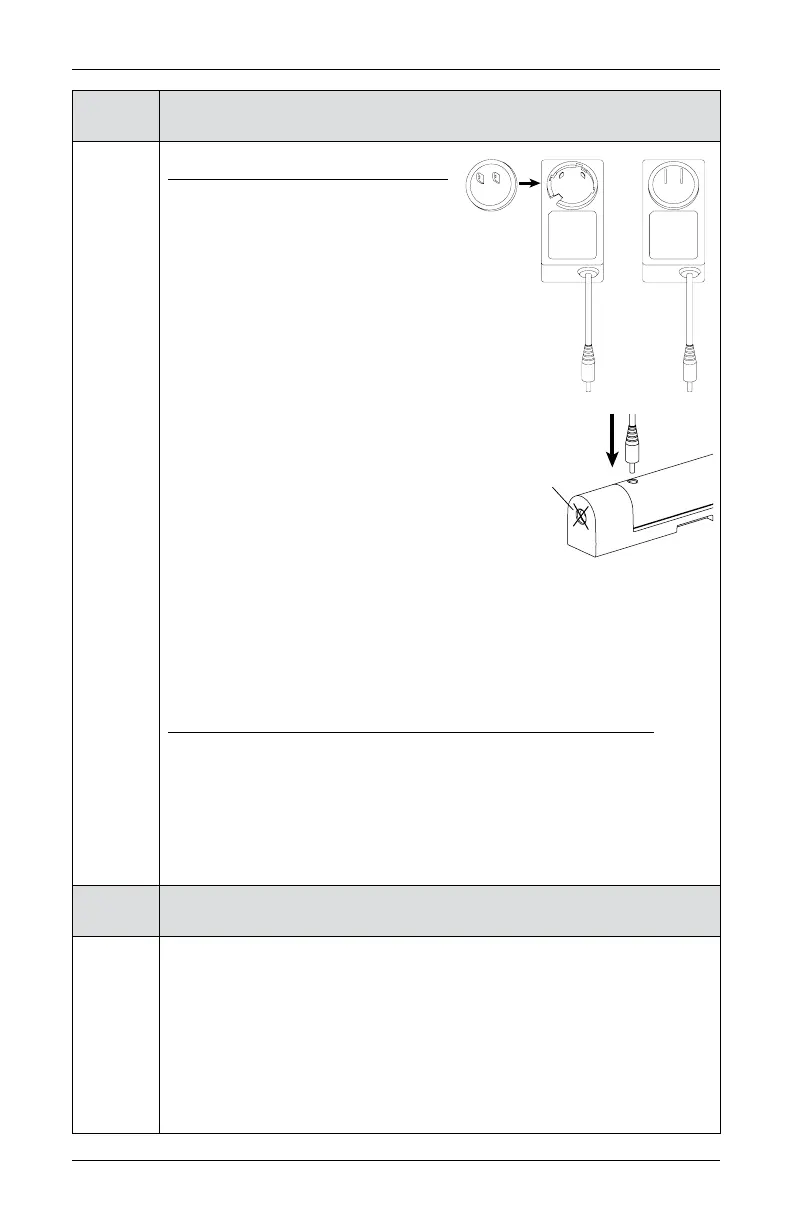
Attach the plug adapter to the charger.
■
Plug the charger into a standard AC outlet.
■
Plug the charging cable into the charging
outlet on the rechargeable battery wand. The
charging outlet is near the nose of the wand.
■
A red light indicator confirms the battery
wand is properly inserted and is charging.
CAUTION: Do not attempt to plug the
charging cable into the battery mount’s power
socket. Doing so will not only fail to charge
the battery wand but could possibly cause damage to both the single
charger and the battery mount.
■
Once the battery has been fully recharged, the red light indicator will turn
green. Charging may take up to two hours, depending on your battery level.
■
Remove the charging cable from the battery wand.
Reinserting the Rechargeable Battery Wand into the Mount
■
Match the direction of the arrow on the underside of the battery wand with
the arrow on the battery mount.
■
Insert the nose of the battery wand into the cavity of the battery mount.
■
Push the battery wand flush into the mount until the battery snaps into
place.
Problem
The battery is charged but the shade does not operate.
Solution
If your rechargeable battery wand is charged but not working, it may be due
to its physical location in your window. The rechargeable battery wand can
operate in temperatures up to 176°F (80°C). If the temperature in your window
exceeds this, its safety feature will shut the battery off temporarily. The
battery will turn back on once the temperature lowers into the operable range.
If you anticipate the rechargeable battery wand consistently exceeding this
temperature limit, please reinstall in a location that avoids direct sunlight.
Not this
socket











 To Next Page