M.37Part. N. 8000 H0368 (09-2008)
ELECTRIC SYSTEM, DIGITAL INSTRUMENT
Digital instrument, warning lights (TE-SMR)
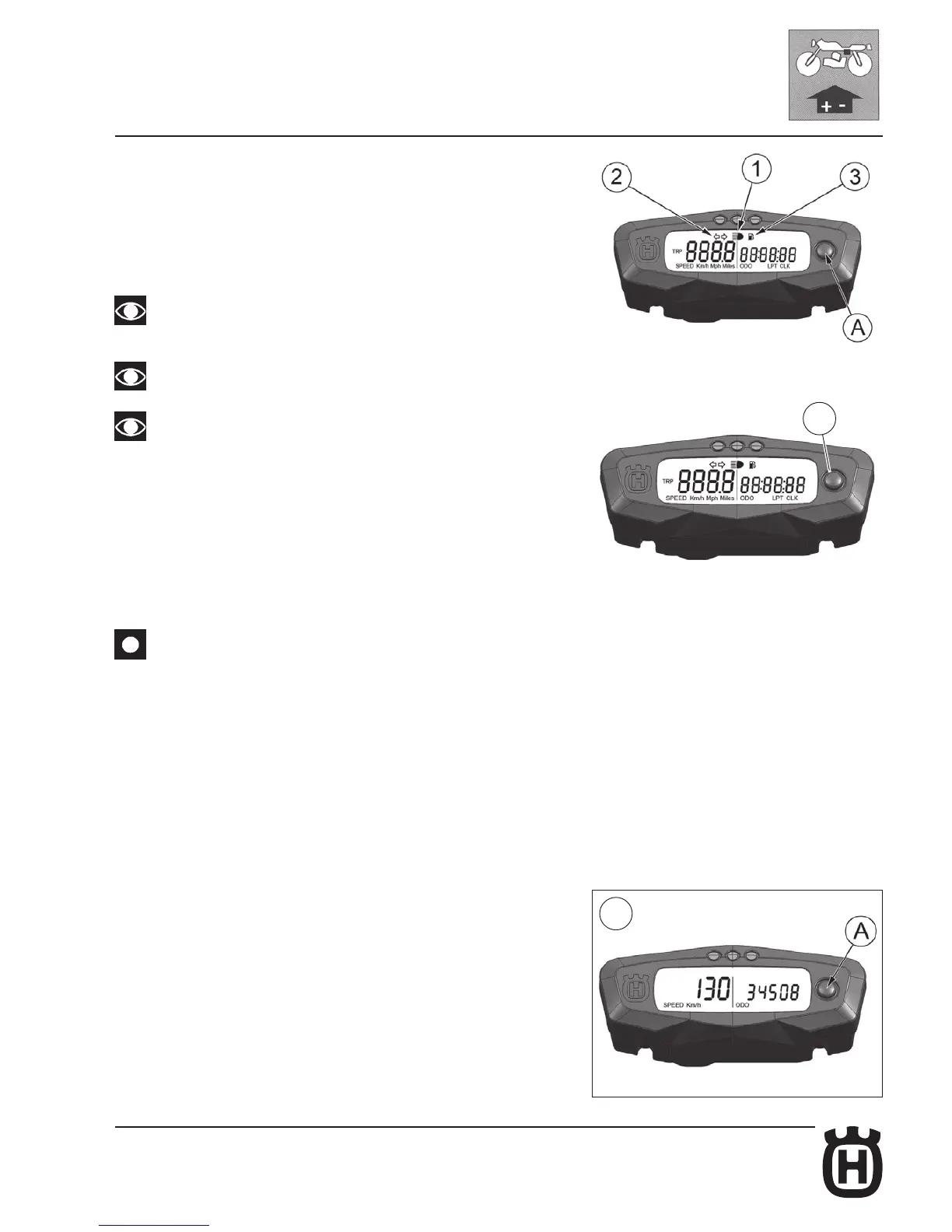
The motorcycle is equipped with a digital instrument; on the instrument are
located 3 warning lights too: high beam, blinkers and fuel reserve.
1- BLUE warning light “HIGH BEAM”
2- GREEN warning light “BLINKERS”
3- ORANGE warning light “Fuel reserve” (1,8 l - 1.58 Imp. qt - 1.9 U.S. qt)
Turning the ignition key to the position “IGNITION” the instrument display
illuminates (amber colour).
- When linked to the battery, for the first 2 seconds, the instrument
shows the version of the checking SW; after the check,
the instrument shows the last planned function.
- When the motorcycle engine is OFF, the instrument doesn’t also
show its functions.
- To select the instrument functions and to set to zero the functions,
use the SCROLL knob (A).
- The instrument functions are the following, as shown below.
1- SPEED / ODO (figure 1, page 15)
2- SPEED / CLOCK (figure 2, page 15)
3- SPEED / TRIP (figure 3, page 16)
4- SPEED / CHRONO (figure 4, page 16)
5- SPEED / RPM (engine r.p.m. numerical value) (figure 5, page 16)
1- SPEED / ODO (figure 1, page 15)
.................
IMPORTANT:
in case of FUEL INJECTION SYSTEM malfunction on the right side of the instrument
display will be displayed the warning message “FAIL”: (see page M.39).
1- SPEED (Km/h or mph) / ODO (figure 1)
- SPEED: motorcycle speed- maximum value: 299 Km/h or 299 mph;
- ODO: odometer- maximum value: 99999 km;
To replace kilometers with miles or miles with kilometers proceed as follows:
1) set to figure 1, stop the engine and push the knob SCROLL (A);
2) start the engine pushing and holding the button SCROLL (A) until the symbol
“Km/h” will be displayed;
3) then the symbols “Km/h” and “Mph Miles” will be displayed alternatively.
Push again the SCROLL (A) button when the unit you wish to use is displayed.
A
1




 To Next Page