70 Excelon Operator’s Manual
6.3.1 System Settings
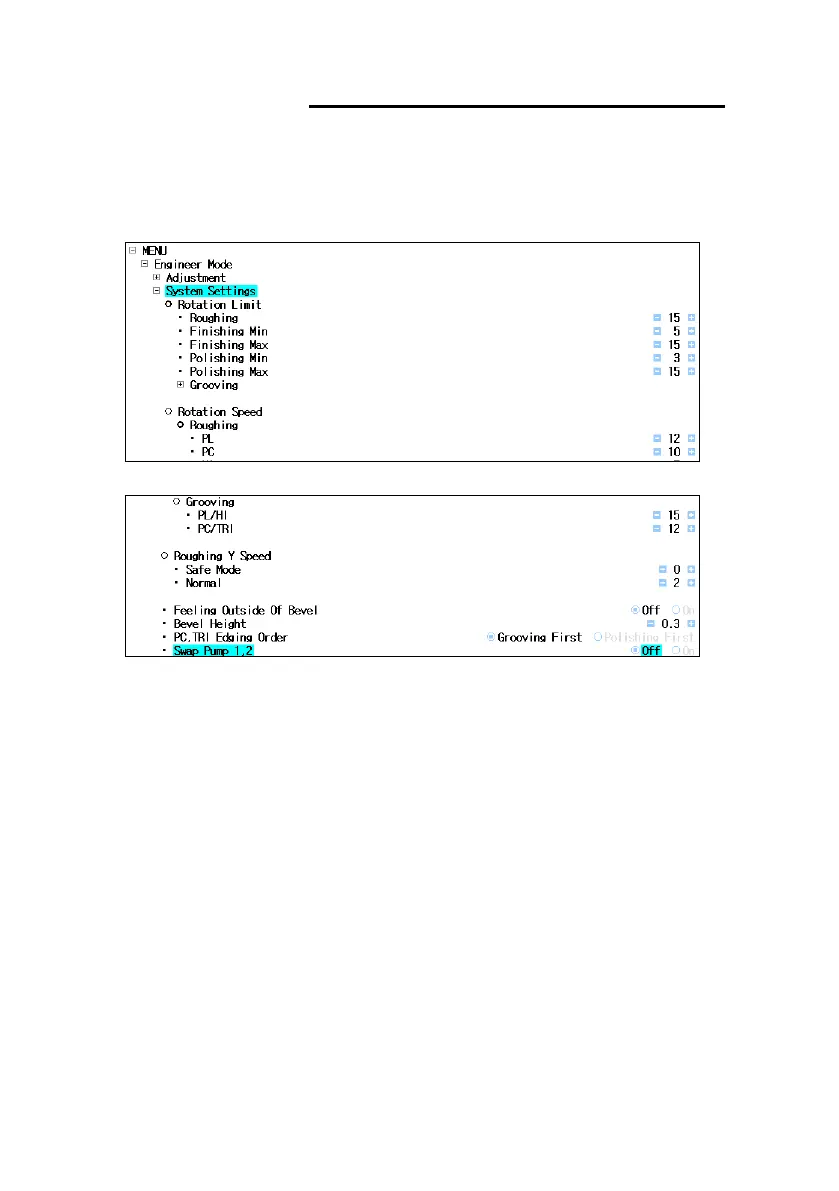
▪ Set values related to rotation of lens
▪ Location : Engineer Mode System Settings
• • • • • •
▪ Rotation Limit : Set amount of lens rotation for each edging step
▪ Rotation Speed : Set lens rotation speed for each edging step and each material.
▪ Roughing Y Speed : Set fall speed of lens when roughing edging started
▪ Feeling Outside of Bevel : Enable or disable feeling bevel position function
▪ Bevel Height : Set bevel height for ‘Feeling Oustside of Bevel ‘function
▪ PC, TRI Edging Order : Change the edging order of PC/TRI lens
▪ Swap Pump 1,2 : Swap Pump 1 and Pump 2
- OFF : Used as it is
- ON : Swap the function of Pump 1 and Pump 2
* Swap Pump could be used when Pump 1 is out of order. Temporarily, you can use
Pump 2 instead of Pump 1.



 To Next Page