31
4
RECEIVE AND TRANSMIT
2001 NEW 2001 NEW
DD
Editing a memory keyer
The contents of the memory keyer memories can be
set using the memory keyer edit menu. The memory
keyer can memorize and re-transmit 4 CW key codes
for often-used CW sentences, contact numbers, etc.
Total capacity of the memory keyer is 50 characters
per memory channel.
• Programming contents
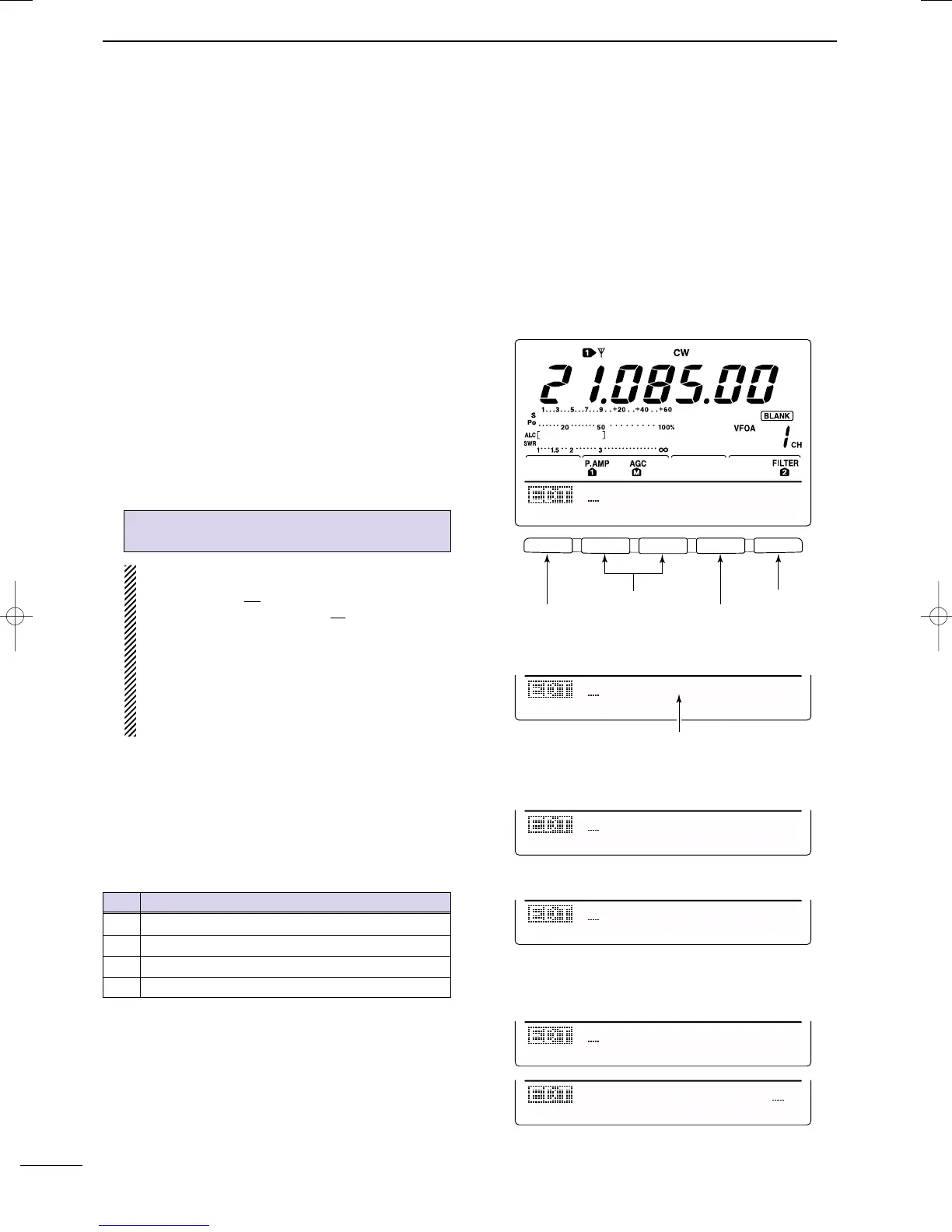
q Push [MENU] to select M1, then push [F4 KEY] to
select the memory keyer menu.
w Push [F3 EDIT] to select edit menu.
•Memory keyer contents of the Channel 1 (M1) is indi-
cated.
• Push [F5] to manually increment the contest number.
e Push [F1] to select the desired memory keyer chan-
nel to be edited.
r Input the desired character by rotating the tuning
dial or by pushing the keypad for number input.
• Selectable characters (with the tuning dial);
NOTE:
“^” is used to transmit a following word with no
space such as
AR
. Put “^” before a text string
such as ^AR, and the string “
AR
” is sent with no
space.
“*” is used to insert the CW contact number. The
contact number automatically increments by 1.
This function is only available for one memory
keyer channel at a time. Memory keyer channel
M2 used “*” by default.
t Push [F2 ç] or [F3 å] to move the cursor back-
wards or forwards, respectively.
y Repeat steps r and t to input the desired charac-
ters.
u Push [MENU] 2 times to return to M1.
Pre-programmed contents
A B C D E F G H I J K L M N O P Q R S T
U V W X Y Z / ? . , * ^
CH Contents
M1 CQ TEST CQ TEST DE JA1 JA1 TEST
M2 UR 5NN* BK
M3 CFM TU
M4 QRZ?
F 1
F
2F
3
F
4
F
5
CQ
TEST
CQ
TEST
M1
ç
å
DEL
SPC
UR
5NN*
BK
M2
ç
å
DEL
SPC
• Edit menu
¥ M2 default indication
CFM
TU
M3
ç
å
DEL
SPC
¥ M3 default indication
QSL
TU
DE
JA3Y
M3
ç
å
DEL
SPC
DE
JA3YUA
TEST
M3
ç
å
DEL
SPC
Example display— when inputting QSL TU
DE JA3YUA TEST into M3.
QRZ?
M4
ç
å
DEL
SPC
¥ M4 default indication
Select M1 to M4
Move cursor left/right
Clear character
Input space
When inputting an asterisk,
the counter is incremented by 1.
IC-7400.qxd 02.4.2 11:35 Page 31



 To Next Page