UL and ULC Installation Requirements
Only UL / ULC listed compatible products are intended to be connected to a UL / ULC listed control system.
For UL 1610, ULC S304 and ULC S559 installations where a secondary method of reporting is required, use the
onboard 2400bps modem included with the modem controller model, or incorporate the PRT-4G-USB cellular
modem module into the installation with the non-modem controller model.
UL/ULC Installation Cabinet Options
ULC Central Station Fire Monitoring, UL/ULC Central Station Alarm Installations
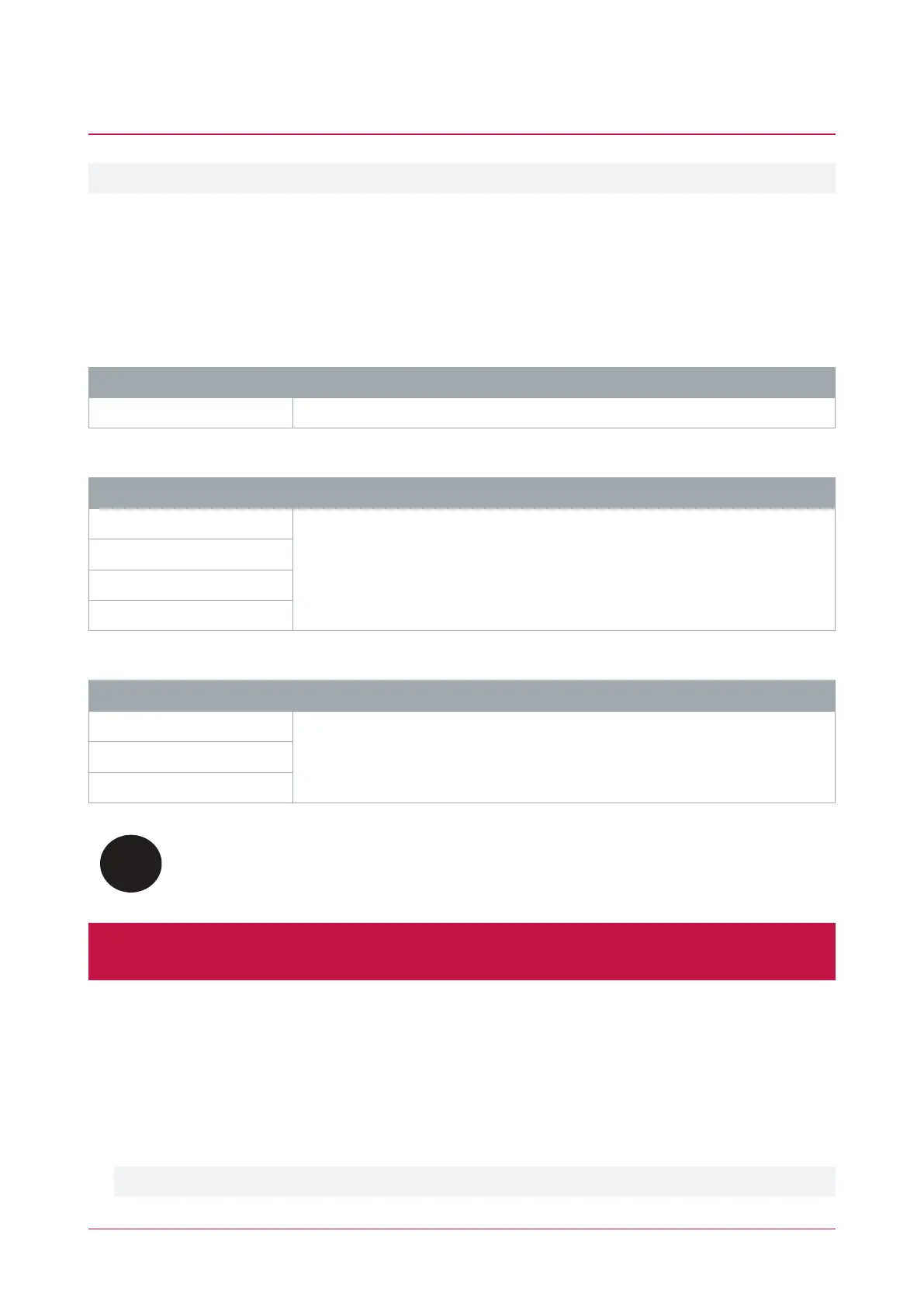
Cabinet Model UL/ULC Installation Listings
EN-DIN-24-ATTACK UL1610, UL1635, UL1076, ULC-S304, ULC-S559
ULC Fire Monitoring
Cabinet Model ULC Installation Listings
EN-DIN-12
ULC-S559
EN-DIN-24
EN-DIN-24-ATTACK
EN-DIN-11V
Electronic Access Control System Installations
Cabinet Model UL/ULC Installation Listings
EN-DIN-12
UL294, UL1076, ULC-ORD-C1076-86, CAN/ULC-S319EN-DIN-24
EN-DIN-24-ATTACK
All cabinet installations of this type must be located inside the Protected Area.
Not to be mounted on the exterior of a vault, safe or stockroom.
All cabinet internal covers and lids/doors must be connected to the cabinet's main ground point for electrical
safety and static discharge protection.
Central Station Signal Receiver Compatibility List
⦁ IP Receiver via Ethernet Port: ArmorIP Internet Monitoring Receiver. Internet monitoring software and
interconnected with a (DAXW/C) central station automation system software and compatible receiving
equipment.
⦁ CID Receiver via Onboard Modem: Any UL and ULC listed receiver that uses the Contact ID protocol.
Modem model only.
PRT-CTRL-DIN | Protege GX DIN Rail Integrated System Controller | Installation Manual 53



 To Next Page