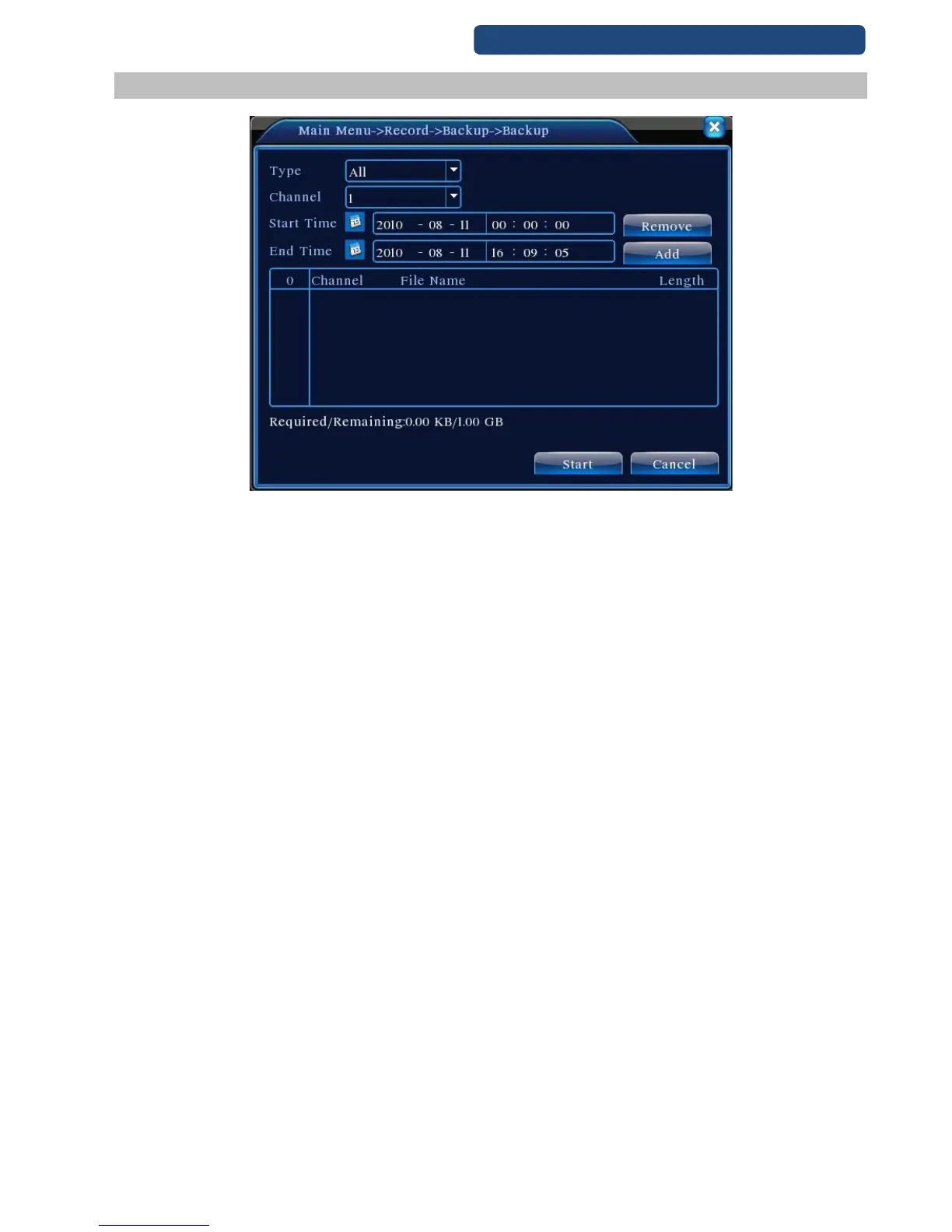
6.4 Record backup
15. picture Backup
Step 1. Choose the right type of the recording (or leave on the ALL option).
Step 2. Choose the channel number.
Step 3. Choose the time which will be saved.
Step 4. After a short time, it will be shown which records are available for the period. Click on the
right file (or select more) and click on the Start button.
Step 5. The record are downloading to the pendrive (it can be a long time, depending on the
recorder file size).
1 hour record is between ~600MB and 3,5GB (depends on the quality of the record)
Bad quality 2000KB/s ~600MB
Good quality 4000KB/s ~1.7GB
Best quality 8000Kb/s ~3.5GB
500GB harddrive good quality, 1 camera ~300 hour recording (~12 days)
500GB harddrive good quality, 8 camera ~37 hour recording (~1,5 days)
1TB harddrive good quality, 1 camera ~600 hour recording (~24 days)
1TB harddrive good quality, 8 camera ~74 hour recording (~3 days)
Remove:Clear the file information.
Add:Show the file information satisfying the set file attributes.
Start/Pause:Click the play button to start the backup and click the pause button to stop the backup.
Cancel:During backup you can exit the page layout to carry out other functions.



 To Next Page